10.4.3 User Manual Contents April 17, 2020
Firmware: 5.2.1 Page 48 of 142
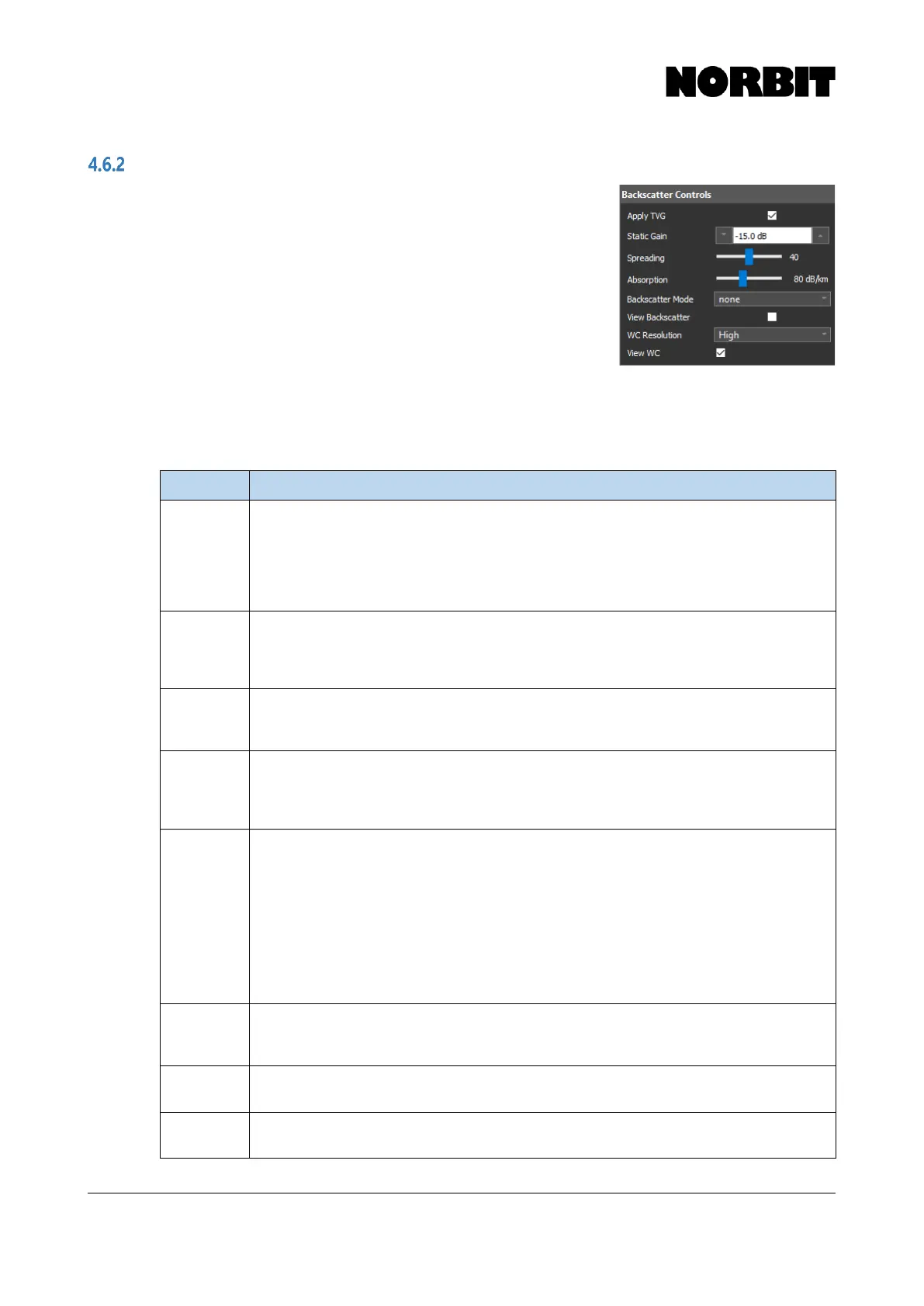
Backscatter Controls
Backscatter Controls change the data dynamics and apply gain
to fit in the dynamic range of the output data format (s7k). The
sonar hardware has a limited time varied gain (TVG) which
operates up to around 30m. Thereafter, TVG yields a constant
level. This may be a problem for some processing software when
creating seamless mosaics. The Apply TVG option removes this
native sonar TVG applied by the hardware and instead applies the
user specified TVG described by the mathematical formula:
TVG = Spreading*Log
10
(R) + 2*Absorption*R/1000 + Gain
This TVG curve is a standard continuous function to let the signal fit in the data format (s7k) range
and prevent signal saturation. This digital gain is applied to all imagery output data: side scan,
snippets, snippet-side scan and water column. For most cases, a Static Gain setting of -15dB,
spreading 40 and Absorption of 80dB/km will sufficiently scale the data.
Removes the native sonar TVG that is applied in the sonar hardware and instead applies the
user specified TVG, based on Static Gain, Spreading and Absorption. When TVG is
applied, all parameters are reported along with the data to the acquisition software to more
effectively process the data e.g. for mosaicking. When the option is deselected, the native
sonar TVG is not removed and no additional digital gain is applied to the data. Therefore, it is
prudent to always enable this option.
Sets a fixed gain value that is used to together with Spreading and Absorption to form the
TVG curve. The default setting of -15dB is suitable in most cases. Adjust this setting if the
sonar signal becomes saturated, in which case the SS/WC/SN indicator will appear red on
the main GUI display (see section 4.7).
Sets the spreading component of the TVG calculation. Spreading loss is a geometrical
phenomenon in which signal intensity is reduced as the range increases and wave fronts are
spread over an increasingly larger area. The default setting is 40.
Sets the absorption component of the TVG calculation. Transmission loss due to absorption
is caused by conversion of acoustic energy into heat. The rate of absorption loss depends on
the water environment and sonar operating frequency. The default setting of 80dB/km is
recommended for 400kHz operation.
Sets the backscatter mode to one of three options: None, Side Scan, or Snippet/Scan, the
latter of which is a side scan composed of snippet data. Snippet collection rate will be limited
to maximum 18Hz. These limits to data output rate were implemented to ensure smooth
collection of data without burdening computational resources. If side scan data is requested
by the acquisition software when Snippet/Scan mode is selected, snippet-side scan will be
generated so that (unlike regular side scan) a correctly positioned side scan can be derived
from snippets data. When surveying with a WBMS STX model, if snippets and/or side scan
data are required, users are advised to deactivate Scanning in Tx Pulse Settings. If the goal
is to classify bottom types, collection of Snippets will be most helpful. If that is not the case,
snippets should be deactivated to conserve disk space and computational resources.
Displays backscatter data under the sonar wedge. Even if it is not displayed in the GUI,
backscatter data is still sent to the acquisition software if a TCP subscription is made. The
SN/SS indicators at the top of the GUI appear green when a subscription is active.
Sets the resolution of water column data. Water column data is output on record 7042. It is
advised to keep the resolution low when computational resources are scarce.
Displays water column data on the sonar wedge. WC data collection is limited to 5Hz. Note
that it will only be recorded to raw wbm/s7k files if the View WC checkbox is enabled.



 To Next Page