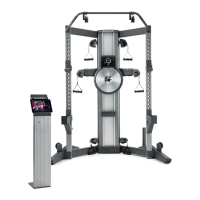
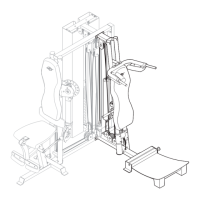
The NordicTrack Fusion CST Studio is a strength system designed for home use, offering a comprehensive workout experience with interactive features. This system aims to help users tone their bodies, build muscle size and strength, and improve their cardiovascular system through a variety of innovative features.
Function Description
The core function of the NordicTrack Fusion CST Studio is to provide a versatile strength training platform. It utilizes a resistance disc system to generate resistance for various exercises, which can be adjusted through the console. The system is designed to facilitate both strength and cardio workouts, often in combination, guided by virtual personal trainers through an interactive iFit app. The iFit app automatically adjusts the resistance of the strength system during workouts, providing a dynamic and immersive training experience. Users can also perform manual workouts, adjusting resistance levels directly from the console. The console displays continuous exercise feedback, such as maximum power output in watts or resistance in pounds per stroke, allowing users to track their performance.
The strength system includes handles and ankle straps that can be attached to rope ends with clips, enabling a wide range of exercises. Squat pulleys are also integrated into the design, allowing for lower body workouts by routing the ropes under them. A key feature is the magnetic tablet holder, which can be attached at any height on the mirror, providing a convenient display for the iFit app or other content. The system also includes a USB charging port, allowing users to charge their tablet while exercising. For those who prefer not to use the magnetic holder, a dedicated tablet stand is provided, designed to securely hold most full-size tablets.
Usage Features
Before beginning any exercise program, users are advised to consult a physician, especially if over 35 or with pre-existing health problems. The strength system should be placed on a level surface with at least 6 ft. (1.8m) of clearance around it, and a mat can be used to protect the floor.
To operate the system, the power adapter must be plugged into the receptacle on the rear of the strength system and then into an appropriate outlet. If the system has been exposed to cold temperatures, it should be allowed to warm to room temperature before plugging in the power adapter to prevent damage to electronic components.
The console is turned on by pressing the power button. Resistance levels can be adjusted using the increase and decrease buttons on the console, with the display showing the selected resistance level. It's important to note that there may be a slight delay for the system to reach the new resistance level after a button press. The console can display power output in watts or resistance in pounds, and the unit of measurement can be changed in the settings mode.
For an enhanced workout experience, the iFit-NordicTrack Fusion CST app can be downloaded and used. This app offers high-energy, time-saving combination strength and cardio workouts led by virtual personal trainers. The app also records and tracks workout and health information, helping users monitor their progress. The system is compatible with Bluetooth Smart heart rate monitors, allowing users to continuously monitor their heart rate during workouts. To connect a heart rate monitor, the iFit button on the console is pressed, and the console pairing number will appear.
When attaching the tablet holder, it should always be held in the horizontal position and oriented so the slot is upward and the padded side faces the mirror. The tablet holder can be positioned at any desired height on the mirror, ensuring it is level and centered. The tablet is then placed securely in the holder. For the tablet stand, the slide is lifted, the tablet is set in the tray, and the slide is pulled down over the top edge to secure it.
Users are encouraged to familiarize themselves with the equipment and proper exercise form, referring to the accompanying exercise guide. Workouts can be tailored to specific goals such as muscle building, toning, or weight loss, with guidelines provided for repetitions, sets, rest periods, and exercise frequency. A warm-up and cool-down period are recommended for each workout.
Maintenance Features
Regular maintenance is crucial for optimal performance and to reduce wear on the strength system. Users should inspect and properly tighten all parts each time the system is used. Any worn parts should be replaced immediately with manufacturer-supplied parts.
To clean the strength system, a damp cloth and a small amount of mild detergent can be used. It is important to keep liquids away from the console and to avoid direct sunlight to prevent damage.
Troubleshooting for the console includes checking if the power adapter is fully plugged in if the console does not turn on. If a replacement power adapter is needed, users should contact customer care, ensuring to use only a manufacturer-supplied regulated power adapter.
If the console does not display correct feedback, the reed switch may need adjustment. This process involves unplugging the power adapter, removing the tower top cover and mirror (with assistance from a second person), locating the reed switch, and slightly loosening its screw. The resistance disc is then rotated until a magnet aligns with the reed switch, which is then slid slightly toward or away from the magnet before retightening the screw. After plugging in the power adapter and rotating the resistance disc, the console's feedback should be checked, and the process repeated if necessary. Once adjusted, the power adapter is unplugged, and all removed parts are reattached.
The ropes may stretch over time, leading to slack. To tighten the ropes, the power adapter must first be unplugged. Similar to adjusting the reed switch, the tower top cover and mirror need to be removed. Then, a pulley carriage is located, and an M8 jam nut, M8 x 33mm bolt, and small pulley are removed from the upper hole. The small pulley is then reattached to the other hole in the pulley carriage, ensuring the rope and pulley move smoothly. This process is repeated for the other pulley carriage, and then all removed parts are reattached before plugging in the power adapter.
Before using the strength system, users should pull each handle a few times to ensure the ropes move smoothly around the pulleys. If any rope does not move smoothly, the problem should be identified and corrected.


 To Next Page
 General