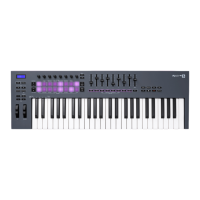
11. Mixer ◄ ► Buttons – Move left and right in the FL Studio Mixer section.
12. Faders 1-8 and Master - Control various parameters using the available modes. The 9th fader
controls main volume in your DAW (excluding HUI).
13. Quantise - Triggers the Quantise [36] function in FL Studio, to snap notes to the grid.
14. Metronome – Toggles FL Studio’s Metronome, or click-track, on and off.
15. Undo - Triggers FL Studio’s Undo function.
16. Redo - Triggers FL Studio’s Redo function.
17. Scale Button - Turns on and off FLkey’s Scale Mode [40].
18. Preset ▲▼ Buttons - Navigates through FL Studio native plugin presets.
19. Pots - Control parameter preset mappings for FL Native generator plugins, control Mixer
Volume/pan, Channel Rack volume/pan, or assign your own parameters with custom modes.
20. Channel Rack ▲▼ Buttons - Move up and down FL Studio’s Channel Rack in all modes to
change the selected instrument (and the instrument played by FLkey).
21. Fader Mode buttons - Control various parameters using the available modes.
22. Solo button - Changes the functionality of the Fader Buttons in FL Studio.
23. Play, Stop, Record - Controls the playback in FL Studio.
24. Score Log - Capture the last five minutes of played MIDI notes in FL Studio
FLkey User Guide
9





 To Next Page