Nox A1 Manual
~ 13 ~
Operating Nox A1
The Nox A1 recorder is only intended to be operated by professionals (healthcare professionals and
service personnel) with relevant qualifications and skills. The ONLY operation that patients might have
to perform by themselves at home is to start recordings that have been configured to be manually
started. In that case, the professional setting up the Nox A1 recorder and hooking up the patient shall
demonstrate how to start the recording manually and train the patient to do so according to the
“Manually Starting/Stopping a Recording” section.
The Nox A1 recorder is operated with three push buttons located on the front panel. Pressing the
Middle button turns on the display. The display will automatically turn off in 3 minutes.
Connecting Nox A1 to a Computer
Warning: The Nox A1 recorder and its accessories should be removed from the
patient before use of the USB connector to prevent electrical shock. The USB
connector shall only be used for the purposes of configuring the device and
downloading data from the device.
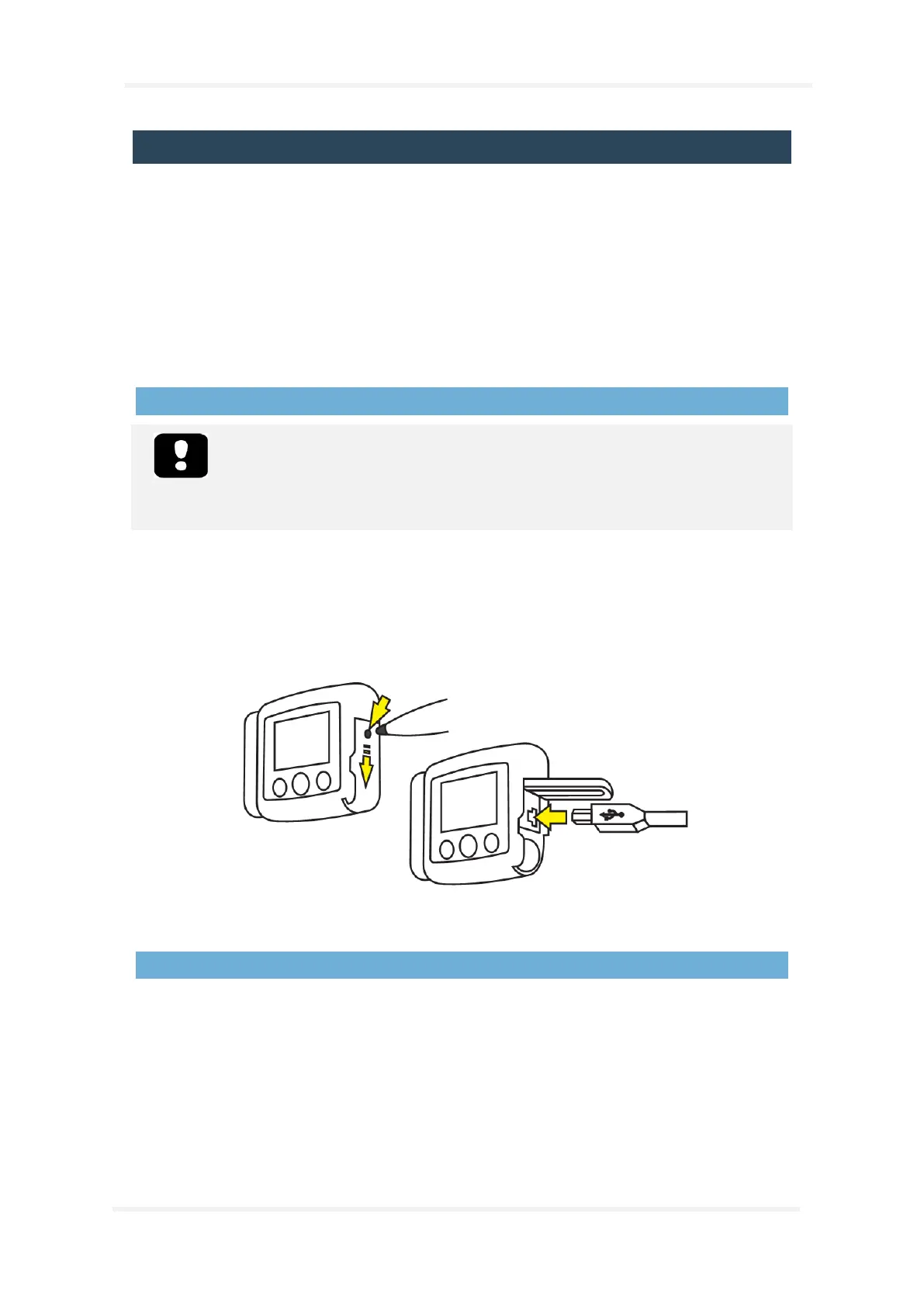
To connect Nox A1 recorder to a computer you need to access the USB connector on the device. The
USB connector is placed under the battery lid making it inaccessible and tamper proof for children. To
open the battery lid, press with the Nox battery Lid Key, accompanying the Nox A1 System Kit , on the
battery lid pin and slide the battery lid down, towards the bottom of the device. The Nox A1 recorder
connects to the computer by using Nox mini USB cable. The battery does not have to be inserted
while the device is connected to the computer.
When the Nox A1 recorder is connected to the computer the device display lights up and a message
saying the device is connected to the computer.
Configuring and Downloading from Nox A1
To download a recording or configure the Nox A1 recorder you will need to start the Noxturnal
software application and connect the device to the computer. Please refer to the Noxturnal manual
for more information on how to perform those tasks.
When you are done working with the device eject it from the Noxturnal software and unplug the Nox
mini USB cable. Insert the battery and close the battery compartment by pressing the lid back towards
the device without causing any strain, then slide it back into position, towards the top of the device.


 To Next Page