Nox A1 Manual
~ 16 ~
Nox A1 Patient Hookup
Warning: Do not use damaged equipment, sensors or accessories. This may result
in bad performance of the Nox Sleep System or patient/operator injury.
Warning: As with all medical equipment, carefully route cables and connections to
reduce the possibility of entanglement or strangulation.
Caution: The Nox A1 recorder and its accessories should always be transported in
its accompanying carrying case to ensure adequate protection and prevent
damage.
The Nox A1 recorder is only intended to be hooked-up by professionals (healthcare professionals and
service personnel) with relevant qualifications and skills.
Inserting a Battery to the Nox A1
Note: Always use fully charged Powerex 2700 mAh Rechargeable Batteries or
fresh lithium battery for each recording to prevent the need for the sleep study to
be repeated.
Note: All lithium batteries used with the Nox A1 recorder shall be per the standard
IEC 60086-4 Primary batteries - Part 4: Safety of lithium batteries.
Before you start a recording, you should make sure that the Nox A1 recorder has a new or fully
charged battery. To insert a new battery, do the following:
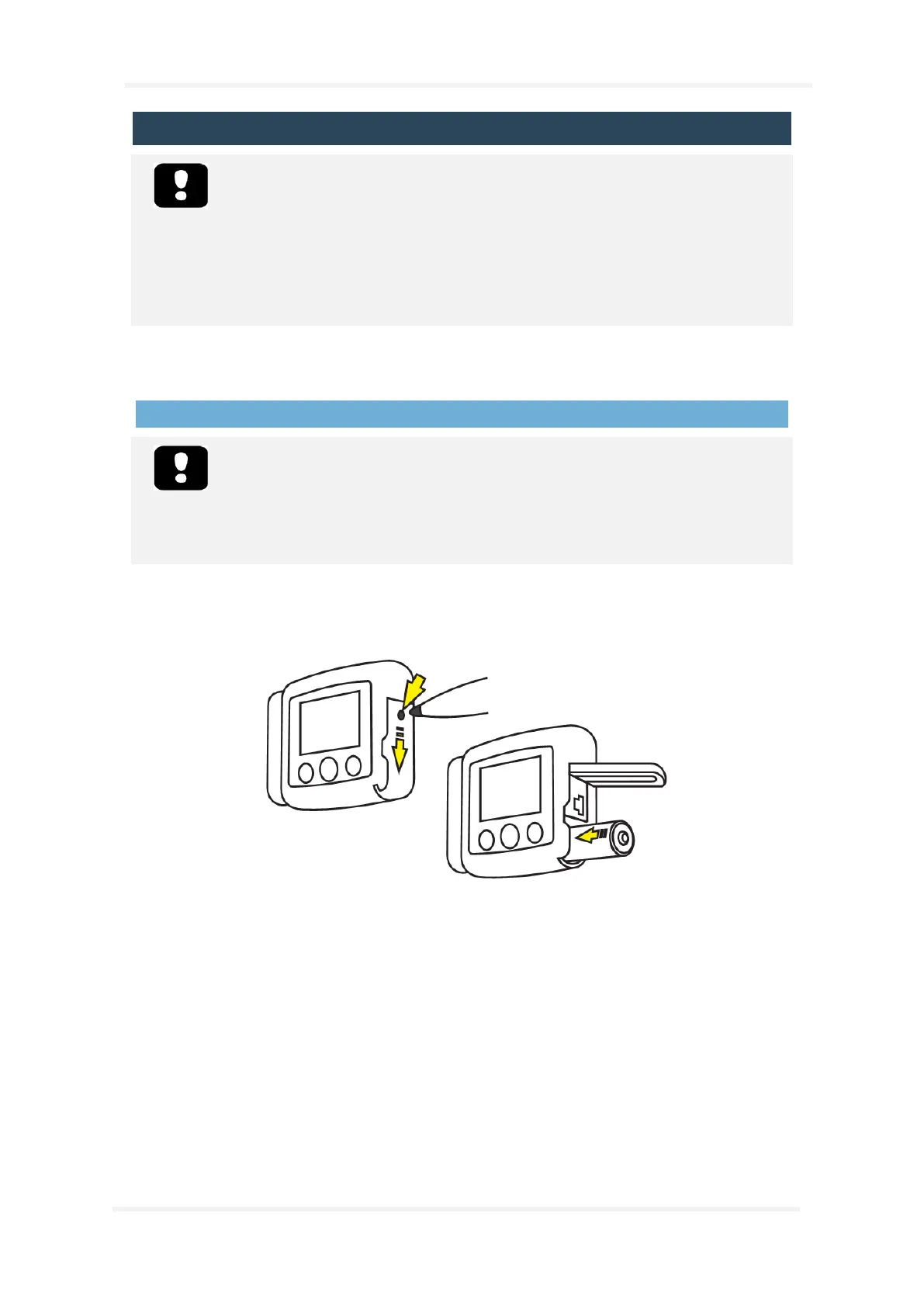
1. Open the battery compartment by pressing down the battery lid pin with the Nox Battery Lid
Key accompanying the Nox A1 System Kit or similar tool and slide the lid towards the bottom
of the device.
2. Place one AA battery in the compartment aligning the battery poles as illustrated on the back
of the device (the positive (+) pole is towards the battery lid).
3. Close the battery compartment by pressing the lid back towards the device without causing
any strain, then slide it back into position, towards the top of the device. Make sure the lid is
securely closed.
The status of the battery can be checked by turning on the device. The battery status indicator
positioned in the upper right-hand corner of the device display allows you to check the battery status.
When the battery is running low during a recording the device will automatically stop the recording.


 To Next Page