NU-SET Smart-Box Series Lockbox User Guide
15
▀ Locking & Unlocking Lockbox
➊
If the PIN is correct, the green LED will flash once along with a long beep.
If the PIN is incorrect, the red LED will flash once with 3 short beep.
➌
➍
Objective: Gain access to lockbox using master password, 12345678
☞
+
✍
Enter a preprogrammed PIN or password using the keypad followed by the [Enter] button.
Open the vault within 8 seconds by sliding the gold lever down. The vault will be locked
automatically after 8 seconds.
If the lockbox cannot be locked or opened (using the correct PIN), press the [Enter] button
repeatedly. If the yellow LED flashes consistently, the batteries are low and would need to
SAMPLE
The 8-digit manufacturer master password is preset to '12345678'. Refer to the "Changing
Owner Password" section to reset a new Master Password.
To lock the Smart-Box, simply close the vault and push the sliding lever up. All 3 LEDs will
flash and the lockbox will be locked.
be replaced.
▀ Downloading Access Log to USB Flash Drive
❻
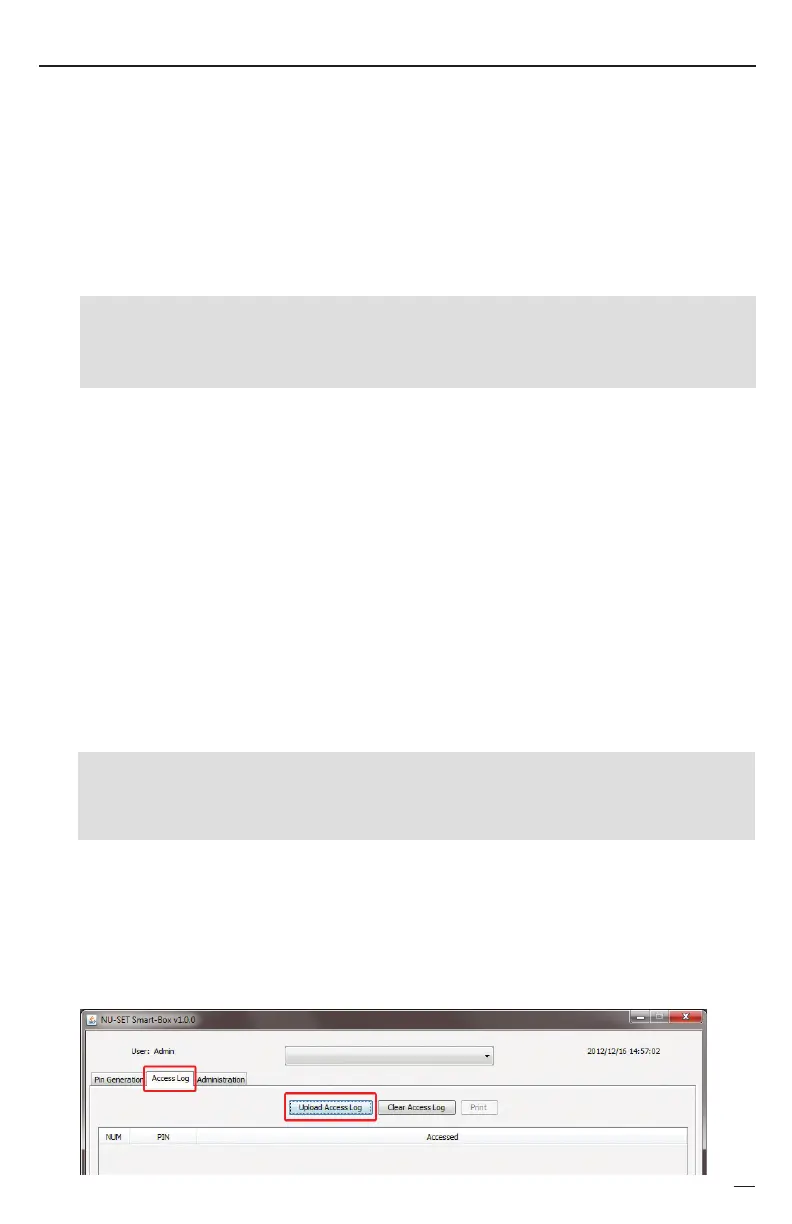
On the application window, click on the “Access Log” tab, and click on the “Upload Access
Log” button.
➊
➌
Insert the USB flash drive into the USB port located inside the battery compartment.
Enter the last 8-digit Report Password followed by the [Enter] button. If the password is
incorrect, the red LED will flash once with 3 short beeps. A green LED indicates that the
After the green LED, the orange LED flashes and the download process will begin.
The overall process may take up to 1 minute to complete (depending on the size of the log).
correct password is entered.
Enter
❺
➍
☞
✍
Once download is complete, the green LED will flash once with a long beep.
SAMPLE
Objective: Download access log to USB device using Report Password, 33333333.
The 8-digit manufacturer report password is preset to '33333333'. Refer to the "Changing
Owner Password" section to reset a new Report Password.
Unplug the USB drive from the Smart-Box and plug into the computer’s USB port. The
computer should recognize the USB drive automatically and assign a drive letter (i.e., E:\).
+
Enter


 To Next Page