NU-SET Smart-Box Series Lockbox User Guide
14
▀ Programming PIN to Lockbox
➌
➊
➌
begin. If program data is not found in the USB drive, the process will be aborted and the red
LED will flash once along with 3 short beeps.
Insert the USB flash drive into the USB port located inside the lockbox battery compartment.
After the green LED, the orange LED will begin flashing and the programming process will
Enter the last 8-digit Program Password followed by the [Enter] button. If the password is
incorrect, the red LED will flash once with 3 short beeps. A green LED indicates that the
correct password is entered.
➍
Once the process is complete, the green LED will flash once with a long beep.
⚠
To prevent accidental lock up, always test the combination before locking the vault. Push the
sliding lever up without actually closing the vault, and follow the “Locking & Unlocking
Lockbox” instruction in the next section.
Smart-Box functions are time-sensitive, please program the lockbox immediately after saving
PINs onto the USB flash drive in order to minimize time lost.
⚠
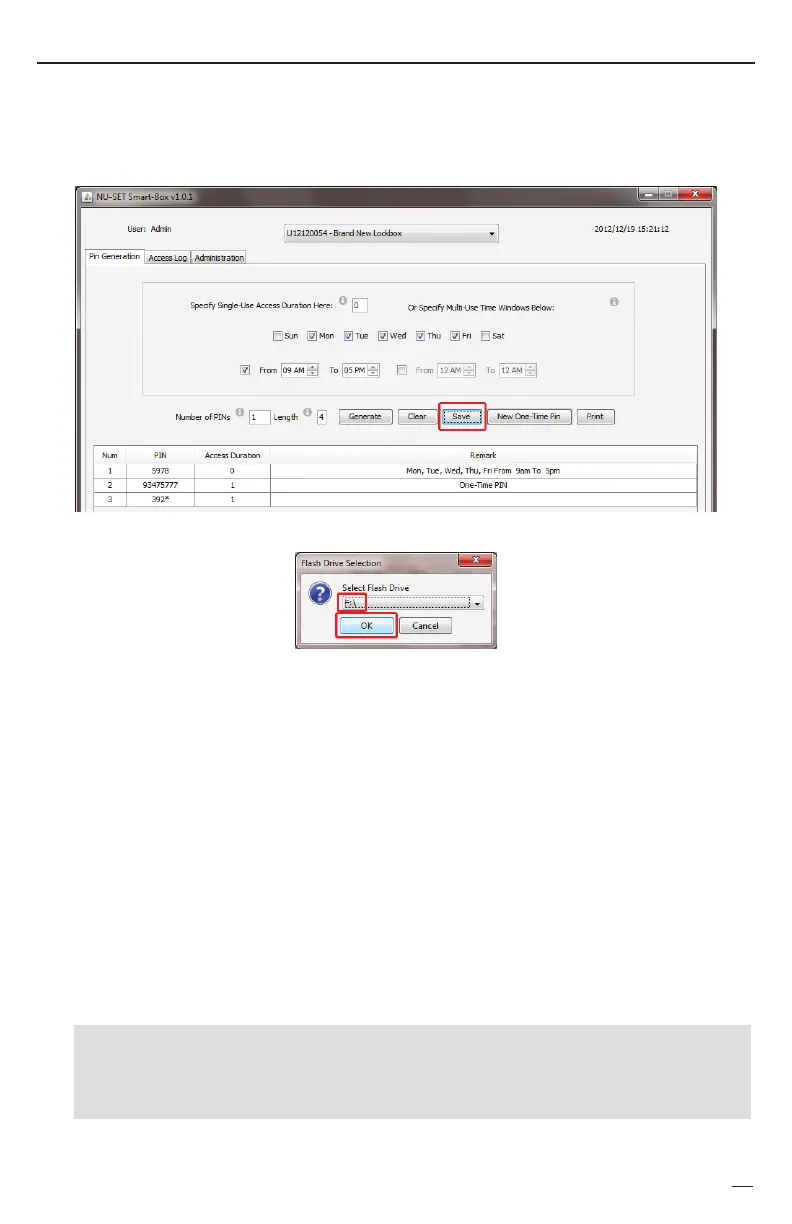
▀ Saving PIN
➊
Be sure the USB flash drive that will be used to program the Smart-Box is connected to the
computer.
Click the [Save] button.
Select the USB flash drive from the drop down list and press [OK].
☞
+
✍
The 8-digit manufacturer program password is preset to '22222222'. Refer to the "Changing
Owner Password" section to reset a new Program Password.
SAMPLE
Objective: Program and transfer PINs to lockbox using Program Password 22222222.
Enter


 To Next Page