NU-SET Smart-Box Series Lockbox User Guide
11
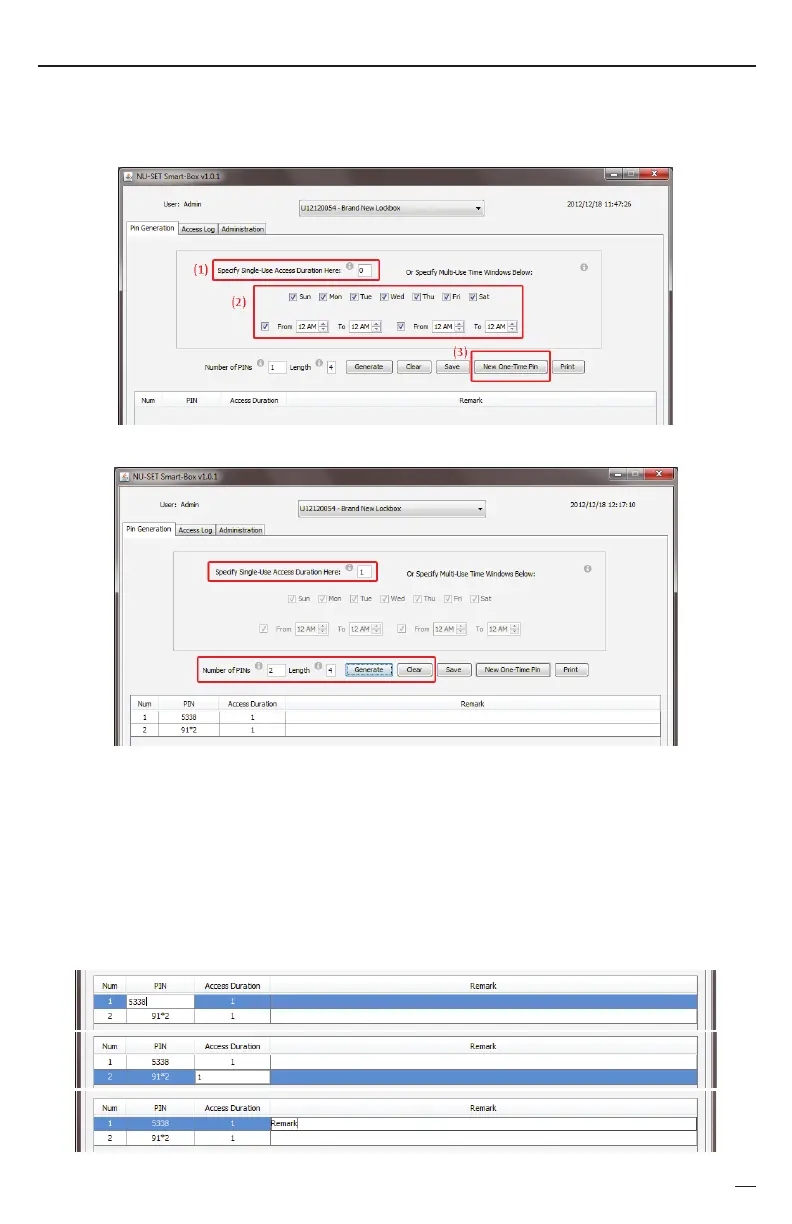
The Smart-Box application can generate 3 types of PINs: (1) PINs by duration, (2) PINs by
weekday and time, and (3) remote access one-time PINs.
To edit PIN, Access Duration or Remark, click the corresponding cell to enter new data.
Hit the ENTER key on keyboard to save.
EDIT PIN
EDIT
DURATION
EDIT
REMARK
➊
Generating PINs by Duration
b. Enter Number of PINs to be generated. Lockbox Manager may create up to 500 codes.
c. Enter the Length (number of digits) for the PINs (from 4 to 6).
a.
d. Click the [GENERATE] button to generate PINs based on your setting.
e. Click the [CLEAR] button to delete all PINs generated.
▀ Setting Up Access PIN
Enter Access Duration for the PINs (from “0” to “999). "0" is for unlimited access.
"1" means the PIN will be valid for 1 hour after its initial use.
f.


 To Next Page