NU-SET Smart-Box Series Lockbox User Guide
10
Using the Smart-Box™
✍
✍
✍
⚠
▀ Changing Owner Password
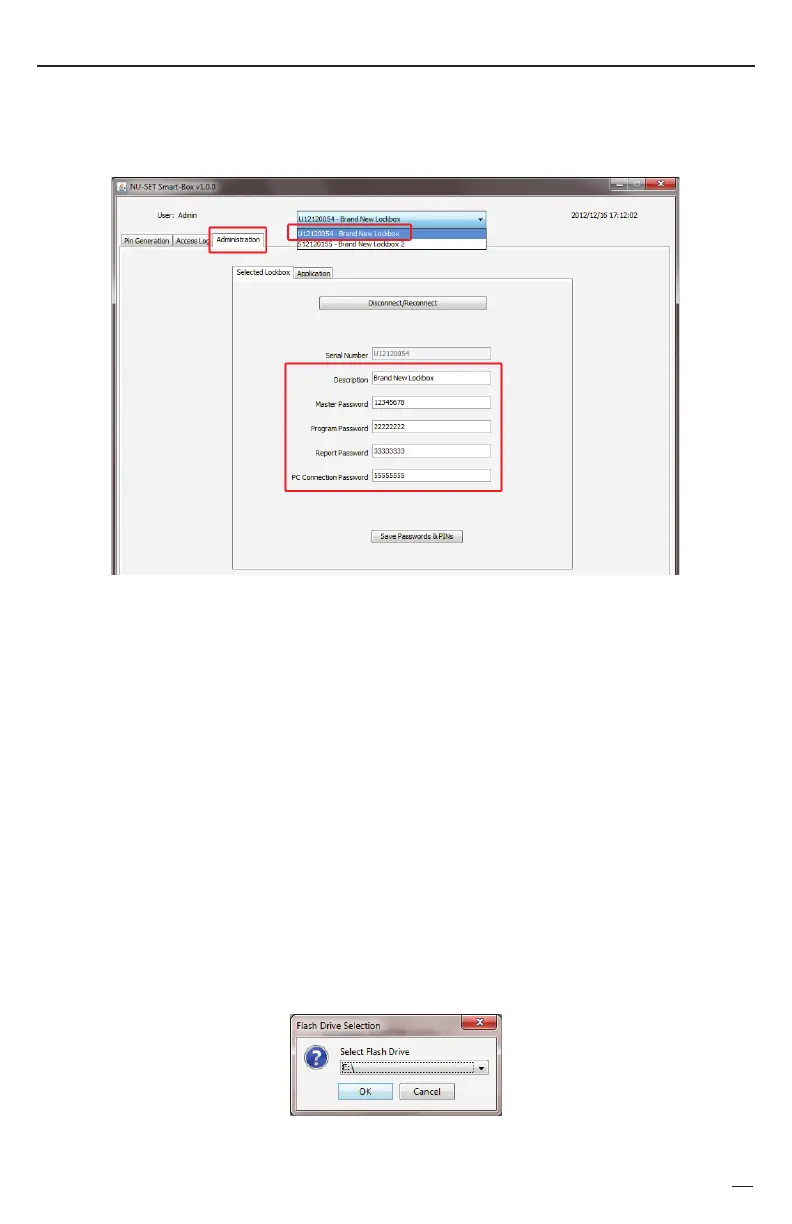
Report password enables users to download access logs from the lockbox to the USB
device. This code must be 8 digits. The default report password is '33333333'.
Program password enables users to upload PINs and date/time information from the USB
device to the lockbox. This code must be 8 digits. The default program password is
'22222222'.
Master password has unlimited access to the lockbox. This password will work even if all
PINs expired. This code must be 8 digits. The default m
aster password is '12345678'.
To change a field, simply overwrite the existing text with new ones in the appropriate box.
For security reason, users are strongly encouraged to change all of the above passwords
before using the lockbox. Click “Save Password & PINs” at the bottom of the screen and
➊
Click on the “Administration” tab on the application and select a Smart-Box from the top
drop-down list (if more than 1 Smart-Box is registered) to edit.
✍
Description Use this field to identify the lockbox, i.e., the address of the Smart-Box.
✍
PC connection password enables a direct connection between Smart-Box and PC. This is for
advance setup and troubleshooting only. For security, please change this code before use.
click “OK” to save a copy of the pin file to the USB flash drive.


 To Next Page