NU-SET Smart-Box Series Lockbox User Guide
9
❽
❺
❻
❼
➍
☞
✍
Refer to “Using the Smart-Box” section on how to retrieve and read the Access Log .
Once download is complete, the green LED will flash once with a long beep.
SAMPLE
Objective: Download access log to USB device using Report Password, 33333333.
The 8-digit manufacturer report password is preset to '33333333'. Refer to the "Changing
Owner Password" section to reset a new Report Password.
Unplug the USB drive from the Smart-Box and plug into the computer’s USB port. The
computer should recognize the USB drive automatically and assign a drive letter (i.e., E:\).
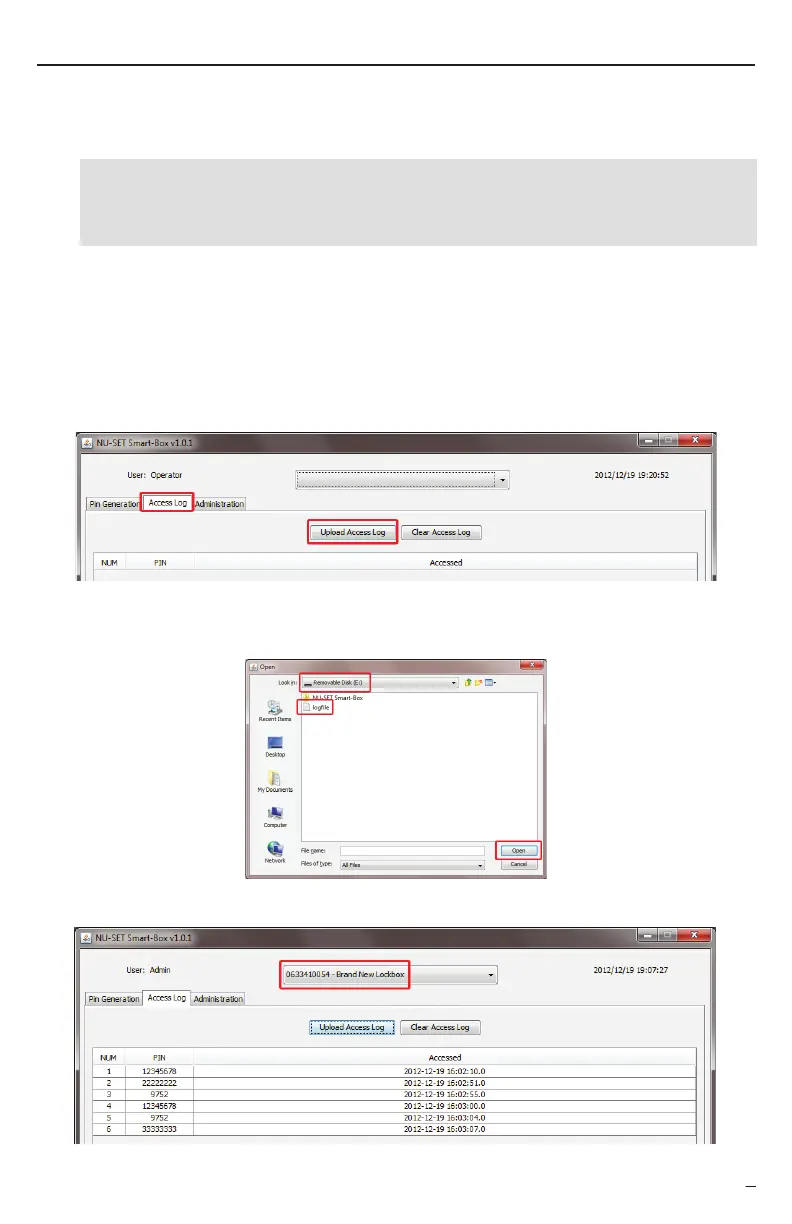
On the application window, click on the “Access Log” tab, and click on the “Upload Access
Log” button.
When the “Open” window pops up, select the USB drive from the drop down list, click on
the file named “logfile”, and click “open”.
The serial number of the new Smart-Box will be displayed at the top drop-down list.
+
Enter


 To Next Page