NU-SET Smart-Box Series Lockbox User Guide
6
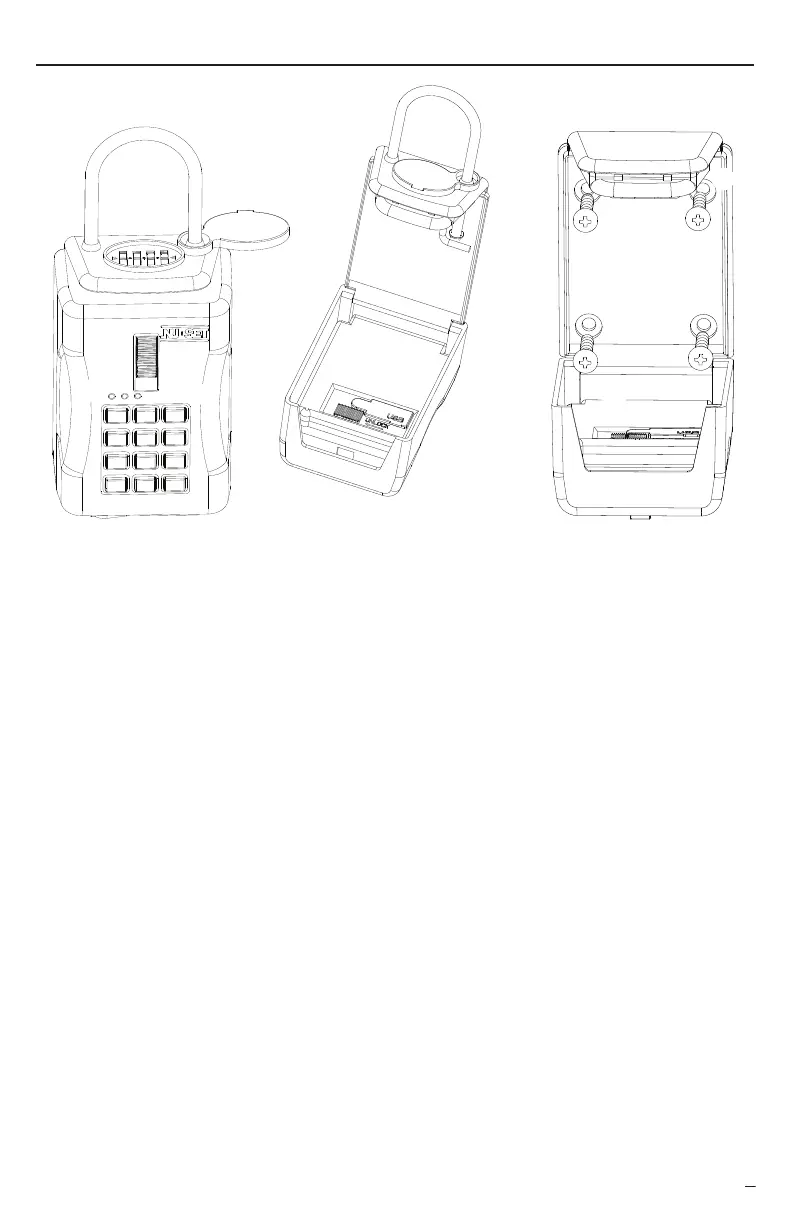
Combination Locking Shackle (7010 Model Only)
A 4-number combination lock which protects lock box from unauthorized removal.
Sliding Lever Lock
LED Indicator
3 different color LEDs represent lockbox working status.
●
Red LED means access denied or errors occurred.
●
Orange LED means lockbox is busy processing data.
●
Green LED means access granted or process completed.
Keypad
12-Button keypad used to enter access codes and passwords.
External Power Inlet
Allow an external power source if internal batteries are drained.
Resettable Shackle Combination
A hidden lock for resetting shackle combination
Battery Compartment
A battery holder for 4x AA batteries.
USB Port
Allow an USB device to program lockbox or to download access log from memory.
Mounting Holes (7060 Model Only)
Allow screws to pass through and to mount the lockbox.
➑
➒
➍
➎
➏
➐
Hardware Interface
▀ Smart-Box Layout
➋
➌
➊
Battery powered lever lock. Slide up ↑ to lock and slide down ↓ to unlock
❶
❷
❺
❻
❼
❽
❽
❾ ❾
❾
#7010 #7060
#7010
❾
❼
❹
❸


 To Next Page