N5
Descriptions for Controller Buttons
Display setup
How to Use the Controller
How to Use the Product by Mode
Temperature setting for the Auxiliary heating part
How to Use the Low Frequency Pad
How to Use the external projector
Preheating function
Sleep music
How to Use the Product
How to Use the Product
Use the product
Lie down with your legs facing the
auxiliary body and press “AUTO” on
the controller to operate the device in
automatic mode.
N5
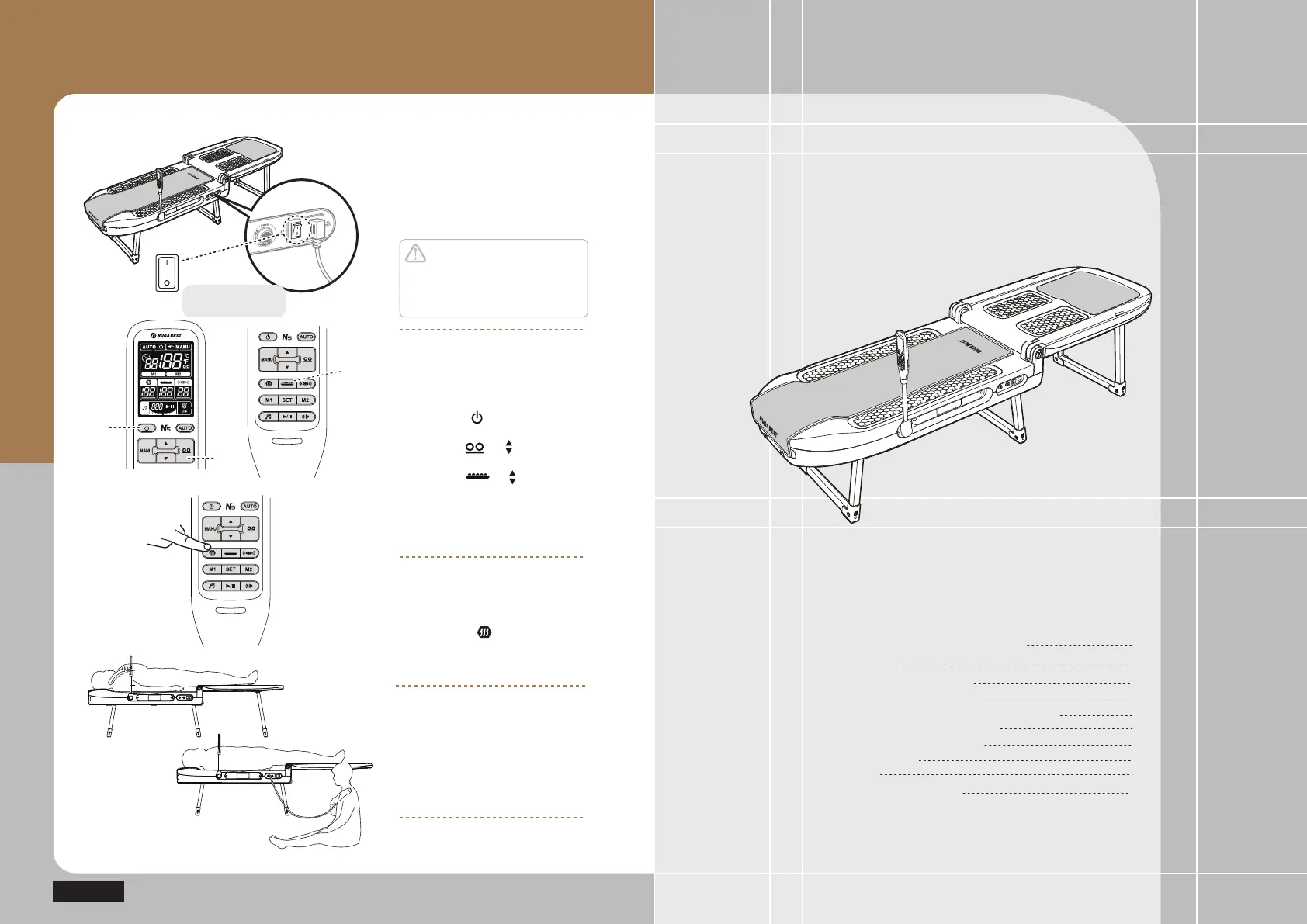
Test Operations after Installation
Check out the power
supply for the product
Turn on the power switch.
Caution
Ensure the power supply to be
turned off after use or during no use.
Otherwise, it might cause failure.
ⴘ
ⴙ
ⴚ
Check out operations of
controller
ⴘ Press the power button on the
controller ( )
ⴙ
Adjust temperature for the internal
projector ( → )
ⴚ
Adjust temperature for the external
projector ( → )
Adjust temperature for the abdomen
heating pad
Refer to ‘How to Use the controller
by Mode’ (Page 22)
Checking out the operation
of the Auxiliary heating part
Press the star ( ) button on the
controller and set the temperature by
SUHVVLQJŸRUź
20
21
22
32
22
25
26
28
29
30
OFF
ON
Power switch
in the main assembly


 To Next Page