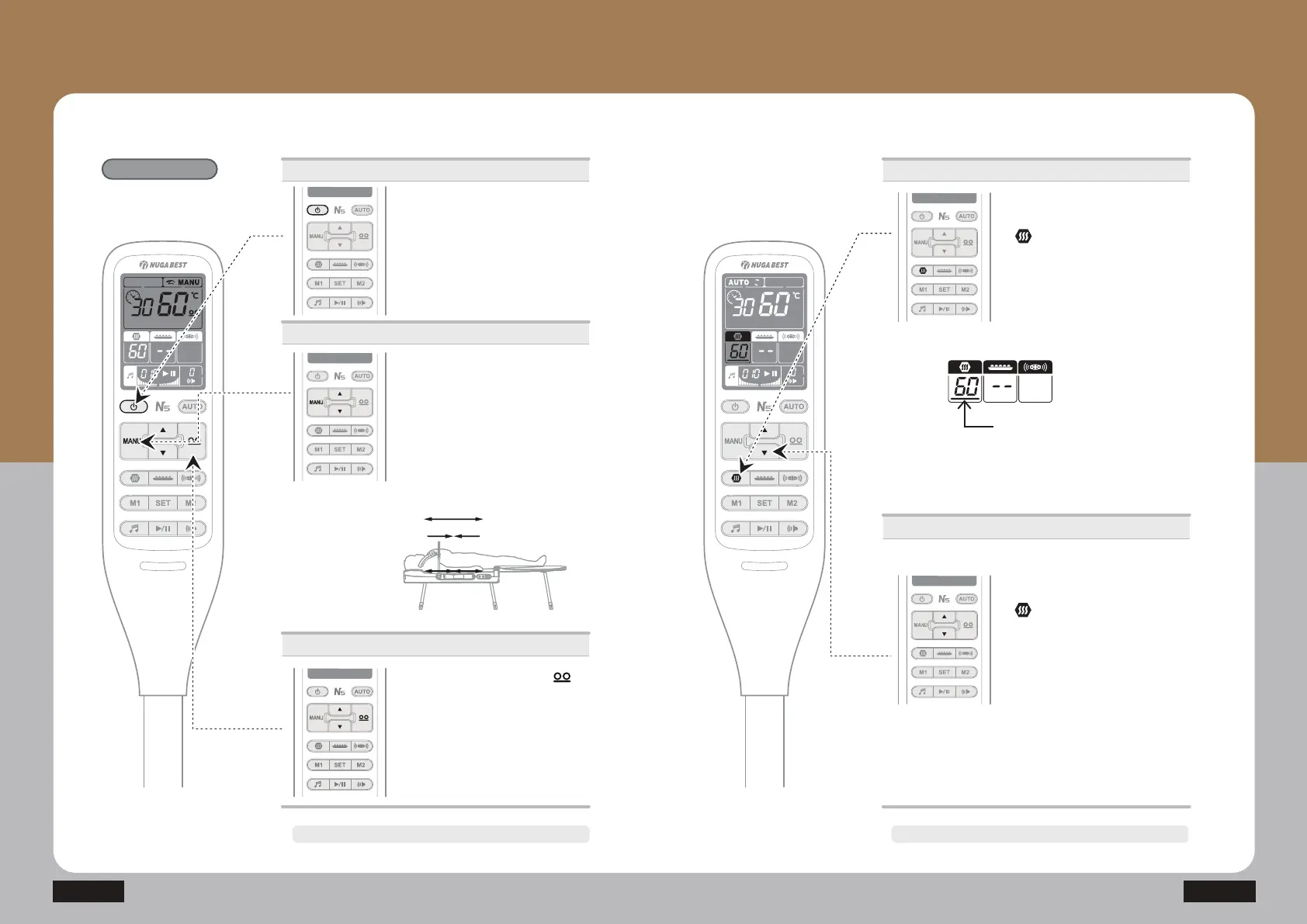
How to Use the Controller
- Temperature setting for the Auxiliary heating part
N5
The power will turn off automatically after approx. 8 hours. The power will turn off automatically after approx. 8 hours.
How to Use the Product
Manual Mode
Power supply
ⴘ Press the power button.
· Press the power button once : On
Press it once again : Off
Manual Mode
ⴙ3UHVVLQJ0$18ŸźLQWKH0$18
mode will cause the MANU icon to blink
and the internal projector can be moved
to a desired area. The internal projector
PRYHVZKLOHŸźLVEHLQJSUHVVHG
Ÿ7KHLQWHUQDOSURMHFWRUmoves to the
cervical and lumbar vertebrae.
Âź7KHLQWHUQDOSURMHFWRUPRYHVWRWKH
thoracic vertebrae region.
ⶸ
ⶸ
ⴚ 3UHVVWKHLQWHUQDOSURMHFWRU
button and adjust the temperature
E\SUHVVLQJŸRUź
(Moderate temperature: 55~60℃
· Range of temperature setting for
internal projector: 40~70Ⳅ
· Temperature setting unit
40~70Ⳅ: Temperature setting per 1Ⳅ
Temperature control
Operations
ⴘ Press the auxiliary heating part
EXWWRQ
· Press the auxiliary heating part
button once: Select
· Press the auxiliary heating part
EXWWRQDQGKROG2Q2II
:KHQWKHFXUVRUWXUQVRQ\RXFDQ
adjust the temperature.
Temperature control
ⴙ Press the auxiliary heating part
EXWWRQDQGDGMXVW
WKHWHPSHUDWXUHE\SUHVVLQJŸRUź
(Moderate temperature: 55~60Ⳅ
·The temperature increases until it
reaches the set temperature.
·Temperature setting unit
30~60Ⳅ: Temperature setting per 1Ⳅ


 To Next Page