N5
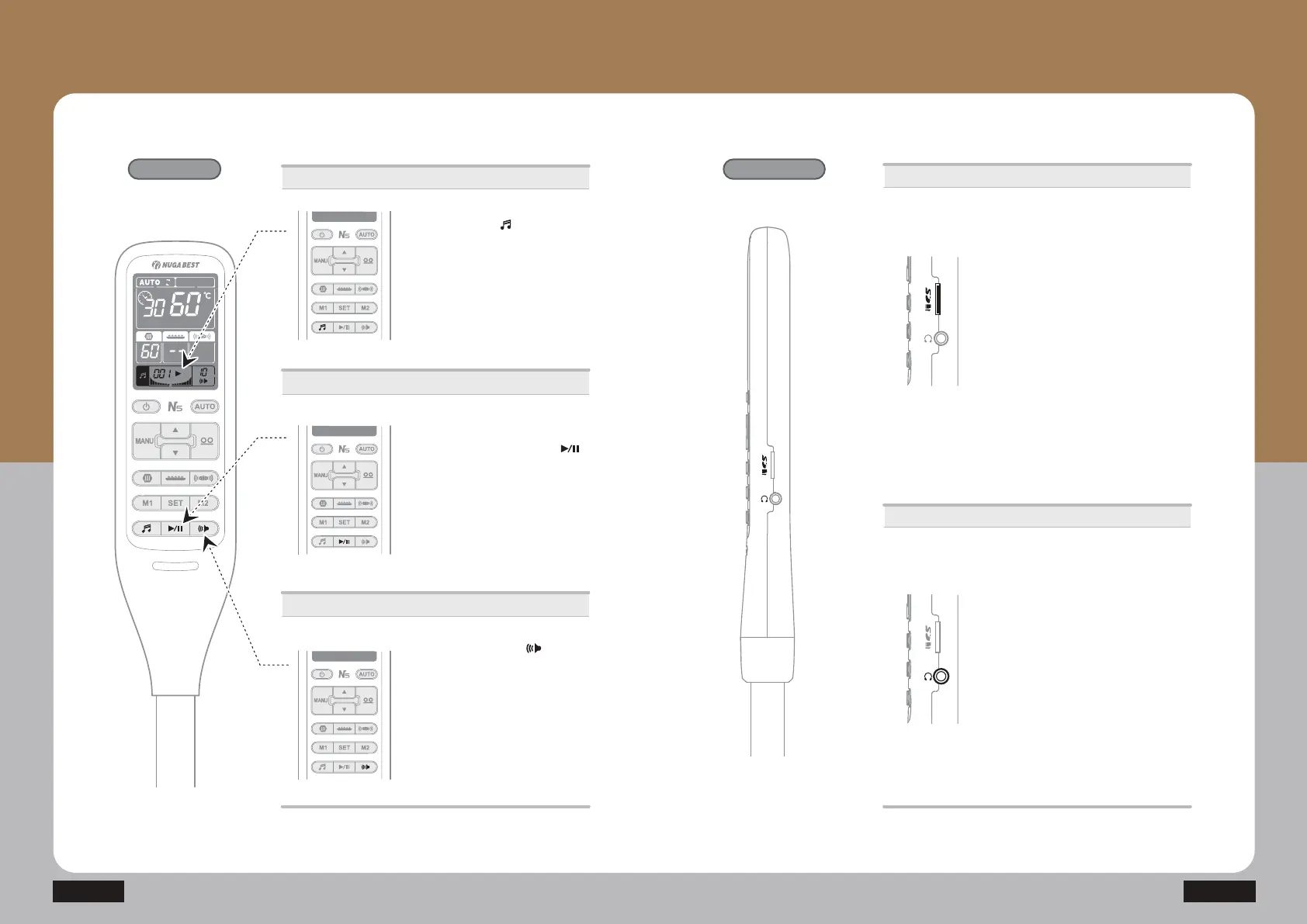
Changing the songs
Volume control
Song change Play music
How to Use the Product
How to Use the Controller
- Sleep music
Operations
ⴘ Press the music ( ) button and
hold to turn on.
· When it’s off, the number of songs
that can be played is shown.
· Press the music button: change the
song
· Press and hold: On/Off
Play music
ྚ Press the Play/Pause button ( )
to play it in sequence.
· Press again to pause
· Pressing the button and hold it for a
while causes current song to be
constantly repeated.
ⴚ Press volume control ( ) button
to increase the volume up to level 10.
(Pressing the button after level 10
lowers the volume to level 1.)
· Press briefly to increase by one level.
· Press and hold to decrease by one
level.
ⴘ Press the mini SD card on the side
of the controller with your nail to
release it.
· Using a card reader, choose any of the
songs on your PC. (supports MP3 only)
· Input the card to play the music.
ྙ You can use earphones so as to not
disturb others with the music.
· The sound volume will vary depending
on the music file, so be careful.
Using earphones


 To Next Page