Power supply
Intensity control
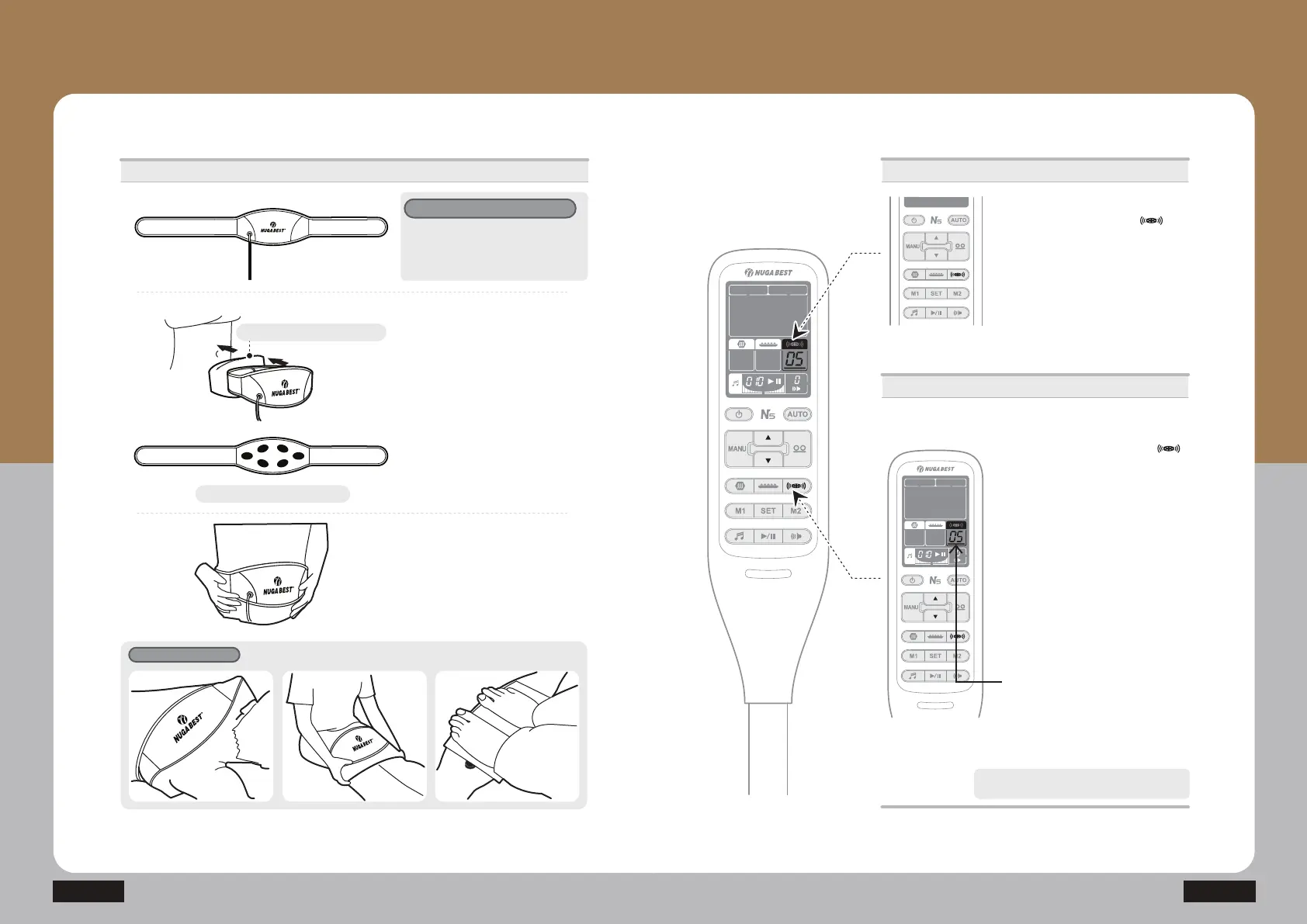
ⴛ Press the low-frequency pad ( )
button and adjust the intensity by
SUHVVLQJŸRUź
(The intensity can be adjusted within the
UDQJHRIWR,WZLOODXWRPDWLFDOO\WXUQ
RIIZKHQLWLVQRWLQFRQWDFWZLWKDKXPDQ
ERG\
7KHORZIUHTXHQF\SDGDXWRPDWLFDOO\VWRSVDIWHU
RSHUDWLRQVIRUDERXWPLQXWHV
N5
When the cursor turns on, you can adjust
WKHLQWHQVLW\
Connection
The low frequency pad is a device to
LPSURYHSDLQRUDP\RWURSKLD
percutaneously by applying weak current to
WKHKXPDQERG\
What is the low frequency pad?
/RZIUHTXHQF\SDGVFDQEHXVHGIRUWKHXVHUVZLWKZDLVWVL]HRILQFKHV
:LWKWKHH[WHQVLRQEDQGLWFDQEHXVHGXSWRWKHZDLVWVL]HRILQFKHV3OHDVHLQTXLUH
LILWLVXVHGIRUPRUHWKDQQFKHV
ྛGWhen the power is off, press the
low frequency pad button ( )
WRWXUQLWRQ
(By default, it is set at ‘00’)
· Check out the connecting conditions
RIWKHORZIUHTXHQF\SDG
,QFDVHWKHUHLVQRSURSHUFRQQHFWLRQ
‘- -‘ will show on the display)
How to Use the Product
How to Use the Controller
- How to Use the Low Frequency Pad
6XUIDFHWRFRQWUDFWWKHDEGRPHQ
Towel for the low frequency pad
ⴘ,IWKHUHLVQRJHWDWKRPHSODFHWKH
wet low frequency pad towel or
a piece of 100% cotton towel or cloth
RQDEGRPHQDQGZHDUWKHORZ
IUHTXHQF\SDG
· When you wet a towel or a cloth with
ZDWHUSOHDVHVTXHH]RXWFRPSOHWHO\
IURPIORZLQJZDWHU
ⴙ:HDUWKHDEGRPLQDOEDQGDIWHUIL[LQJ
the low frequency pad in a good
PDQQHU
9DULRXVZHDULQJPHWKRGV
<RXPD\ZHDULWDURXQGDQ\DUHDRWKHUWKDQWKHDEGRPLQDODUHD


 To Next Page