13
Your phone can also go to sleep, and wake up from this sleep. Putting your phone to
sleep saves battery power without the inconvenience of fully powering-off the phone.
Sleep: Tap the power button. The phone will immediately go to sleep.
Wake: Tap the power button and the phone will wake up and show you the Lock
Screen.
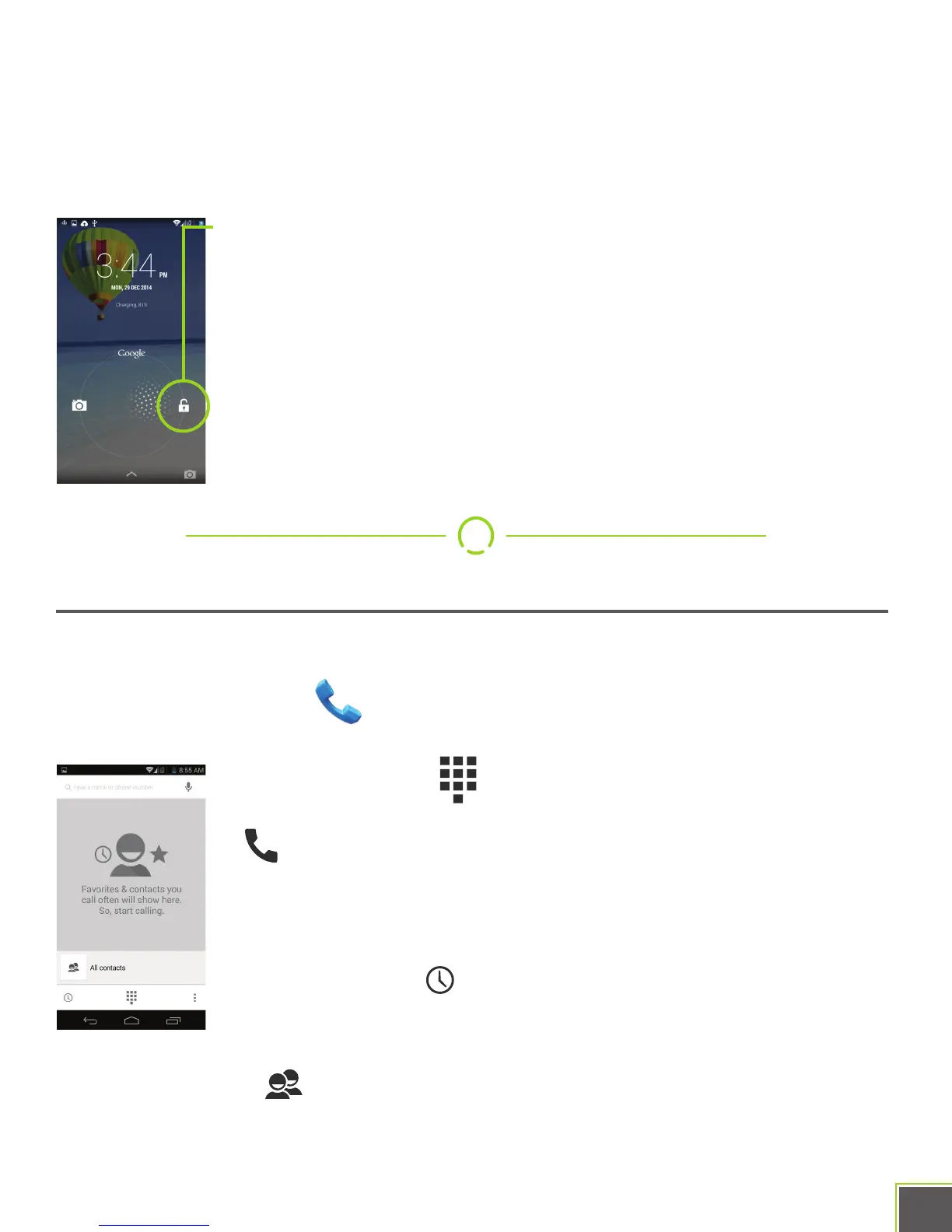
The Lock Screen shows up every time you wake your phone from sleep.
To unlock it, slide the padlock icon to the right, towards the unlock icon.
You can modify the Lock Screen to behave differently, but that’s an
advanced topic better left to Google’s official documentation.
.
Make A Phone Call
Of course, a phone should make calls, and your NUU Mobile smartphone will do just that.
First, start the Phone app. It’s located on the main Home screen or can be
accessed from All Apps.
Press the keypad icon to bring up a numeric keypad.
Type the phone number you wish to dial and then press the dial button
, which looks like a phone handset. At that point, you may put
the phone up to your ear and speak normally after the other party picks
up. If you need to dial an extension, you may press the keypad icon
during the call and enter it that way.
Press the recent icon to bring up a list of recent incoming and
outgoing calls. You can choose to re-dial a number from this list by
using the dial button on the right side of each entry.
Press the People icon to bring up a list of your contacts. You can select a contact by
tapping on it, and then choose to dial that contact’s number.


 To Next Page