9
“Trash”: Destroys the currently-selected item. There is usually no un-delete, so
be careful!
How Do I...?
In the following pages you’ll find short introductions to the things you can do with a
smartphone. These are not as in-depth as you’d find in the official Android User Guide
from Google, as they’re meant to get you started.
Initial Configuration
The very first time you power on your phone, you’ll have to go through the initial setup.
It’s not too difficult, but you will have a fair amount of account information to enter, namely
your Google credentials. Here is the general order of events:
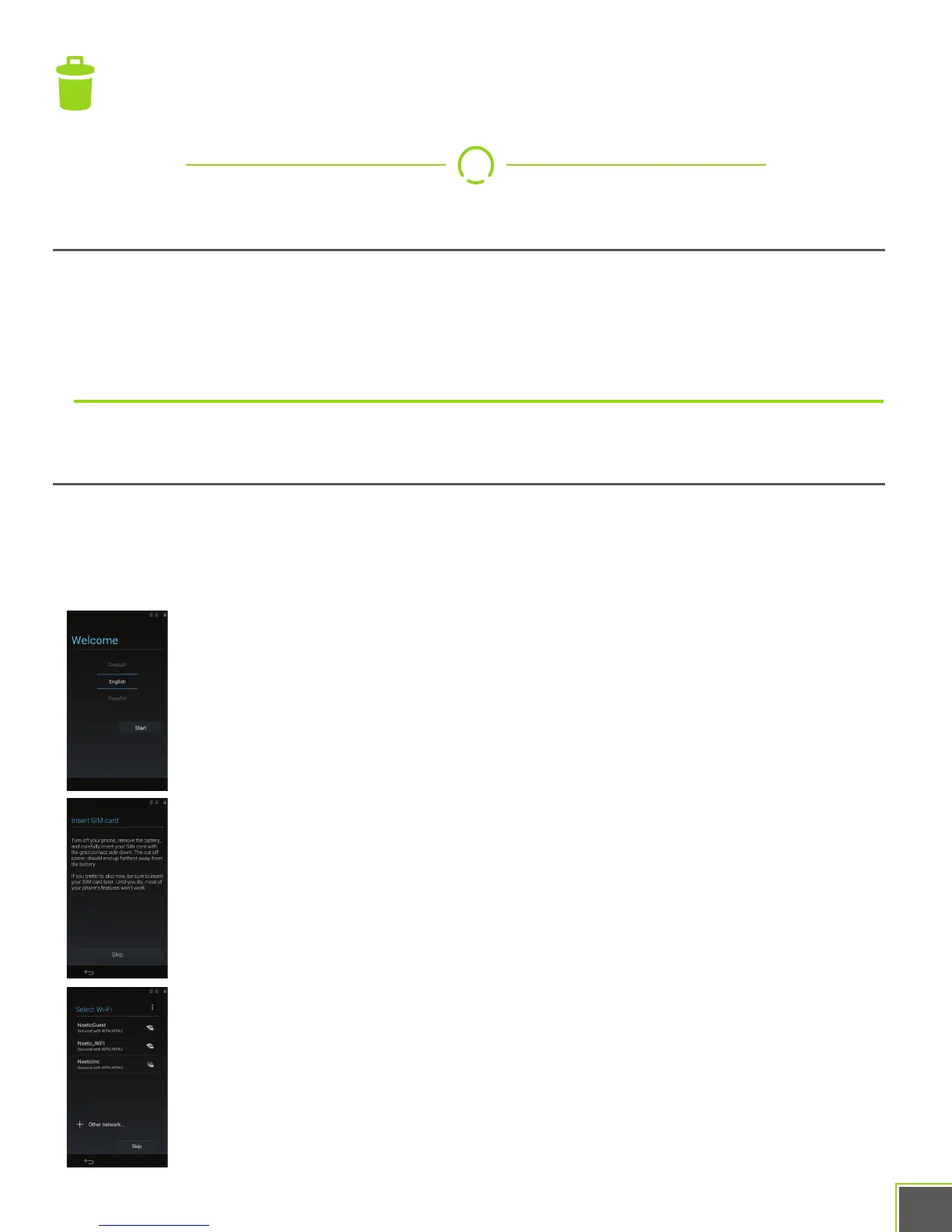
Welcome Screen: Pick your language by swiping up and down and
pressing the > (or START) button.
Insert SIM Card: Pops up if there’s no SIM installed. You can skip this
screen.
Connect to WiFi: If you’re in range of a trusted Wi-Fi hotspot, configure
it and connect to it here.


 To Next Page