18
FM Radio
You can find the FM Radio app by using the All Apps button.
You must plug in a pair of headphones to use the FM radio! The headphone cable is
used as the FM antenna. You can make the sound output through the phone speakers,
but you still must have the headphones plugged in.
Once you’ve started the radio playing, just press Home to have it play in the background
while you do other things.
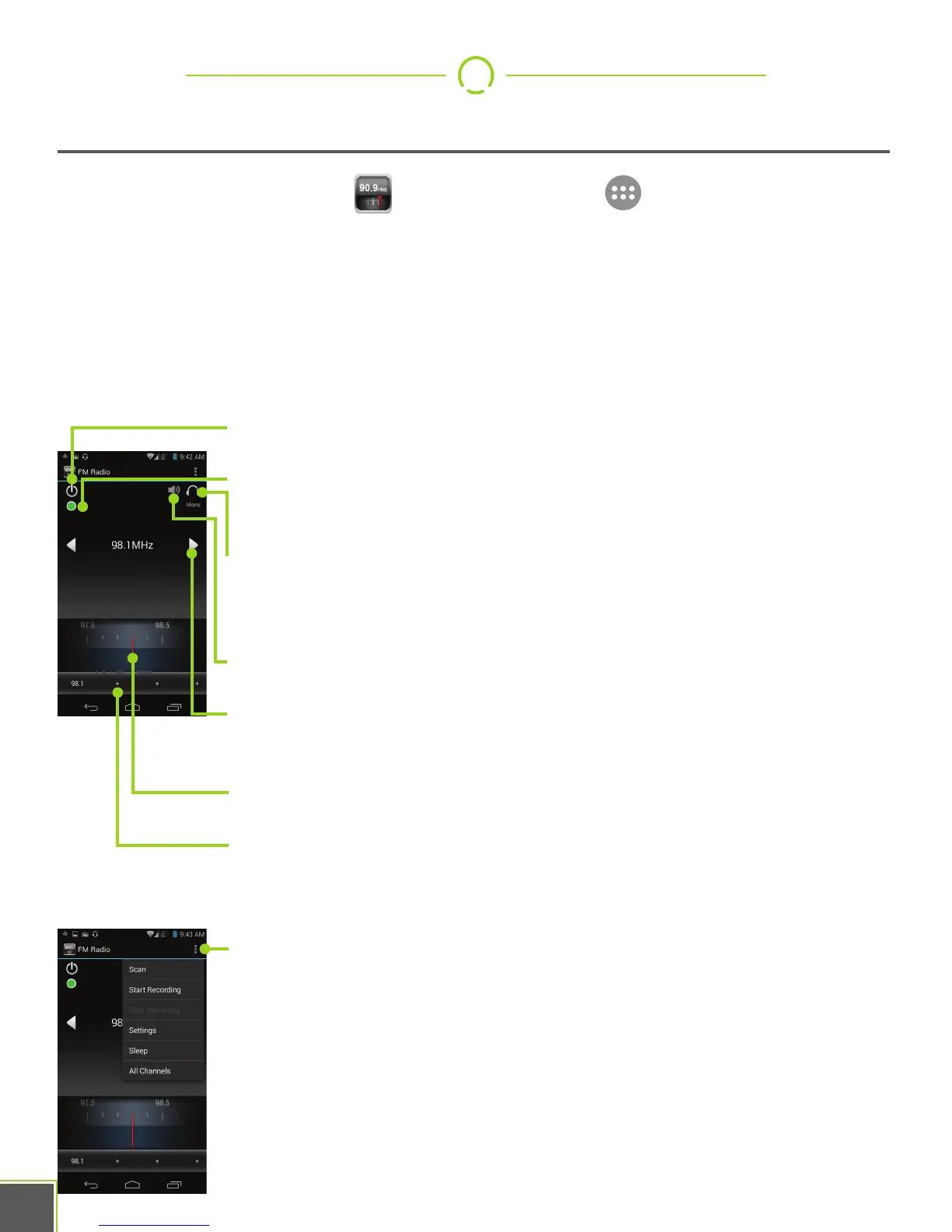
Power: Switches the radio on or off.
Record: Records the radio broadcast to an .AAC file. See the
settings to change the length of recording.
Headphone/Speaker: This is a toggle switch that changes
between playback through the headphones or the phone
speakers.
Mute: Mutes radio.
L/R Tune: Tap to increment tuner by one step, long-press to scan
for next station in that direction.
Dial: Swipe left and right to tune manually.
Pre-Sets: Long-press on a + button to make the currently-tuned
station into a pre-set. Tap a pre-set you’ve configured to tune to
that station.
Settings: You may configure recording length, regional band
settings, and start or stop recording from this menu


 To Next Page