17
Panoramic photos are easy, but do require steady movement. Put the camera in
panorama mode, tap the blue shutter button, and slowly swing the camera in one
sideways direction as if you were spinning around. Tap the shutter button again to stop
taking a panorama. The camera app will automatically stop taking a panorama if you’ve
turned far enough--about 180 degrees.
Notifications
One of the things that makes a smartphone smart is its capability to notify you of things
and your ability to customize those notifications to your liking. Want your smartphone
to tell you when you’ve got new e-mail? You can do that. Want it to skip the e-mail and
only vibrate if you get a severe weather alert? You can do that, too.
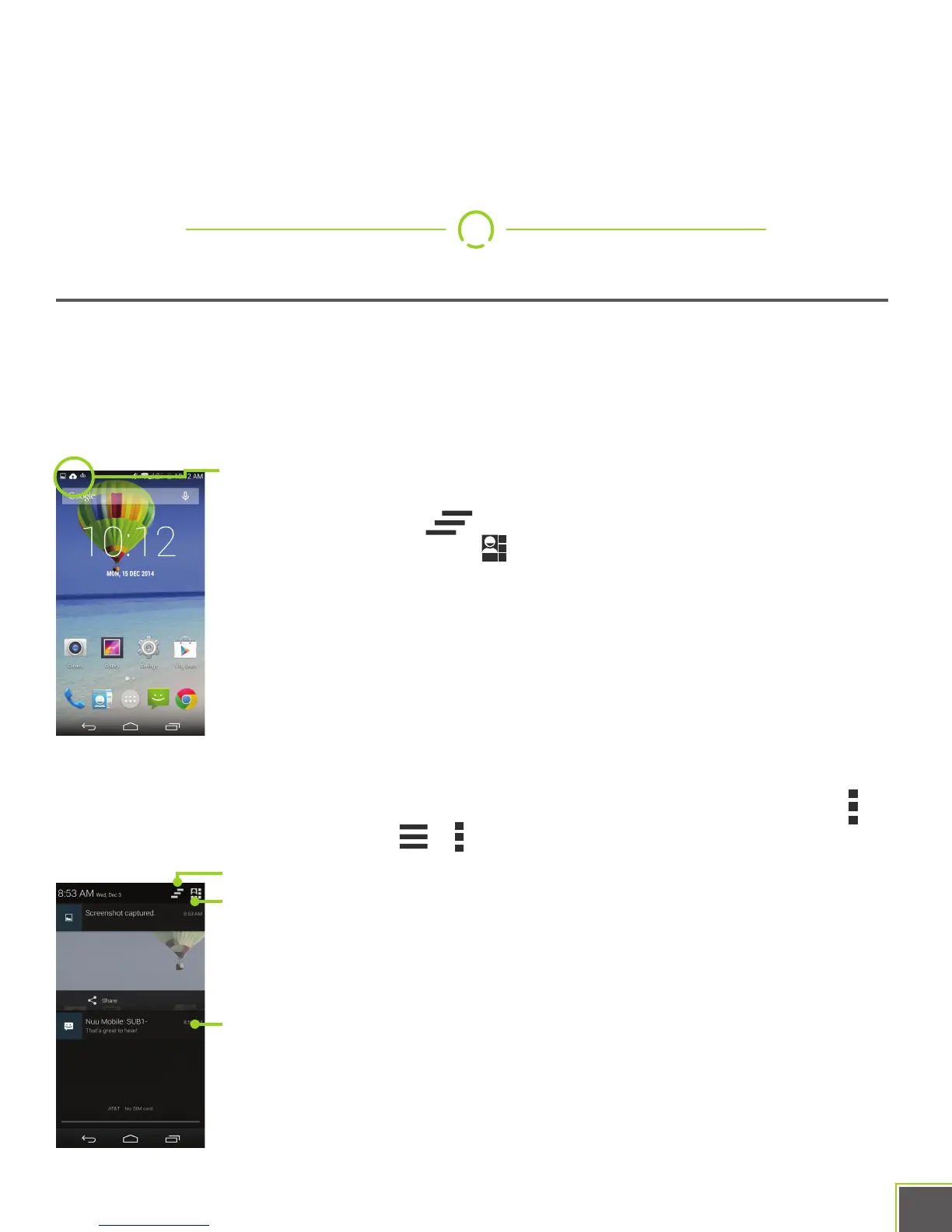
Notifications show up at the top of the screen. Swipe down with one
finger from the top of the screen in order to get a more detailed view.
The Dismiss button will make all current notifications go away.
The Quick Settings button lets you get at common settings for your
phone, like Airplane Mode and brightness controls. You can also
access Quick Settings by swiping down from the top of the screen
with two fingers, instead of one.
Some notifications, like e-mail, can be tapped on. Doing this usually
takes you right to the app so you can respond. You can also swipe
down slowly on some notifications to get response options without
actually having to switch to another app.
Notifications are configured from within each app. Make use of the Menu//Overflow
button or the various option buttons / in the app to check those settings.
Dismiss all
Quick Settings
Notification


 To Next Page