22
Note that effects and edits are not permanent until you choose to save them with the
Save button in the upper-left. Before you save, you can review effects and edits by using
the Menu button. You’ll see the picture and a film-strip of effects applied running across
the bottom of the screen. Swipe up on a listed effect to remove it. You can also use the
Undo and Redo arrows at the top to step back and forth through the effects
you’ve applied in order. Once you have everything to your liking, just hit Save!
People
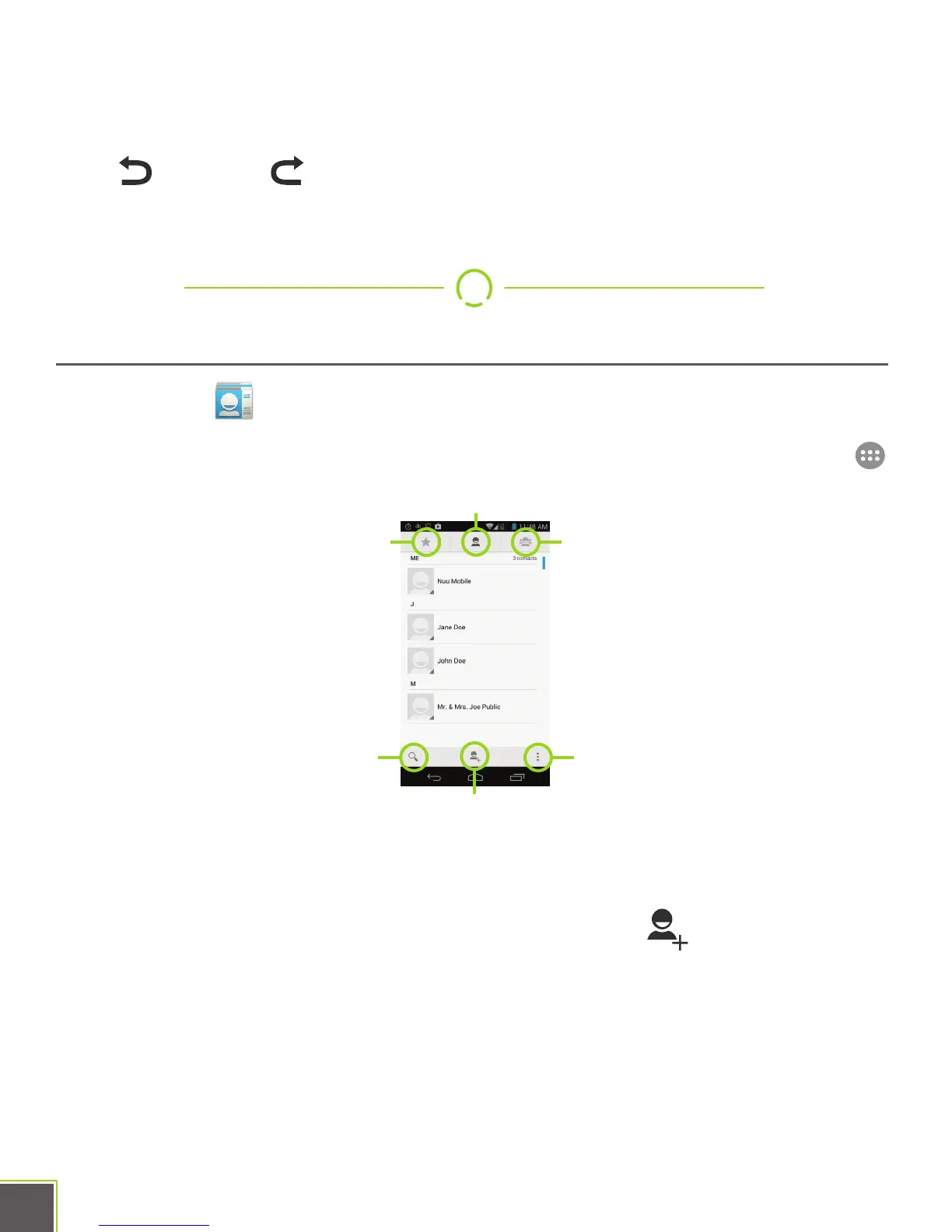
The People app lets you keep all your friends and family in one spot. Once
someone has been added here, you can find them easily and choose to message, e-mail,
phone, or video chat with them easily. Open the People app by locating it in All Apps .
If you signed into the phone with a pre-existing Google account, your Google contacts will
automatically sync with the People app the first time you run it.
If not, you can add a new contact with the Add Contact button . Just fill out the form
and tap Done when finished.
To edit a contact, long-press the contact’s name in the list.
The Groups button lets you view the groups you’ve created. When you are adding a
contact or making a new one, one of the options is to also put it in a group. Groups
make for an easy way to keep your contacts organized and easy to use.
Frequent/Favorite
Search Menu
Groups
Contacts
Add Contact


 To Next Page