16
Take Pictures
We very strongly recommend installing an SD card before using
the camera! Use the SD card so that your photos are easily trans-
ferrable.
It is said that the best camera is the one you have with you, and part of the point of buy-
ing a smartphone is to have one with you as needed. Your NUU smartphone has a good
pair of cameras for which you’ll find excellent uses.
To start taking pictures, load the Camera app. If it’s not on your Home screen,
check the All Apps button for it. You can also load the Camera app from the lock screen-
-just swipe from right to left starting from the edge of the screen.
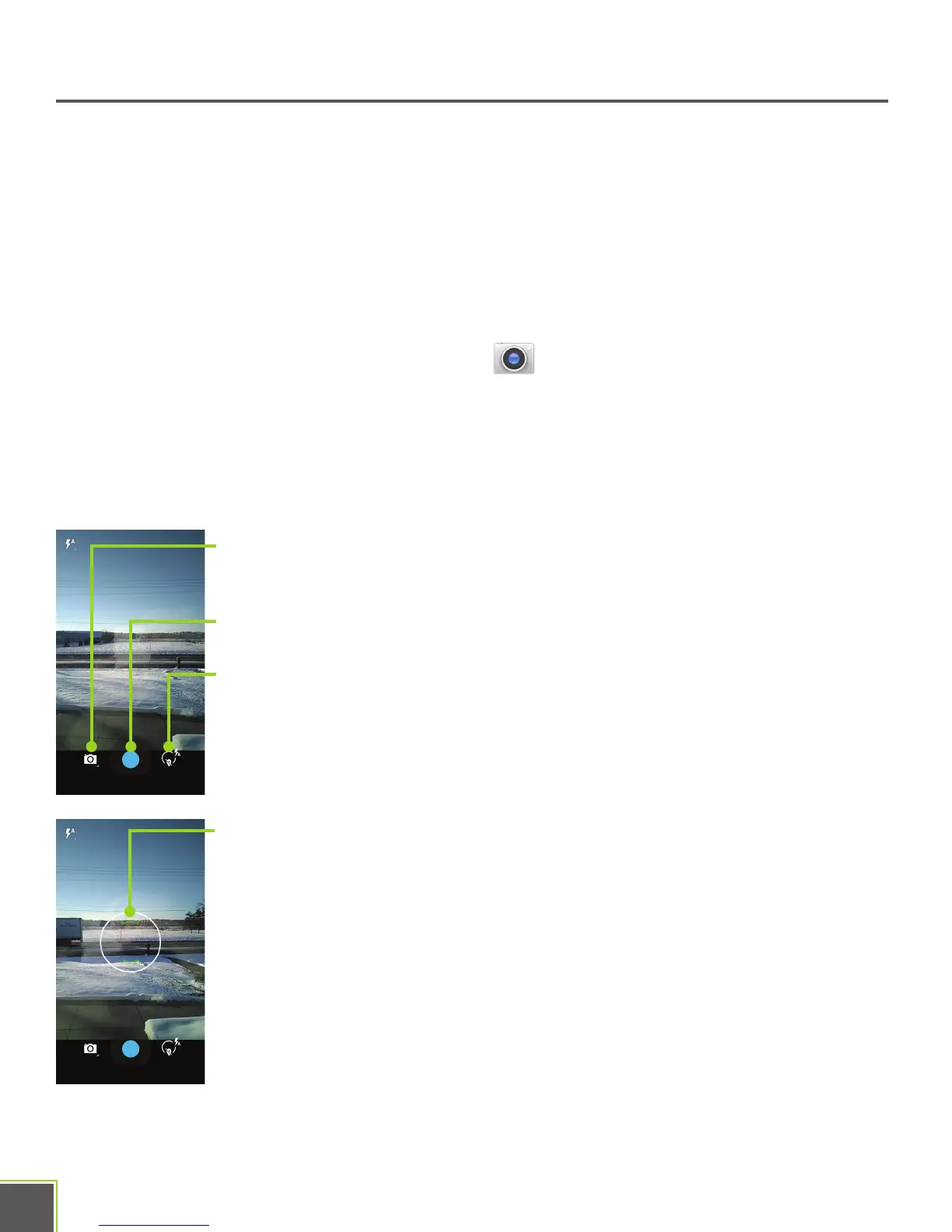
Once in the Camera, you’ll see some floating controls near the bottom of the screen.
From left to right they are Mode, Shutter, and Options
Mode: Switch between taking video, still shots, and panoramic
images.
Shutter: Takes a photo or starts recording video.
Options: Choose which camera to use, change the flash setting, turn
on HDR, change where photos get stored, just to name a few of the
many options in here.
When taking a photo, you’ll see a focus ring on the screen. Use it to
frame the subject of your photo. Tapping on the screen changes the
location of the focus ring. If you’ve got most of the automatic options
turned on, doing this will adjust the color balance, exposure, focus
point, and so on.
When shooting video, the blue shutter button becomes a red record button. Tap it to
stop or start recording.


 To Next Page