10
5.7.1 Explanations and Functions for Display and Control Panel
01-Temperature Display
This display shows
Sterilization chamber temperature during “stand-by” and during the operation (thermometer
position),
During program preparation, the temperature setting values or the alarm setting values,
Failure codes,
EoF warning when power is interrupted,
The set temperature values and alarm values.
02-Time Display
This display shows the values set for time during program preparation. Also; this display
shows he time values in the control of the settings.
03-Encoder Button
The encoder button has two physical movements. The button turn clockwise and
anticlockwise to increase or decrease the temperature and time values of the program. Also,
the button press for select / confirm.
04-Start / Stop Button
Used button to start the device to operating at set values or to stop the operation.
05-Heating Lamp
The led is “on” during heating, it indicates that the heating process is carried out.
06-“Operating The Program” Lamp
A lamp indicating that the program is running as soon as the device is started.
07-Data Transfer Lamp
The lamp indicates that the records are transferred in the memory or the file is transferred
during software update.
08-Alarm Led
This led flashes when there is a warning or error on the device.
09- “End of the program” Lamp
11- Back / Alarm Mute Button
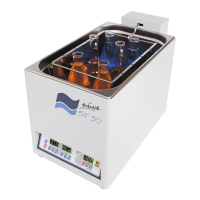
12- Shaking speed display
13- Shaking process start / stop button
06- “Operating the program” Lamp
14- Shaking speed value increase button
15- Shaking speed value decrease button


 To Next Page