17
XIII. NV-MI1 Mute Interface
The NV-MI1 Mute Interface is an additional accessory
that can be used to temporarily mute all zones whenev-
er the phone rings or the doorbell chimes. No external
power is needed for this purpose.
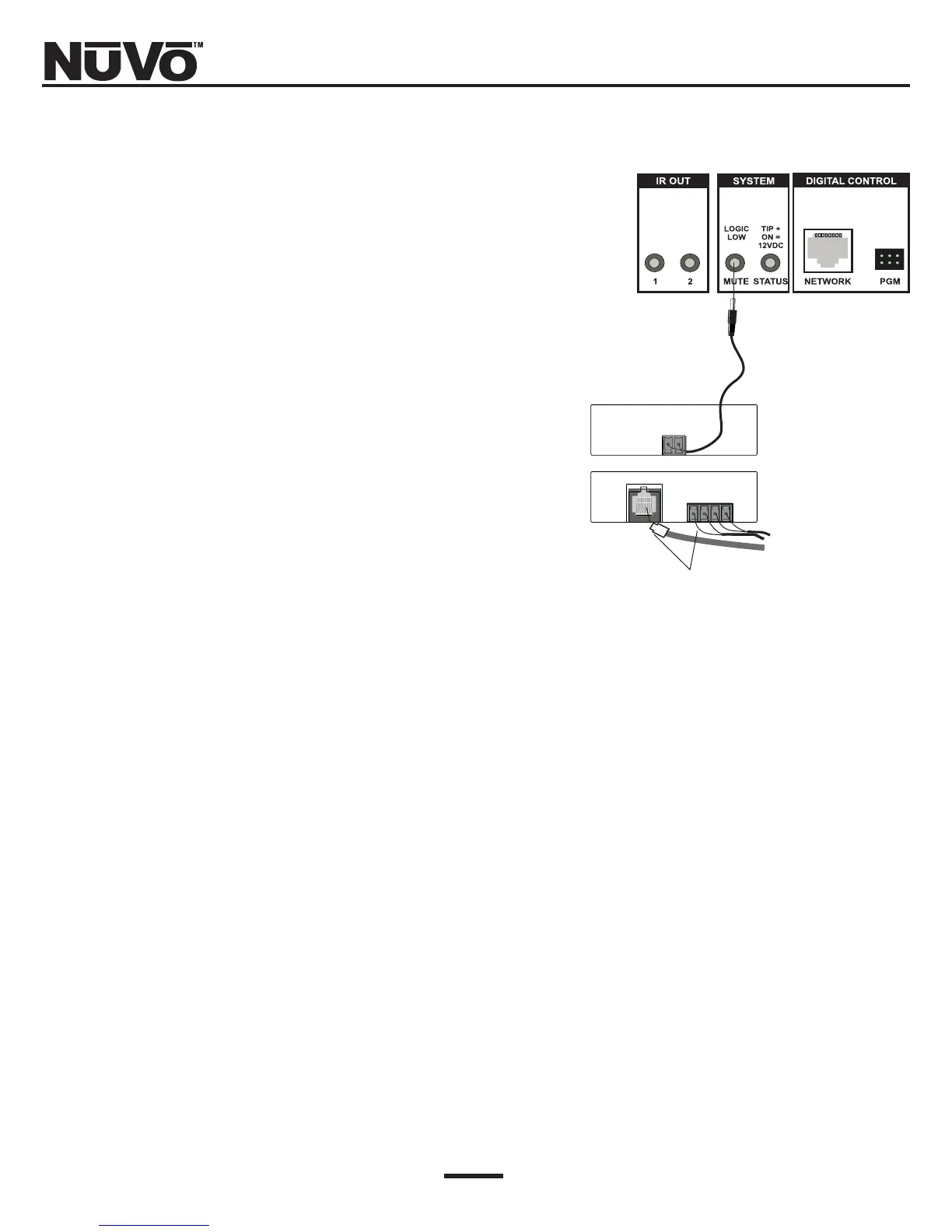
To mute the system when the doorbell chimes, simply
run a pair of doorbell wires from the chime terminals
to the connector on the MI1 labeled “DOORBELL A” or
“DOORBELL B” (or both). Then connect a pair of wires
from the “Mute Out” jack on the MIB-1 to the “Mute”
input on the back of the Simplese amplifier (Fig. 15).
To mute the system when the phone rings, simply con-
nect a standard four conductor telephone line cord (for
two phone lines) into the “Telco In” jack, and then con-
nect a pair of wires from the “Mute Out” jack on the
MIB-1 to the “Mute In” pins on the back of the
Simplese amplifier (Fig. 15).
The MI1 is not supplied with the Simplese package.
Fig. 15: NV-MI1: Mute Interface
The MI1 will accept two phone lines and two doorbell sig-
nals, and combines them to one two-conductor connection
to the Simplese’s “Mute” input.
Up to two phone lines from the home’s telephone serv-
ice can be connected to the MI1 via typical four-con-
ductor phone line with an RJ11 connector. Two door-
bells can be connected to the MI1 from the doorbell
chimes using two-conductor wire.



 To Next Page