11
IV. Attaching Source Equipment
to the Simplese
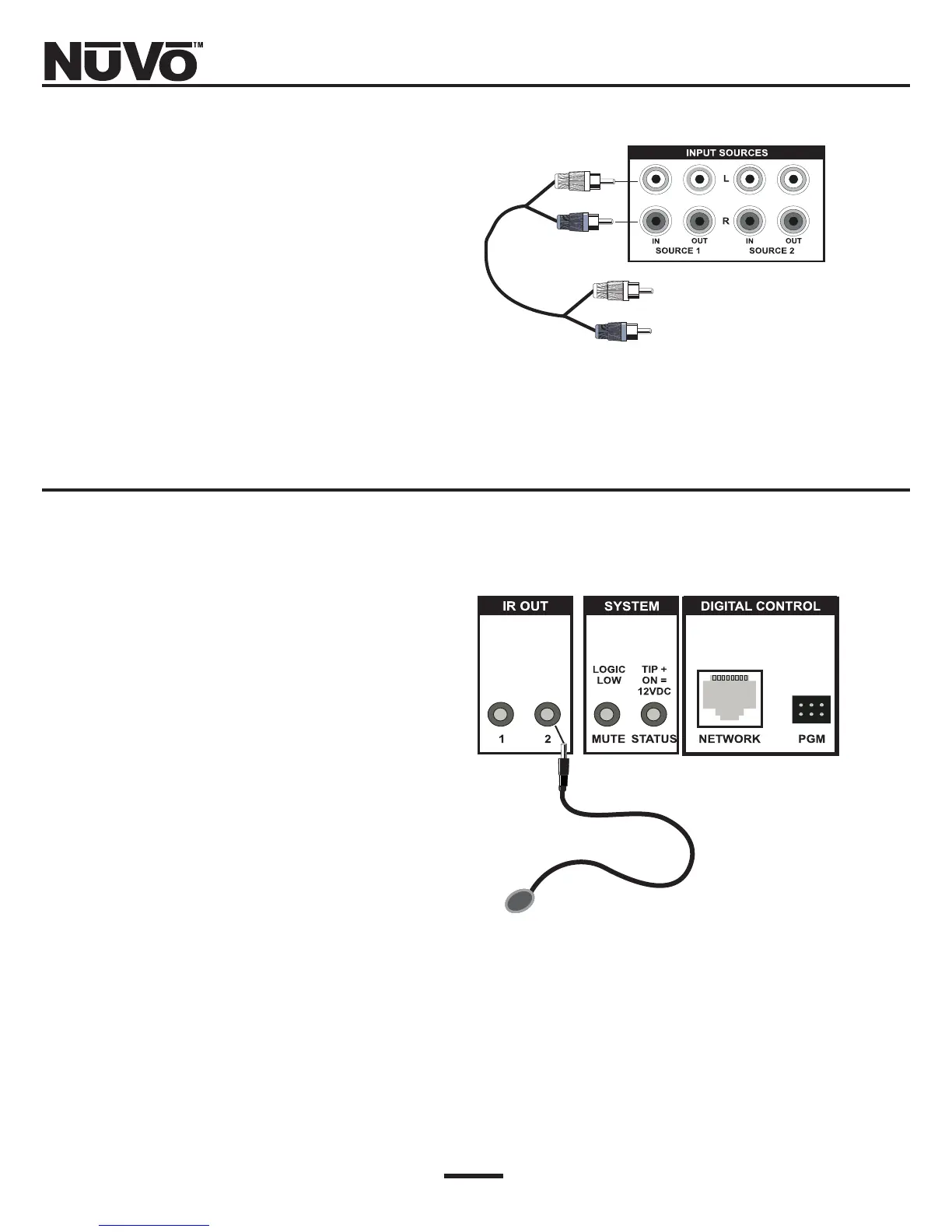
Each piece of source equipment is connected to the
Simplese amplifier with RCA cables. These go from the
RCA output on the back of the source equipment to the
RCA source inputs on the back of the Simplese amplifi-
er (Fig. 4).
V. Connecting the IR Emitters
IR commands are transferred from the Simplese ampli-
fier to source equipment via mini IR mouse emitters.
Two of these are supplied with your Simplese system.
The emitters are plugged into the "IR OUT" section of
the amplifier (Fig. 5).
Output 1 is locked to the Source 1 input. This emitter
should be routed to the IR receiver on the source equip-
ment plugged into the 1st source input. Likewise, the
IR output 2 should be routed to source 2.
IR source routing allows you to have two identical
sources and still have independent control of both
sources.
Fig. 4: Source Inputs
This end of cable plugs into the
corresponding audio output of
your source equipment.
Fig. 5: IR Emitter Outputs
The NV-VEC emitter flasher has an
adhesive pad that attaches directly
over the IR receiver window on the
source equipment.



 To Next Page