Nytech DS-8310 Recording Video Clips
English - 39
Recording Video Clips
Quick Guide
Your Nytech DS-8310 allows you to record video clips.
1. Press the Power button [2] to power the camera on.
2. Press the camera mode button [11] to open the Program menu.
3. Press W, X, S or T on the four-way button [7] to choose the option
Movie (icon
).
4. Press the SET button [9].
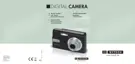
5. Focus the desired subject area by using the LCD [13]. The
remaining recording time will be shown on the display (see figure).
Resolution
Remaining recording time
6. Press the shutter button [3] to start recording.
7. To stop recording, press the shutter button [3] again. To pause the
recording, press S on the four-way button. To resume a paused
recording, press S on the four-way button again.
i
While recording a video clip you can press the zoom buttons [4].
However, while pressing the zoom buttons no sound will be
recorded.
In automatic mode, white balance will be fixed to the value for
the first frame.
The digital zoom is not available during video clip recording.



 To Next Page