36
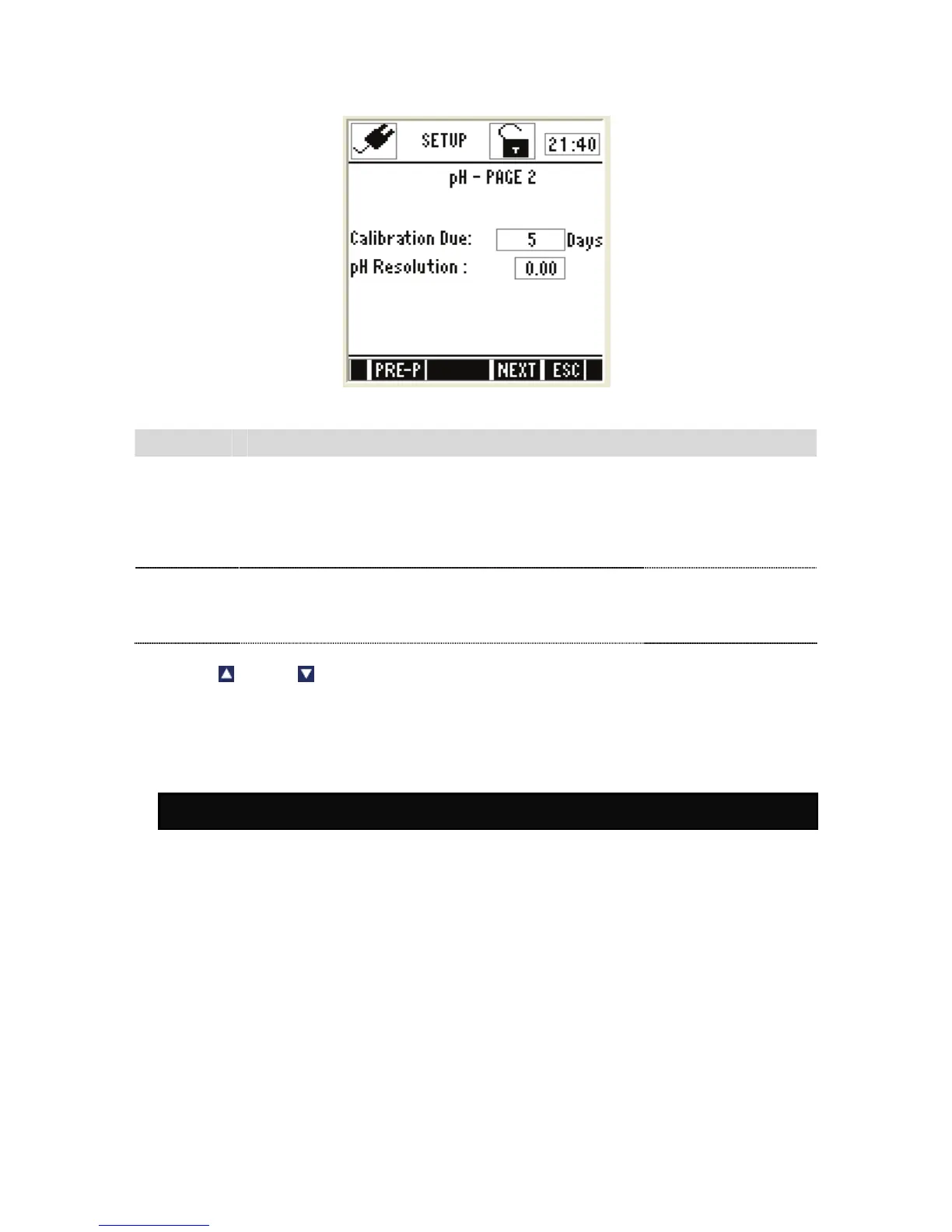
pH Settings – Page 2
Figure 12: pH Settings - Page 2
Parameter Description Factory Default
pH Calibration
Due
Specify number of days for the pH calibration alarm.
The meter shows CAL DUE indicator after calibration
due days are passed from the last calibration date.
Available range: 0 to 30
5 Days
pH Resolution
Sets the resolution for pH measurement
Available range:
0.1, 0.01, 0.001
0.00
) Press (Up) or (Down) arrow key to change pH measurement & calibration
related settings of the meter.
2. pH Calibration
2.1.1 About pH Calibration
When you re-calibrate your meter, previous pH calibration points are
replaced on a point by point basis. For example, if you previously calibrated
your meter at pH 4.01, 7.00, and 10.01, and you have now re-calibrated at
pH 7.00, the meter retains the old calibration data at pH 4.01 and pH 10.01.
The meter shows previously calibrated points in the display when the meter is
in pH measurement mode. To completely re-calibrate the meter, or when you
use a replacement probe, it is best to clear the previous calibration and re-
calibrate the meter at all points.
The meter supports four internationally recognized standard buffer groups:
USA, NIST, DIN & PWB. The default buffer group is USA.


 To Next Page