89
PART A - % Saturation Mode
1. O2 % - DO Saturation Setup
The DO saturation (%) setup screen presents many options to control the operating
parameters, which can be controlled and set from the DO setup screen. The settings
are displayed in 2 pages. Press NEXT-P (F2) and PREV-P (F1) to navigate through
these pages.
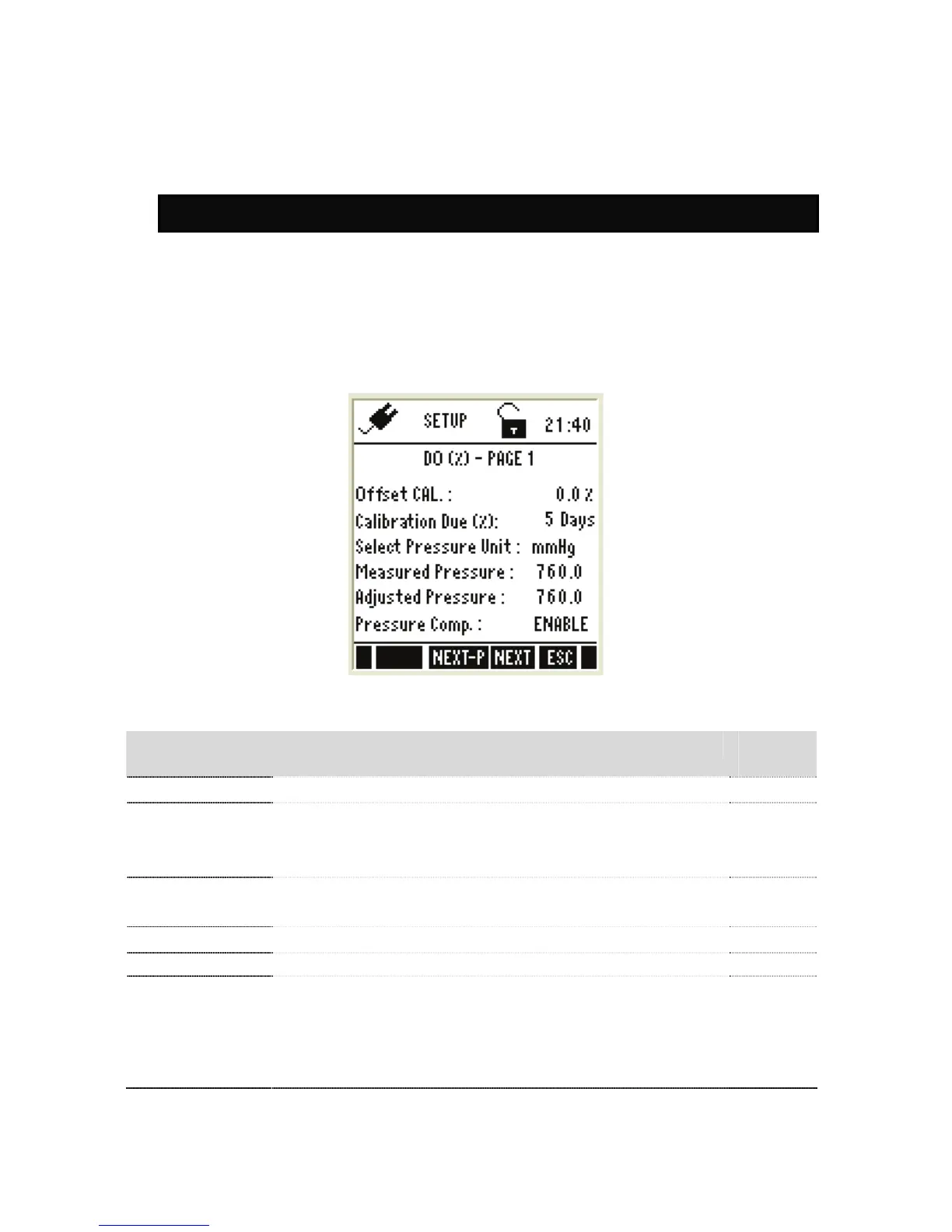
DO (%) – Page 1
Figure 43 : DO (%) – Page 1
Parameter Function Factory
Default
Offset Cal
Allows to adjust % saturation offset calibration
0.0 %
Calibration due
Specify number of days for the DO calibration alarm. The
meter shows CAL DUE indicator after calibration date.
Available range : 0 to 30
5 days
Select Pressure Unit
Sets the unit for barometric pressure
Available units: mmHg and kPa
mmHg
Measured Pressure
Barometric pressure as measured by the instrument.
Adjusted Pressure
User adjusted value.
-
Pressure
Compensation
ENABLE – The meter will compensate for the barometric
pressure at the location depending on the altitude.
DISABLE – No compensation for the pressure.
(This is applicable only for the % saturation mode. For mg/L
or ppm mode pressure comp. would always be applicable)
ENABLE


 To Next Page