64
3. Conductivity Measurement Mode
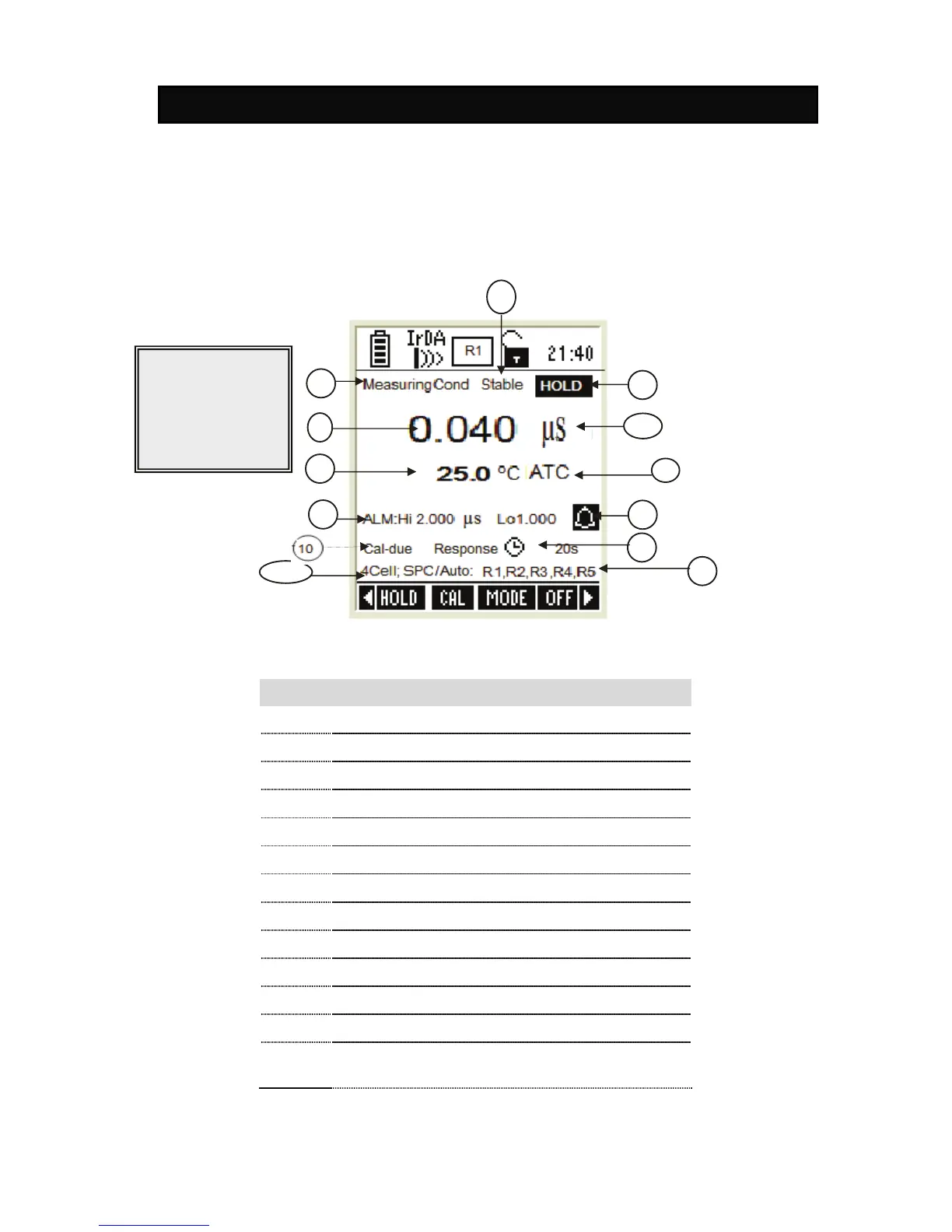
In conductivity measurement mode, the meter displays conductivity and temperature
readings. The LCD shows related information for the conductivity measurement such
as temperature compensation mode, stable indicator, probe condition, calibration
points, response time of the conductivity probe and conductivity alarm conditions.
You can customize or enable/disable some of these indicators in the Setup mode.
1.1 Indicators in Conductivity measurement screen
Figure 28 : Conductivity measurement screen
- END OF CONDUCTIVITY SECTION -
Item Description
1 Measurement mode indicator
2 Appears when the reading is stable
3 Appears when the reading is on hold
4 Conductivity reading
5 Units of measurement
6 Temperature reading & units
7 Temperature compensation mode
8 Conductivity HI & LO Alarm limits
9 Conductivity Alarm indicator
10 Calibration Due indicator
11 Response time of the CON probe
12 Conductivity ranges (that have been calibrated)
13
Number of calibration points and method of
calibration
1
4
5
6
7
8
9
12
3
11


 To Next Page