24
About the Filter Envelope
Oberheim
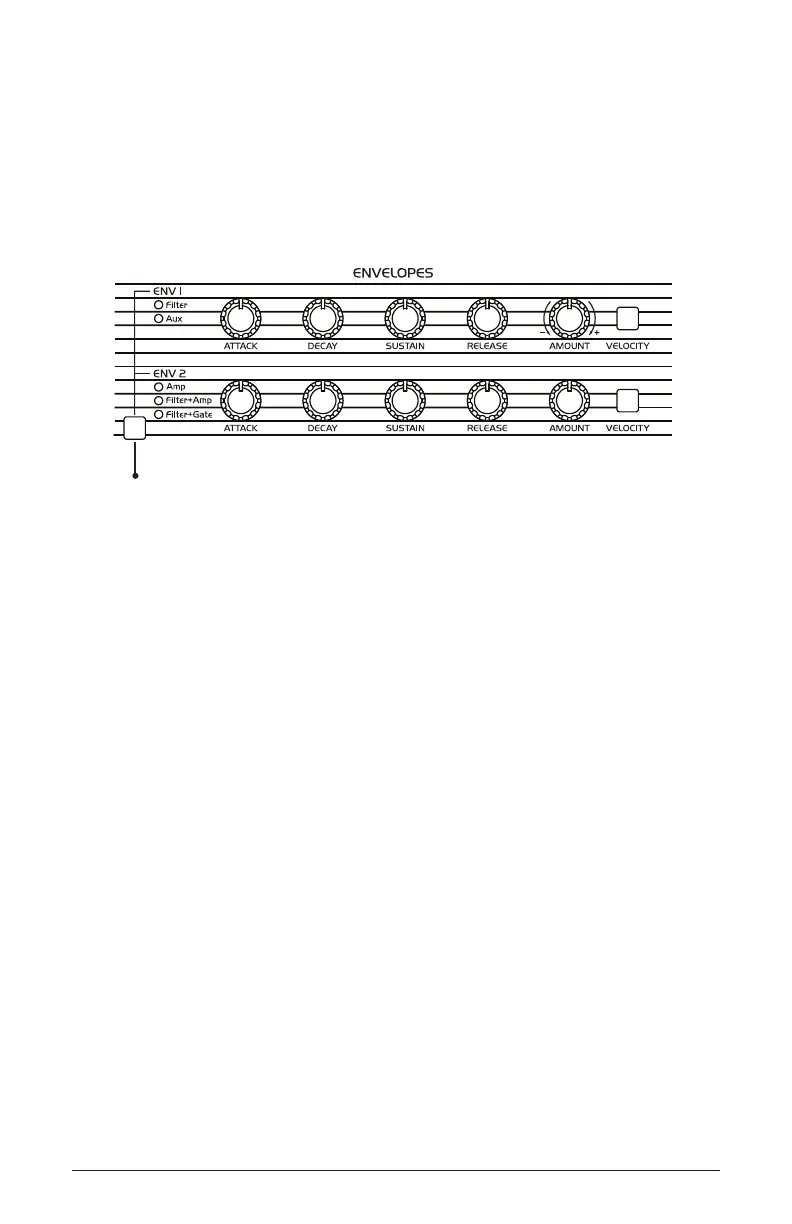
Using the Env Routing Button to Assign the Envelopes
The envelope routing button provides a way to assign the envelopes to
specic destinations. Pressing the env routing button toggles through
the various options. Note that the options are xed - that is, envelopes
are not freely assignable, but instead toggle through the xed routing
schemes.
Envelope routing
button
Env 1 Destinations:
• filter - Envelope 1 controls Filter Cutoff frequency
• aux - Envelope 1 functions as an auxiliary envelope that can be used
to modulate a destination selected through the Mod Matrix. The Aux
setting is available when Env 2 is set to filter + amp or filter + gate.
Env 2 Destinations:
• amp - Envelope 2 controls the Amplier (loudness)
• filter + amp - Envelope 2 controls both Filter Cutoff frequency and the
Amplier (loudness). Note that if the Env 2 velocity button is on, it
affects only Filter Cutoff and not Amplier volume.
• filter + gate - Envelope 2 controls Filter Cutoff frequency while
Amplier volume is simply triggered (gated) on/off each time you
press a key on the TEO-5 keyboard. Note that if the Env 2 velocity
button is on, it affects only Filter Cutoff and not Amplier volume.



 To Next Page