2
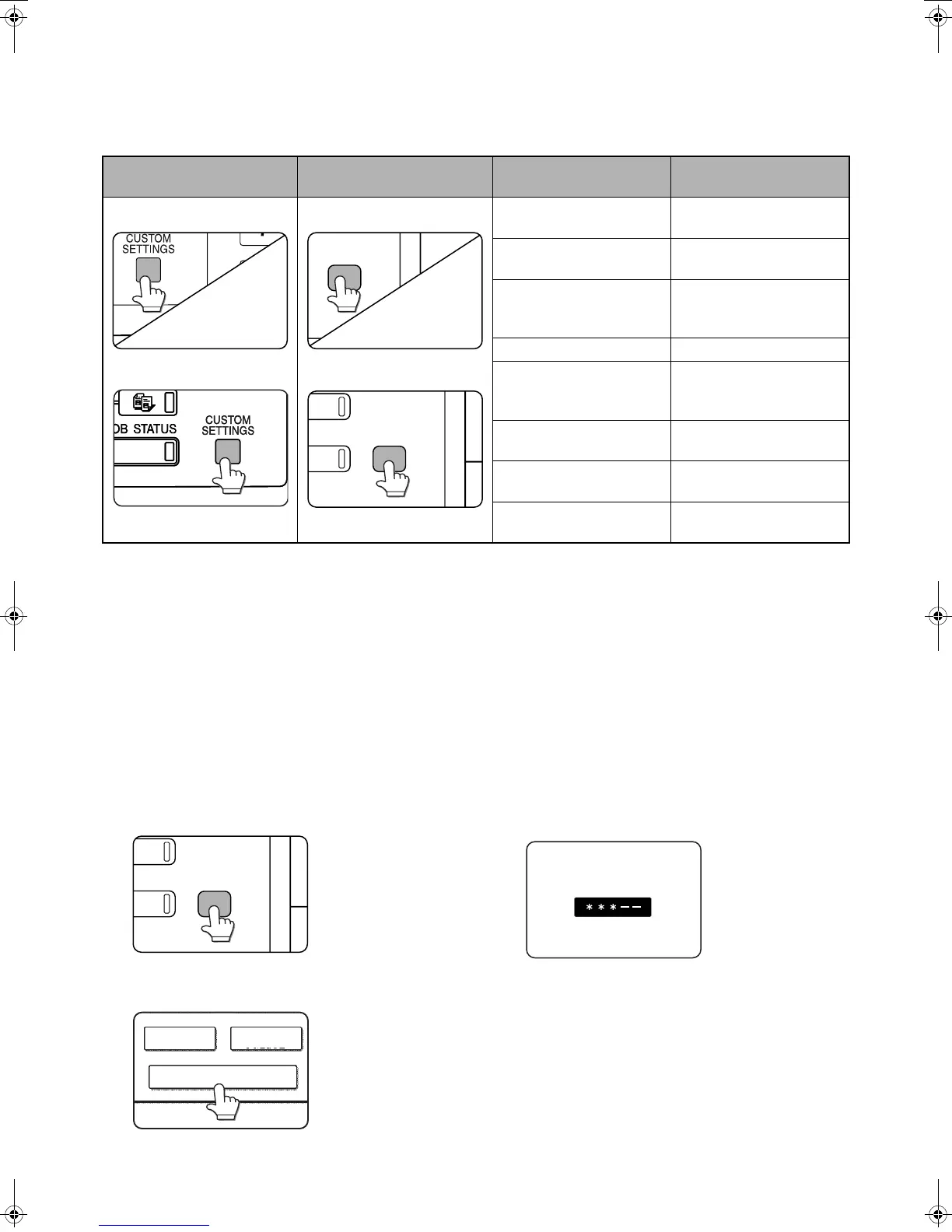
[SYSTEM SETTINGS] Key
The [SYSTEM SETTINGS] key on the operation panel is called the [CUSTOM SETTINGS] key in the Facsimile
Operation Manual. When configuring system settings, refer to the illustration below. At other places in the Operation
manual that refer to the "Custom Settings", substitute "System Settings".
* With respect to the administrator settings, see the following.
2. ADMINISTRATOR SETTINGS
The "Administrator Settings" in the system settings are referred to as "Key Operator Programs" in the Facsimile
Operation Manual. For explanations of the administrator settings for the fax function, see chapter 8, "KEY
OPERATOR PROGRAMS", in the Facsimile Operation Manual.
At places in the Facsimile Operation Manual that refer to the "Key Operator Programs", substitute "Administrator
Settings".
Due to this change, steps 1 to 3 on pages 8-3 and 8-11 are as follows.
1
Press the [SYSTEM SETTINGS] key.
2
Touch the [ADMINISTRATOR SETTINGS]
key.
3
Enter the administrator password (5-digit
number) with the numeric keys.
The factory default
administrator password
is indicated on page 2 of
Administrator settings
guide.
For the steps that follow, see pages 8-3 and 8-11 of the
Facsimile Operation Manual.
Location in
Facsimile Operation Manual
When using the
im4512/im3512
Applicable function
Operation manual page
(chapter)
USING THE TRANSFER
FUNCTION
Page 3-18
Changes in the fax reception
function
Page 5-2
STORING, EDITING, AND
DELETING AUTO DIAL
KEYS AND PROGRAMS
Page 6-2
STORING A GROUP INDEX
Page 6-9
PROGRAMMING,
EDITING, AND DELETING
FCODE MEMORY BOXES
Page 6-10
EDITING AND DELETING
A MEMORY BOX
Page 6-14
PRINTING PROGRAMMED
INFORMATION
Page 6-14
ADMINISTRATOR
SETTINGS*
Chapter 8
ADMINISTRATOR SETTINGS
SENDER CONTROL
FAX DATA
RECEIVE/FORWARD
Jupiter2_IGI_Fax_Sheet(ZB3500590).fm 2 ページ 2007年7月4日 水曜日 午前8時14分



 To Next Page