6-10
PROGRAMMING, EDITING, AND
DELETING F-CODE MEMORY BOXES
The procedure for programming a memory box for F-code transmission is explained here. There are three types of
F-code memory boxes: F-code polling memory (page 4-4), F-code confidential transmission (page 4-6), and F-code
relay broadcast (page 4-8). Memory boxes are programmed, edited, and deleted as follows.
PROGRAMMING AN F-CODE MEMORY BOX
A box name, sub-address/passcode, and function must be programmed in a memory box.
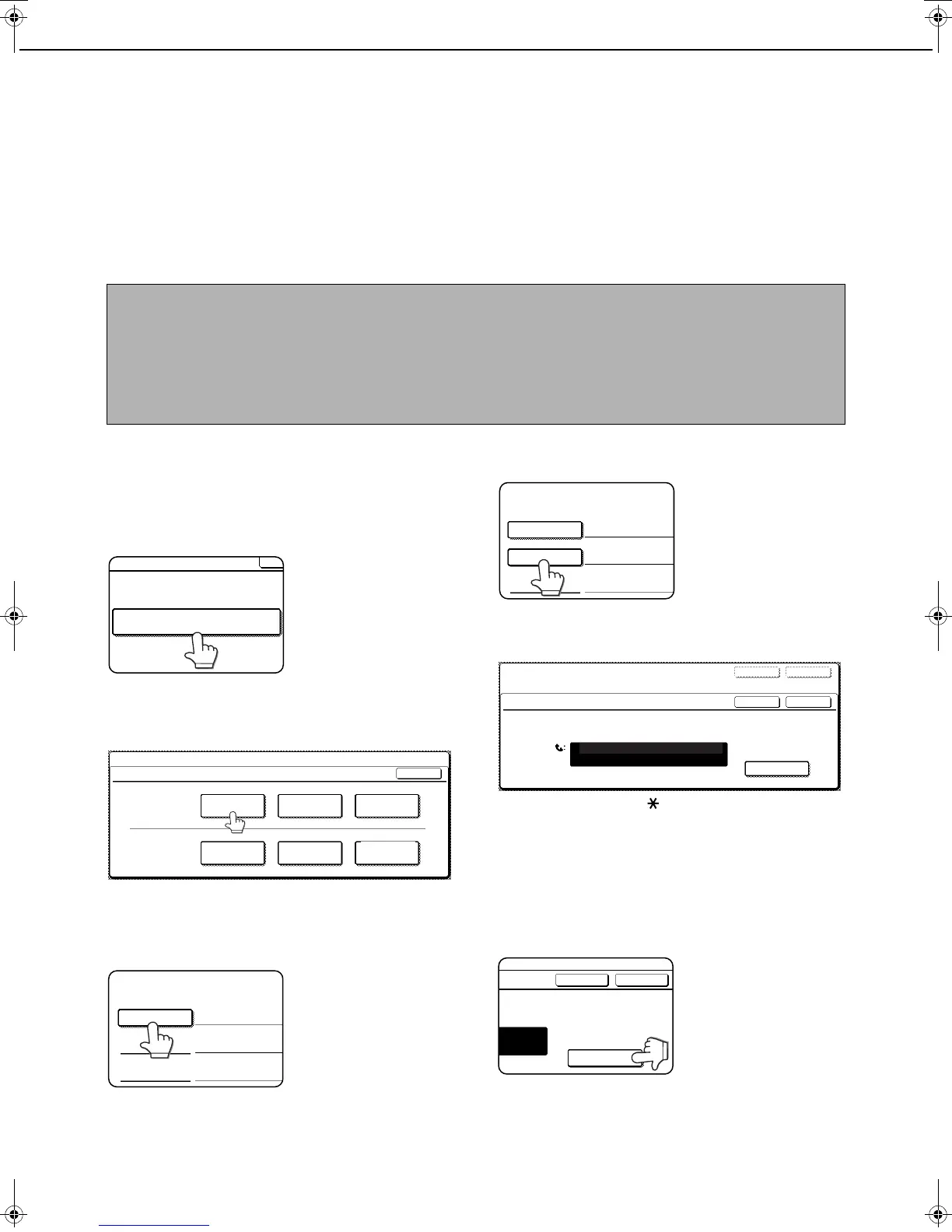
1
Press the [CUSTOM SETTINGS] key and
then touch the [ADDRESS CONTROL] key
(refer to steps 1 and 2 on page 6-2).
2
Touch the [F-CODE MEMORY BOX] key.
3
Touch one of the memory box keys ([POLLING
MEMORY], [CONFIDENTIAL], or [RELAY
BROADCAST] ) on the store (upper) line.
([POLLING MEMORY] is touched in the example here.)
●
The F-code memory box programming screen appears
.
4
Touch the [BOX NAME] key.
The "No." that automatically
appears is the lowest
number from 001 to 100
that has not yet been
programmed. When the
[BOX NAME] key is
touched, the letter-entry
screen appears. Enter up to 18 characters for the name.
For information on entering characters, see chapter 7 of
the "Copying operation manual".
5
Touch the [SUB ADDRESS] key.
The sub-address/
passcode entry screen
appears.
6
Use the numeric keys (0 through 9) to
enter a sub-address (max. 20 digits).
● The characters " " and "#" cannot be used in a
sub-address.
● If you enter an incorrect digit, press the [C] key and
re-enter the correct digit.
● If you do not wish to enter a passcode, proceed to
step 9.
7
To set a passcode, touch the [PASS
CODE] key.
A slash (/) appears after
the sub-address.
If you enter an incorrect
digit, press the [C] key
and re-enter the correct
digit.
NOTES
●
When programming a new memory box, a sub-address that is being used for another box cannot be used. The
passcode, however, can be the same as a passcode used in another box.
● A passcode can be omitted.
● Up to 100 F-code memory boxes can be programmed. If 100 F-code memory boxes have already been
programmed, a warning message will appear and you will not be able to program a new box. First delete an
unused F-code memory box (page 6-13) and then program the new box.
POLLING MEMORY CONFIDENTIAL
RELAY
BROADCAST
POLLING MEMORY CONFIDENTIAL
RELAY
BROADCAST
CUSTOM SETTINGS
F-CODE MEMORY BOX
OK
STORE
AMEND/DELETE
F-CODE MEMORY BOX / POLLING MEMORY
No.001
SUB ADRESS
BOX NAME
POLLING TIMES
F-CODE MEMORY BOX / POLLING MEMORY
No.001
SUB ADDRESS
BOX NAME FAX INFORMATION
POLLING TIMES
F-CODE MEMORY BOX / POLLING MEMORY
No.001
EXITNEXT
OKCANCEL
ENTER THE SUB ADDRESS / PASS CODE VIA THE 10-KEY PAD,THEN PRESS [OK].
214341434
PASS CODE
SUB ADDRESS / PASS CODE
OKCANCEL
-KEY PAD,THEN PRESS [OK].
PASS CODE
Tiger2_fax_sec.book 10 ページ 2004年12月15日 水曜日 午前11時4分



 To Next Page