Restricting users of this machine (NDS over TCP/IP)
7
7-22 VL3622c/VL2822c/VL2222c
7.5
7.5 Restricting users of this machine (NDS over TCP/IP)
Configure settings to restrict users who use this machine by NDS over TCP/IP authentication.
These settings are required if you use the NetWare 5.1 or later and use NDS authentication in the TCP/IP
environment. You can restrict the functions available to each user.
To use the authentication with NDS over TCP/IP, you must specify the DNS server in [TCP/IP Settings]. Dur-
ing user authentication, the tree name and context name are inquired to the specified DNS server to obtain
the IP address of the NDS authentication server.
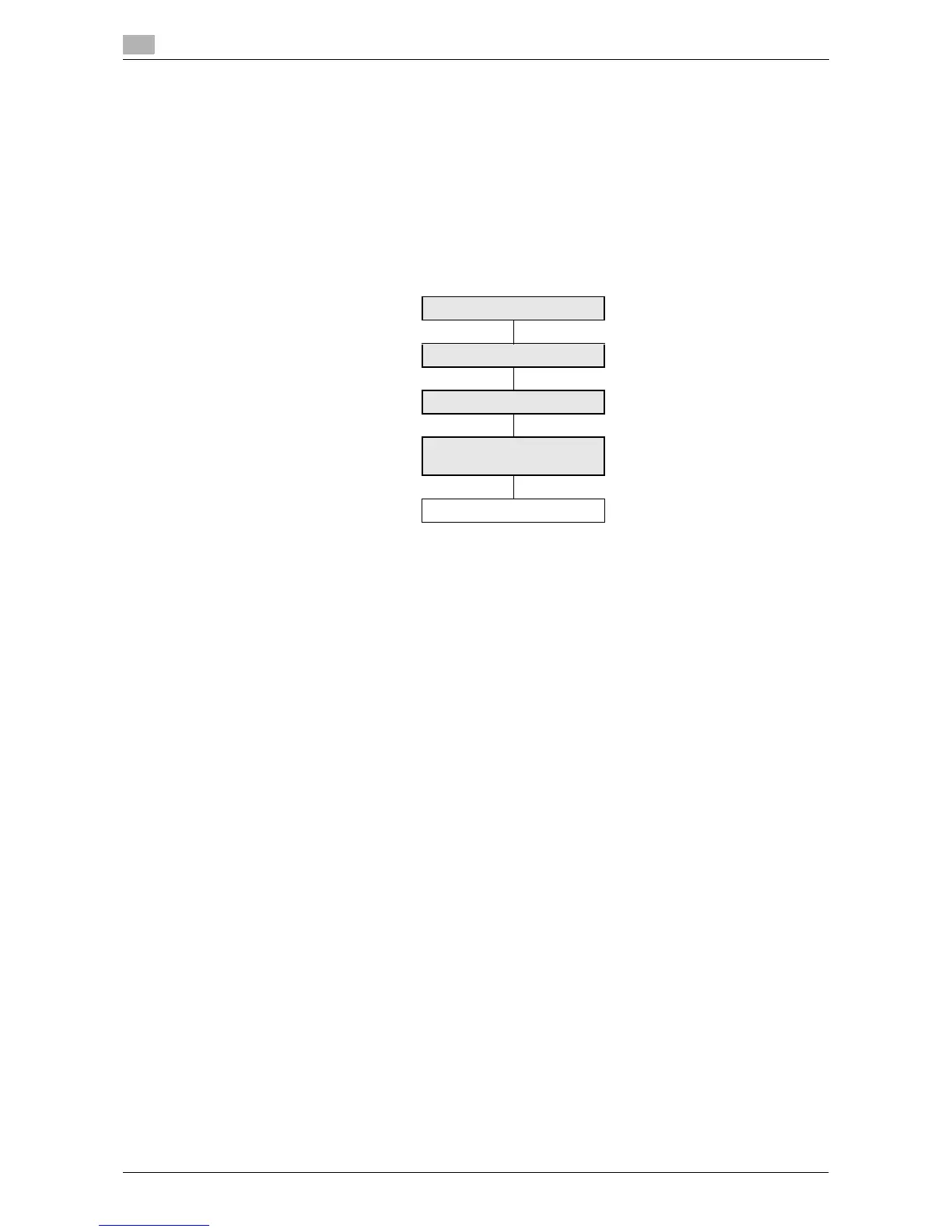
Use the following flowchart to configure settings. Clicking a step jumps to the associated procedure.
Reference
- Apply the latest service pack to each NetWare version.
7.5.1 [TCP/IP Settings]
Configure settings to use this machine in the TCP/IP network environment.
- To use the authentication with NDS over TCP/IP, you must specify the DNS server.
For details, refer to page 2-3.
[TCP/IP Settings]
[External Server Settings]
[Authentication Method]
[Default Function Permis-
sion]
Finish


 To Next Page