Configuring settings to send or receive faxes
14
14-6 VL3622c/VL2822c/VL2222c
14.4
14.4 Configuring settings to send or receive faxes
Configure settings related to transmission and reception of faxes including file handling at the time of a polling
transmission and printing method at the time of reception of a fax.
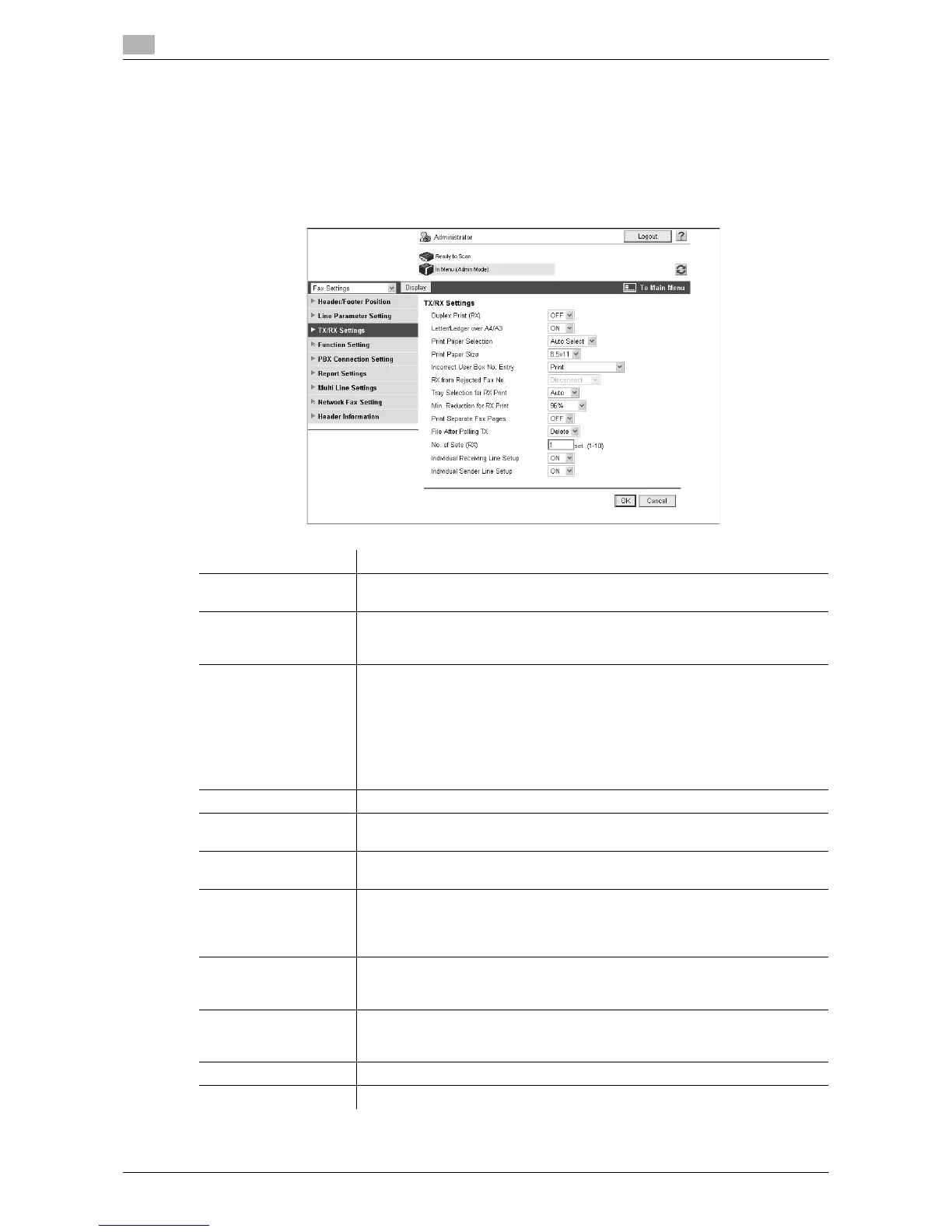
[TX/RX Settings]
In the administrator mode of Web Connection, select [Fax Settings] ö [TX/RX Settings].
Item Description
[Duplex Print (RX)] Select whether to print a received fax on both side of sheets.
This item is not available when [Print Separate Fax Pages] is set to [ON].
[Letter/Ledger over
A4/A3]
Specify whether to use paper in inch-sized paper first when printing received
faxes.
This item is not displayed for Taiwan models.
[Print Paper Selection] Select the priority order of paper trays used to print received faxes.
If you select [Priority Size], received faxes are printed on paper of the priori-
tized size. If the prioritized size is not specified, received faxes are printed on
paper of the nearest size.
If you select [Fixed Size], received faxes are printed on paper of only the spec-
ified size.
If [Tray Selection for RX Print] is set to other than [Auto], this item will be set to
[Auto Select].
[Print Paper Size] Select the size of paper used to print received faxes.
[Incorrect User Box No.
Entry]
Select an action to be taken when the unregistered User Box number is spec-
ified when a fax is received by using User Boxes.
[RX from Rejected Fax
No.]
This item is not available.
[Tray Selection for RX
Print]
If you want to fix the paper tray used to print received faxes, select the paper
tray to be fixed.
If [Print Paper Selection] is set to other than [Auto Select], this item will be set
to [Auto].
[Min. Reduction for RX
Print]
Specify a reduction ratio of received faxes.
When a received fax does not fit within the standard paper size, this setting is
used to adjust the size.
[Print Separate Fax
Pages]
Select whether to divide a received fax into two or more pages when the doc-
ument is larger than the standard paper size.
This item is not available when [Duplex Print (RX)] is set to [ON].
[File After Polling TX] Specify whether to delete a file after completing polling transmission of the file.
[No. of Sets (RX)] If you need two or more sets of a received fax, specify the number of sets.


 To Next Page