10
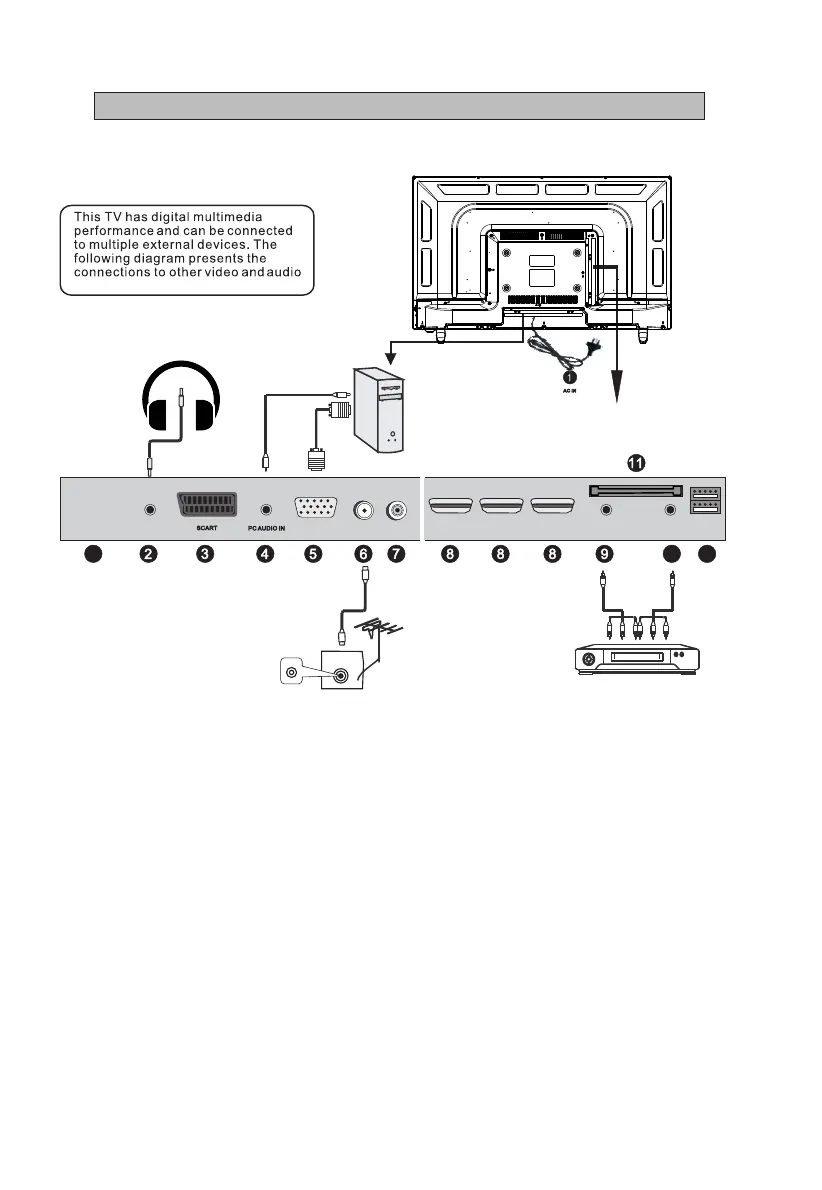
IV - Connecting Cables
Headphones
1. AC IN
2. EARPHONE OUTPUT
3.SCART INPUT
4.PC AUDIO IN : PC audio input.
5.VGA IN : connect with the D-sub 15 pin signal cable to your computer.
6.RF IN:Connect to external aerial.
7.COAXIAL : Digital TV sound output.
8.HDMI IN : High-denition multimedia interface (Note: compatible video
signal 480P/576P/720P/1080i/1080P)
9.YPbPr IN : Component input terminal.
10.AV IN : Connect to the left/right RCA video out connection of any vide
resource.
11.CI SLOT : Insert a CI (common interface) card.
12.USB : Access multi-media les stored in the USB device.
(Note: compatible format includes: *.dat, *.vob, *.ts, *.mpg , *.avi , *.mkv,
and *.mp4 for video, *.jpg and *.bmp for photo, *.mp3 for music. )
HDMI I N
VGA IN
COAXIAL
DVD
RF IN
EARP HONE
OUT
10
USB
YPbP r IN
CI SLO T
AV IN
12
TV
HDMI I N HDMI I N
Computer
1
100-240V~
50/60Hz



 To Next Page