11
V - Remote Control
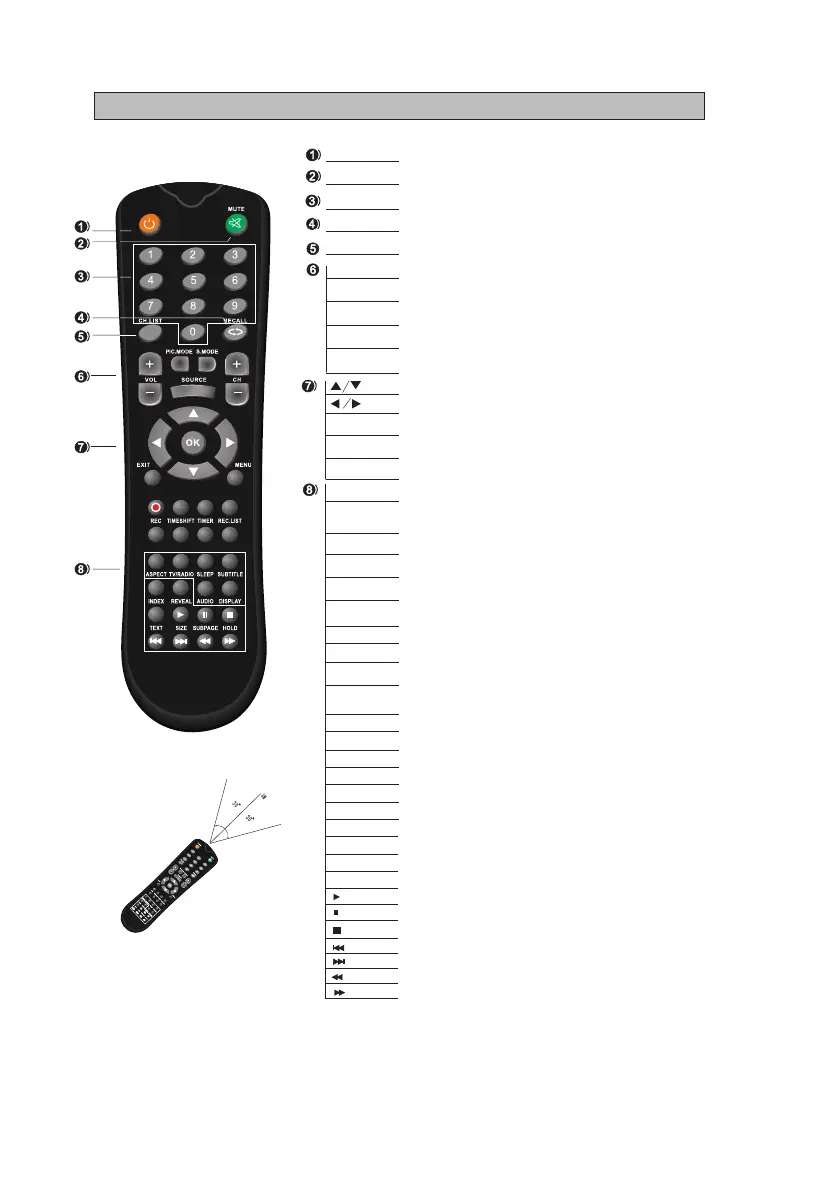
STA NDB Y Switches the set between ON and STANDBY.
MUT E Switches the sound on or off.
0-9 Figures 0-9 are used to directly input channel number.
REC A LL Returns to the channel selected last time.
CH. L IST Press to show the channel list programme.
VOL+ /V O L- Increase / decrease the sound level.
PIC . MOD E Selects the different picture mode directly.
S.M O DE Selects the different sound mode directly.
SOU R CE Displays the source list of input signal.
CH+ / CH- Selects a program.
Decrease/increase the option value.
Selects the previous/next function option.
OK Con rms your selection or displays the current mode.
EXI T Returns to TV viewing from any menu.
MEN U Selects a menu.
REC
TIM ESH IFT
TIM ER
REC .LI S T
RED
GRE EN
YEL LOW
CYAN
ASP ECT
TV/ RAD IO
SLE EP
SUB TIT LE Recalls you preferred subtitile in digital mode.
IND EX Ask for the list of main Tv letter broadcast page number,
Sleep time setting.
Select the aspect format.
Display the characters hidden.
REV EAL
AU D IO
DIS PLAY Display the system state information set by active user.
TEX T
SIZ E Change the size of current page.
SUB PAG E Display the current sub-page.
HOL D Hold the current page and prevent again.
Display the teletext on screen.
Available in the following modes:
teletext, DVB-T and TV.
{
Switch between DVB-T and RADIO. (Digital radio is not
available in countries such as France)
Play .
Pause .
Stop .
Skip to previous track or chapter .
Skip to next track or chapter .
Fast reverse .
Fast forward.
Starts recording of the current DVB-T channel.
Press AUDIO to change audio mode.
Press the TIMESHIFT button when you want to pause;
press the button again to resume playback of the TV program.
Enter the setup menu of time recorder.
Displays the list of recorded programs.
STANDBY
Notes: The remote control shall be applied in
effective reception scope of the television.
Make the remote control point towards the
infrared receiver of the television and ensure
that there are no obstacles.Its normal operation
distance will be shortened in direct sunlight or lamplight.
Be careful to use the remote control.avoid falling
off or being trampled or splashed with liquids.



 To Next Page