EasyManua.ls Logo

Oceanic OCEALED3219B2 - C - Channel Settings; Channel Management and Auto Search

Oceanic OCEALED3219B2
43 pages
Print Icon
To Next Page IconTo Next Page
To Previous Page IconTo Previous Page
Loading...
19
OK
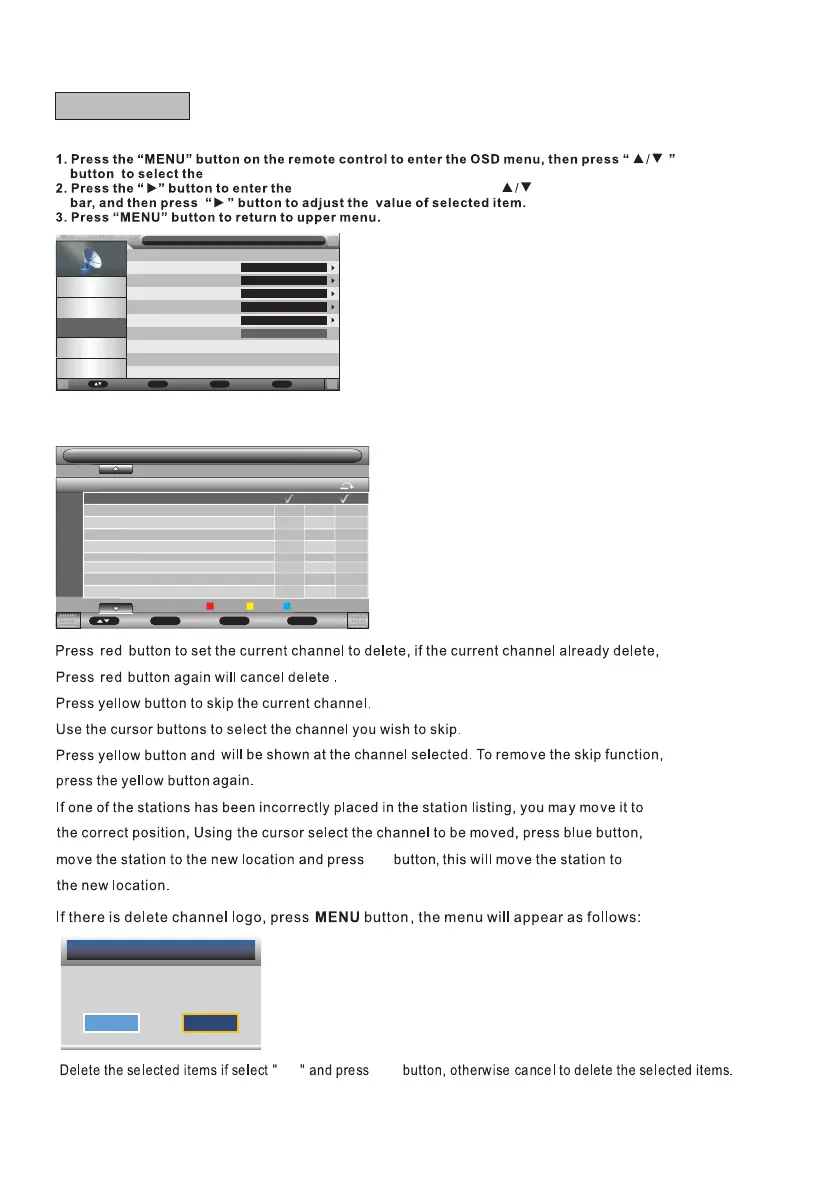
Channel Management
Press "p/q" button to select Channel Management, then press OK button or "►" button to enter.
"Channel" menu.
"Channel" menu setting, use " " to move the menu
Message
Do you want to delete the
selected items?
OK
Cancel
Move Exit
Exit
Channel / Channel Manager
No Channel Name
X
0001
0002
0003
0004
0005
0006
0007
0008
0009
C02
C04
S05
S06
C09
C11
C12
S13
S30
Del
Skip Swap
MENU
Return
CH+-
Page+-
OKOK
C - Channel
Picture
Sound
Channel
Feature
Setup
Channel
Move Enter
OK
Return
Menu
Exit
Exit
Channel Management
Country
TV Connection
Auto Search
DTV Manual Search
ATV Manual Search
Enter
France
Air
Enter
Enter
Enter

Related product manuals