14
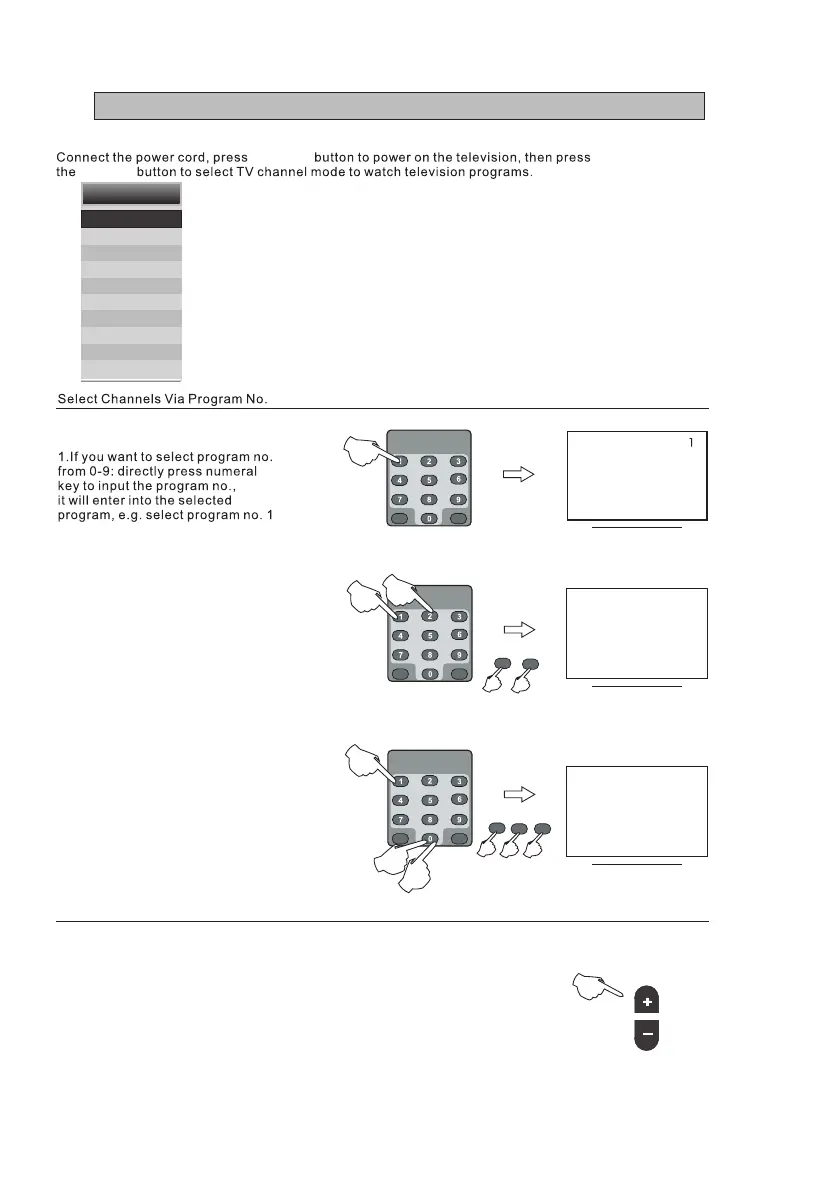
3.If you want to select program number
from 100-100+: Input the channel number
you desired, e.g. select channel 100.
1 2
12
1 0
100
0
2.If you want to select program number
from 10-10+: Input the channel number
you desired, e.g. select channel 12.
Channel select
1. Use the buttons on the television panel to conduct channel selection.
First press "CH+/-" buttons on the front panel to enter into channel
selection mode state, then press "CH+/-" buttons on front panel to
select channel.
2. "CH+/-" buttons of the remote control may also be applied to conduct
channel selection.
CH
SOURCE
STANDBY
Input
DTV
ATV
AV
SCART
YPBPR
HDMI 1
HDMI 2
HDMI 3
PC
Media
VII - Watching Television Programs



 To Next Page