16
Colour Mode:
Auto Installation
Next Pa ge
Home mode
Dynamic
Mild
- Setup 1 -
Move Enter
OK
Exit
Exit
Country:
Auto Installa tion
Previ ous P age
UK
France
Italy
Poland
Spain
- Setup 2 -
Move Enter
OK
Exit
Exit
Next Pa ge
Language:
Auto Installa tion
Previ ous P age
- Setup 3 -
Move Enter
OK
Exit
Exit
Next Pa ge
Your TV has been set to
power off after 4 hours of
continuous viewing. If you
want to change this setting,
please choose Off. This
setting can also be changed
in the MENU.
Auto Installation
Previ ous Page
- Setup 4 -
Move Enter
OK
Exit
Exit
Next Pa ge
Auto Power Off:
Home Mode:
Auto Installation
Next Pa ge
Home
Dynamic
Standard
Mild
- Setup 1 -
Move Enter
OK
Exit
Exit
Message
Are you sure?
OK
Cancel
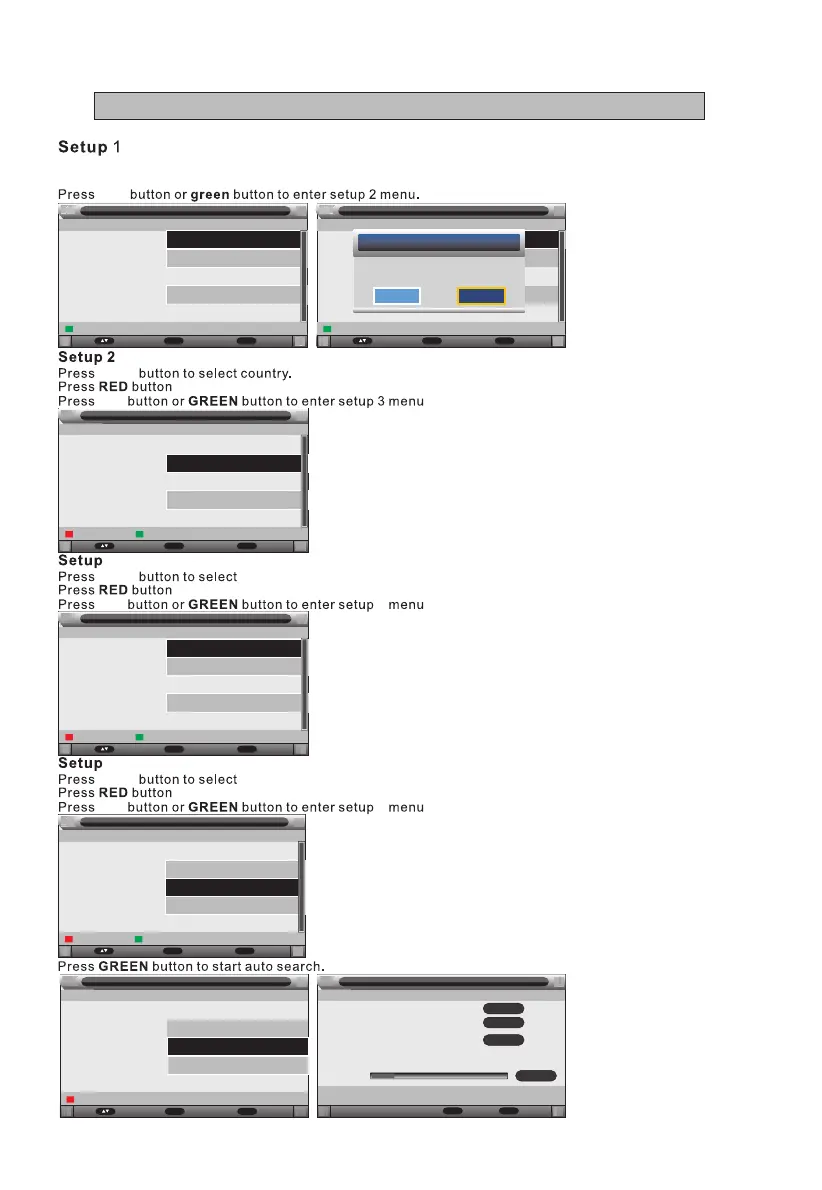
The rst time you switch on the TV, you will be prompted to search channels.
OK
First, you will be prompted to choose the type of screen brightness. You may choose the "Home Mode"
option for default setting. You may change the brightness value later on inside the settings menu.
p /q
OK
return to setup 1 menu.
p /q
OK
3
4
language.
return to setup 2 menu.
p /q
OK
4
5
auto power off.
return to setup 3 menu.
English
Français
Italiano
Español
Nederlands
1 Hour
2 Hours
4 Hours
Auto Installa tion
Previ ous P age
- Setup 5 -
Move Ente r
OK
Exit
Exit
Auto Search
Auto Installa tion
5
6
0
Exit
Exit
ATV channels found:
DTV channels found:
Radio channel s found:
Skip
Menu
DVB_T CH:46 690000KHz
28%
Process:
All
ATV
DTV
VIII - First Time Installation



 To Next Page