34
*.MKV,*.MPG, *.DAT (MPEG1/MPEG2),*.TS
*.AVI (MPEG-4),*.MP4
*.VOB (MPEG-2MP@ML)
BMP
1080*
1080*
1080*
Remark: Depending on the capacity of the device, the reading can take more than 1 minute before
lauching the video.
The unit cannot read my USB device.
-O nce you have plugged your device to the unit, you may need to switch on the USB device before
it can operate.
-T his unit does not support a direct USB connection with a computer. You need to use a USB device,
a MP3 player or a PMP (Portable Multimedia Player with hard disk).
-I f you are using a USB external hard disk: you need to connect your device simultaneously to an
external power source and to the unit. If you are using a self-powered PMP, make sure that the
battery is suf ciently loaded.
-C heck that the les system of your USB device is formatted into the FAT 32 format. USB
device formatted into NTFS are not compatible with this unit. Caution: if you attempt to modify
your le system, formatting your device will erase all data. Please refer to your USB device's in
struction manual rst.
-Warning: Connect your USB device directly to the USB port of the device.
Using an extension cable is not recommended and may cause interference and failure of data transfer.
Connecting a USB device
1) Power-on the unit.
2)Insert a USB key inside the connector.
3)Press SOURCE to select the input mode (USB).
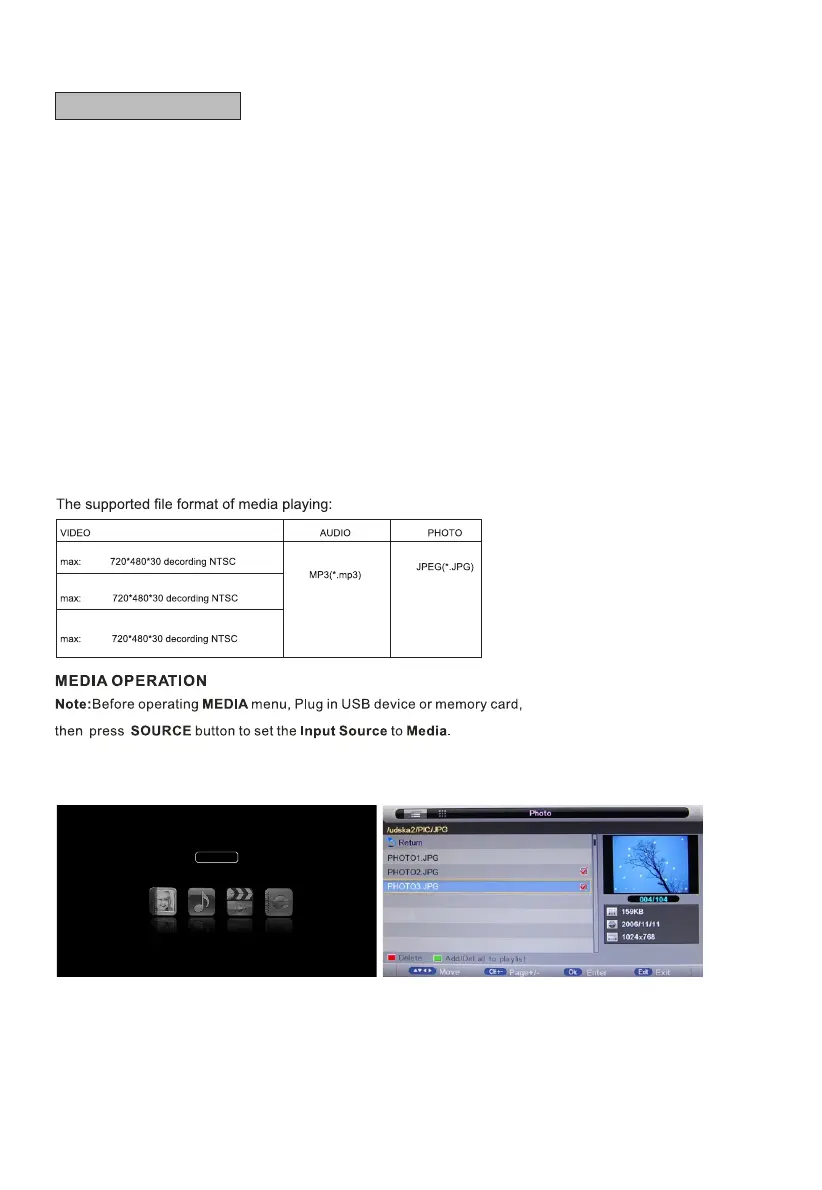
Photo
Photo Manager
Highlight the "PHOTO" item in multimedia main menu by press "t /u " key, then press "OK" key enter
photo page, as follow:
Key Operation
1) RED: Delete the focused folder/ le.
2) GREEN: Add/Del all photo les to play list.
3) OK: Add/Del highlight les to play list.
4) CH+/-: Page up/Page down.
H -Media Player



 To Next Page