33
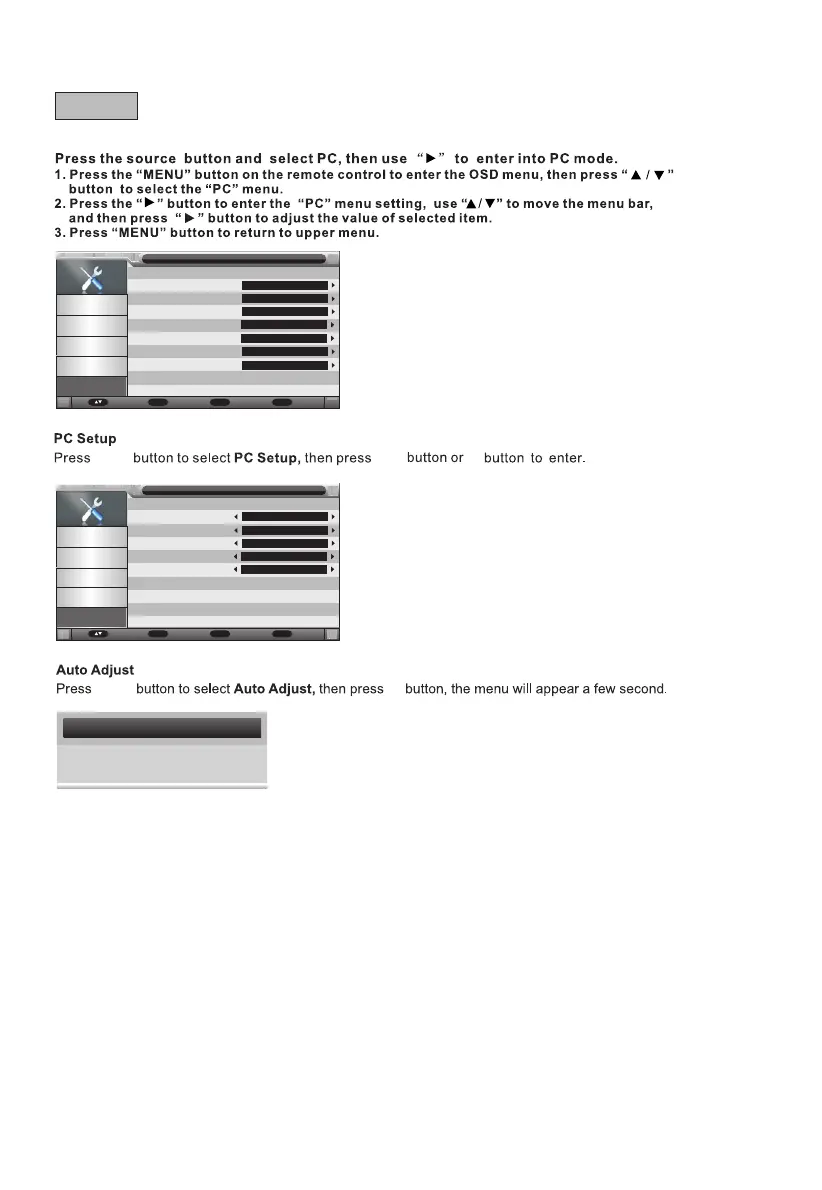
OSD Timer
Auto SCART
PC Setup
Blue Screen
Home Mode
Reset TV Setting
Software Upgrade
Setup
Picture
Sound
Channel
Feature
Setup
15 Seconds
On
Enter
Off
Home mode
Enter
Enter
Move Enter
OK
Return
Menu
Exit
Exit
p/q
u
Auto Adjust
H Position
V Position
Phase
Clock
Setup-PC Setup
Picture
Sound
Channel
Feature
Setup
0
0
0
0
p/q
u
OK
Adjusting,Please wait.....
H-Position
This item is used to adjust the horizontal position of PC/VGA picture.
Available range: -16 to +16.
V-Position
This item is used to adjust the vertical position of PC/VGA picture.
Available range: -16 to +16.
Phase
This item is used to adjust the picture applying to the TV.
Available range: 0 to 100.
Clock
This item is used to adjust the signals transfer speed.
Available range: -50 to +50.
Message
Enter
Move Enter
OK
Return
Menu
Exit
Exit
G - PC



 To Next Page