35
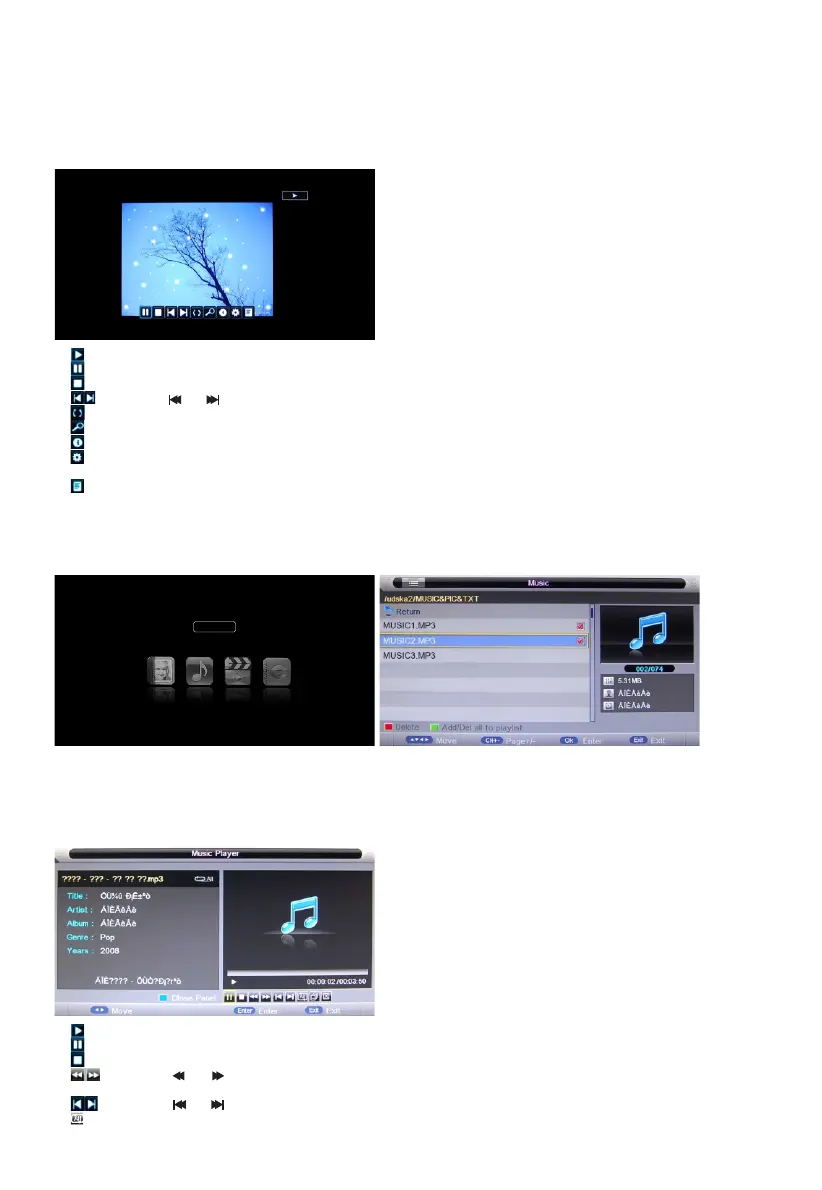
1) : Same as "PLAY" key on remote, to start playing pictures in slide show mode
2) : Same as "PAUSE" key on remote, to pause the playing le
3) : Same as "STOP" key on remote, to stop sliding show, and return to the le browser
4) : Same as " " / " " key on remote, to play the previous or next le directly
5) : To rotate the playing picture(0º、90º、180º、270º).
6) : To zoom the playing picture.
7) : Same as "INFO" key on remote, to display the information of the current le.
8) : To enter "Photo Setup" menu, including "Repeat Mode", "Background Music", "Music Source",
"Slide Time", "Effect".
9) : To enter the play list menu.
10) EXIT: To close the le and return to the le browser.
Press "PLAY" key to start playback.
Music Manager
Highlight the "Music" item in multimedia main menu by press "t /u " key, then press "OK" key enter
music page, as follow:
Key Operation
1) RED: Delete the focused folder/ le.
2) GREEN: Add/Del all music les to play list.
3) OK: Add/Del highlight les to play list.
4) CH+/-: Page up/Page down.
Music
1) : Same as "PLAY" key on remote, to start playing le, or resume the paused le.
2) : Same as "PAUSE" key on remote, to pause the playing le
3) : Same as "STOP" key on remote, to stop the playing le.
4) : Same as " " / " " key on remote, to play fast backward or forward. The speed can switch to
twice, four times, eight times and sixteen times, and displayed with “X2、X4、X8、X16” on screen.
5) : Same as " " / " " key on remote, to play the previous or next le directly.
6) : To switch the repeat mode, including ”Repeat 1”, ”Repeat All”, ”Repeat Dir” and ”Random” modes.
Press "PLAY" key to start playback.



 To Next Page