27
Feature
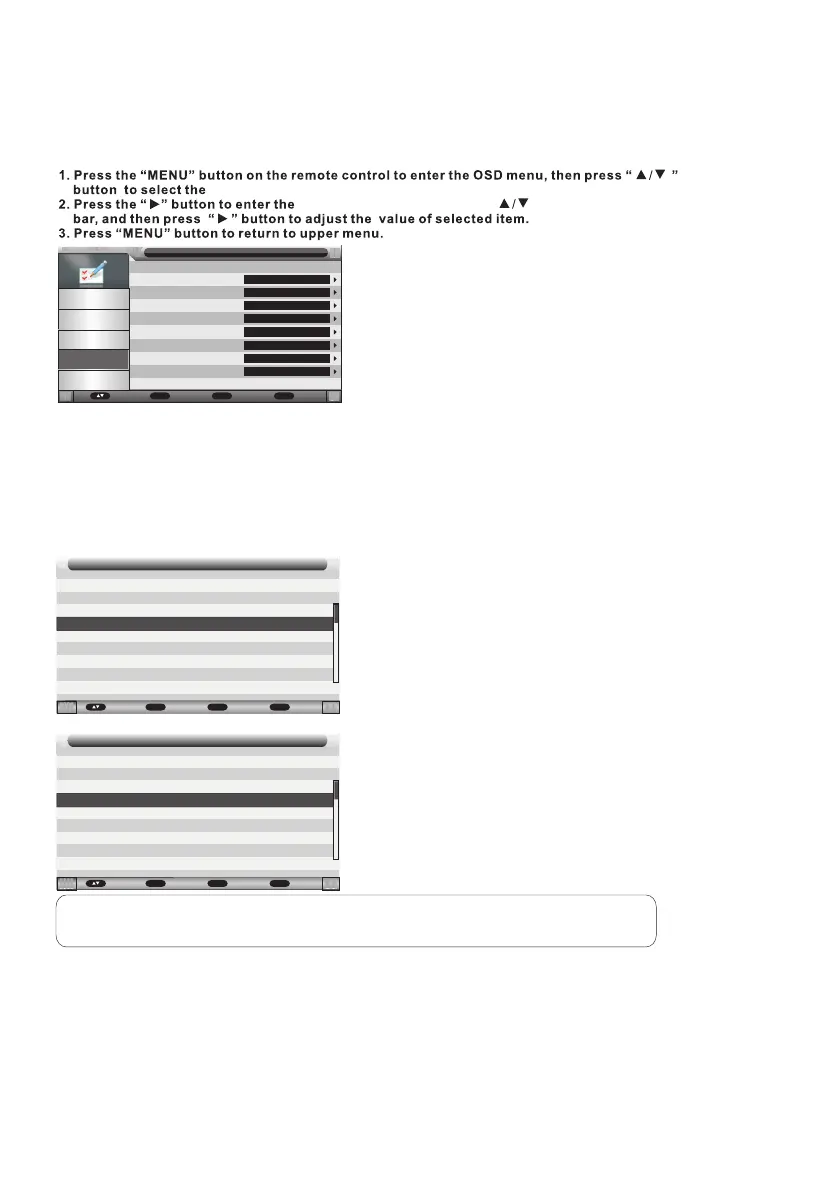
"Feature" menu.
"Feature" menu setting, use " " to move the menu
Lock
Langu age
Clock
Sleep Timer
Auto Po wer Off
Heari ng Impaired
CI Info
REC/Timeshi ft
Featu re
Pictu re
Sound
Chann el
Featu re
Setup
Enter
Enter
Enter
Off
4 Hours
Off
Enter
Enter
Move Enter
OK
Retur n
Menu
Exit
Exit
Clock
It is used to check out the current system time and set time zone/DST.
Hearing Impaired
This function helps the hearing impaired users enjoy the programs with the gestures and symbols
on the screen while the signal is available.
CI Info
Ensure a CI card is inserted in the slot provided.
Press ▲/▼ button to select CI Info, then press OK button or ► button to enter.
Common Interface
Viaccess Access
Common Interface
Consultation
Settings
Update
Viaccess Conditional Access
Main menu
Press "OK" to com rm;Press "EXIT" to quit.
Press OK button or ► button to enter.
Notes:
1. This is just an example for reference, different CI module will have different CI menu.
2. Other menu and description are the same as that for TV source.
Move Enter
OK
Retur n
Menu
Exit
Exit
Move Enter
OK
Retur n
Menu
Exit
Exit



 To Next Page