APPENDIX C SOFTWARE SERVICE TOOL INSTRUCTIONS
Ohaus Corporation www.ohaus.com 46 Navigator Series Service Manual
C.2 DEFINING LED DISPLAY VERSION
If the software version has been updated to version 1.04 or later, the following commands needs to
be sent to the scale to define the LED display version. Please refer to Figure 1-3 for LED version.
Old LED version:
1: MFG Enable service mode.
2: (esc)OLED Define current display as old LED display, store this data into EEPROM.
New LED version:
1: MFG Enable service mode.
2: (esc)NLED Define current display as old LED display, store this data into EEPROM.
C.3 CONFIGURING THE SCALE
If the PC Board has been replaced, the scale needs to be configured. The software tool will send
the PCB the required data for the Model Name entered.
1. When communications are reliable, return to the Replace PCB tab.
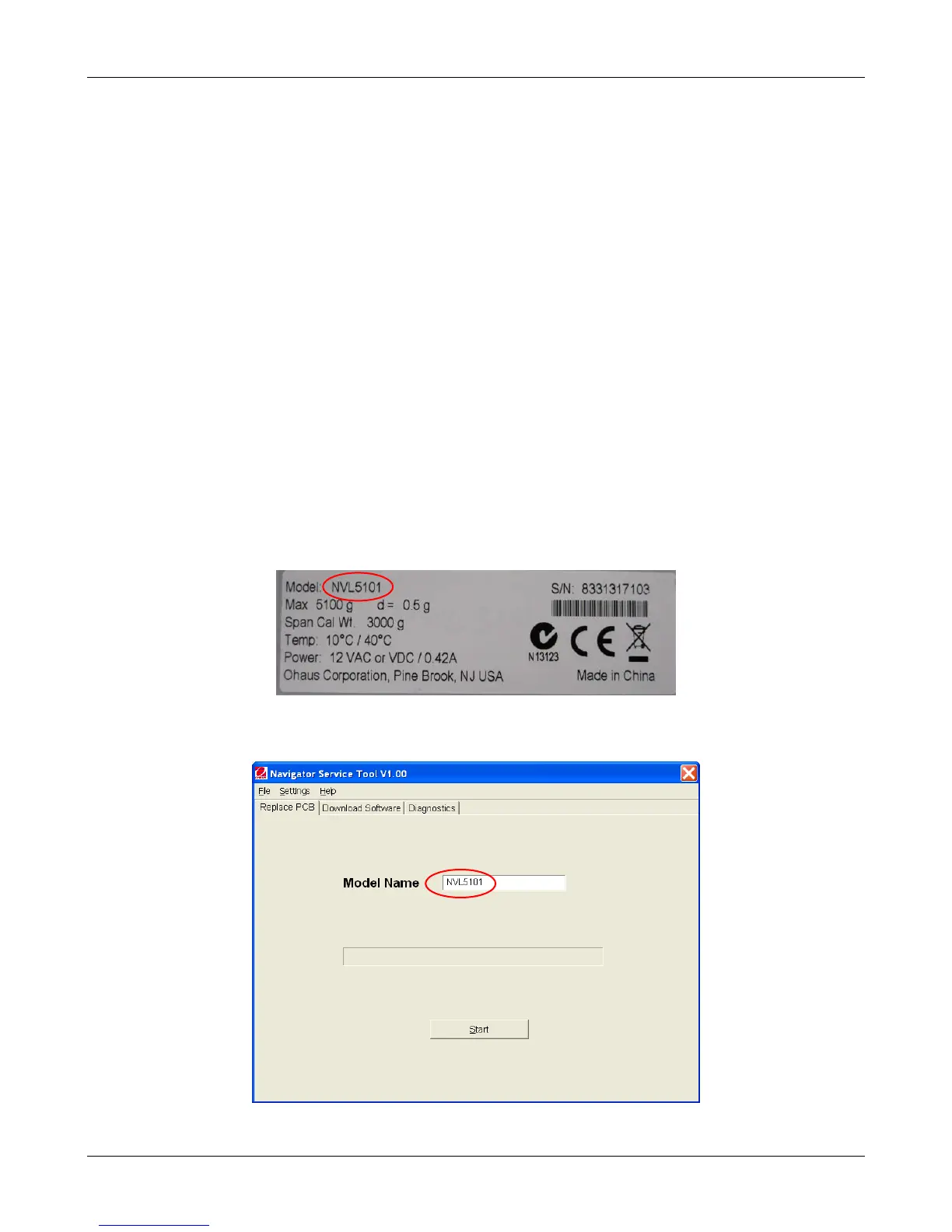
2. To configure the scale, enter the model name that appears on the Data Label (e.g. NVL5101,
See figu.C-4) in the Model Name text box (See Fig.C-5).
Figure C-4. Model Name on Data Label
Figure C-6. Model Name entered



 To Next Page