PAGE 24
© 2022 OJ Electronics A/S
9.1 Scheduled Operation
The system will operate in Scheduled Operation unless you choose to override the
scheduled events with Manual Operation or the thermostat application is set to
Regulator mode.
During Scheduled Operation, the temperature is controlled automatically according
to the programed heating schedule – see “Heating Schedule”.
The function of the buttons and symbols shown on the home screen varies
according to the chosen operating mode.
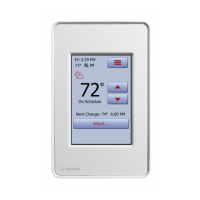
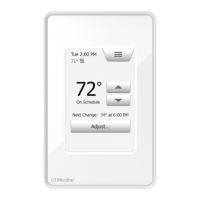
Scheduled Operation home screen:
1. Day and time.
2. Measured temperature.
3. Heating indicator. If visible, the underfloor heating system is currently active.
4. Tap here to access the menu.
5. Current target temperature/setpoint.
6. Tap here to increase the temperature.
7. Tap here to decrease the temperature.
8. Current thermostat operating mode.
9. Information on the next thermostat behavior change.
10. Tap here to adjust the length of time the displayed target temperature/setpoint is
to remain valid.
1
2 3
4
5
6
7
8 9
10





 To Next Page