2_OCS LOCK OJMAR 37
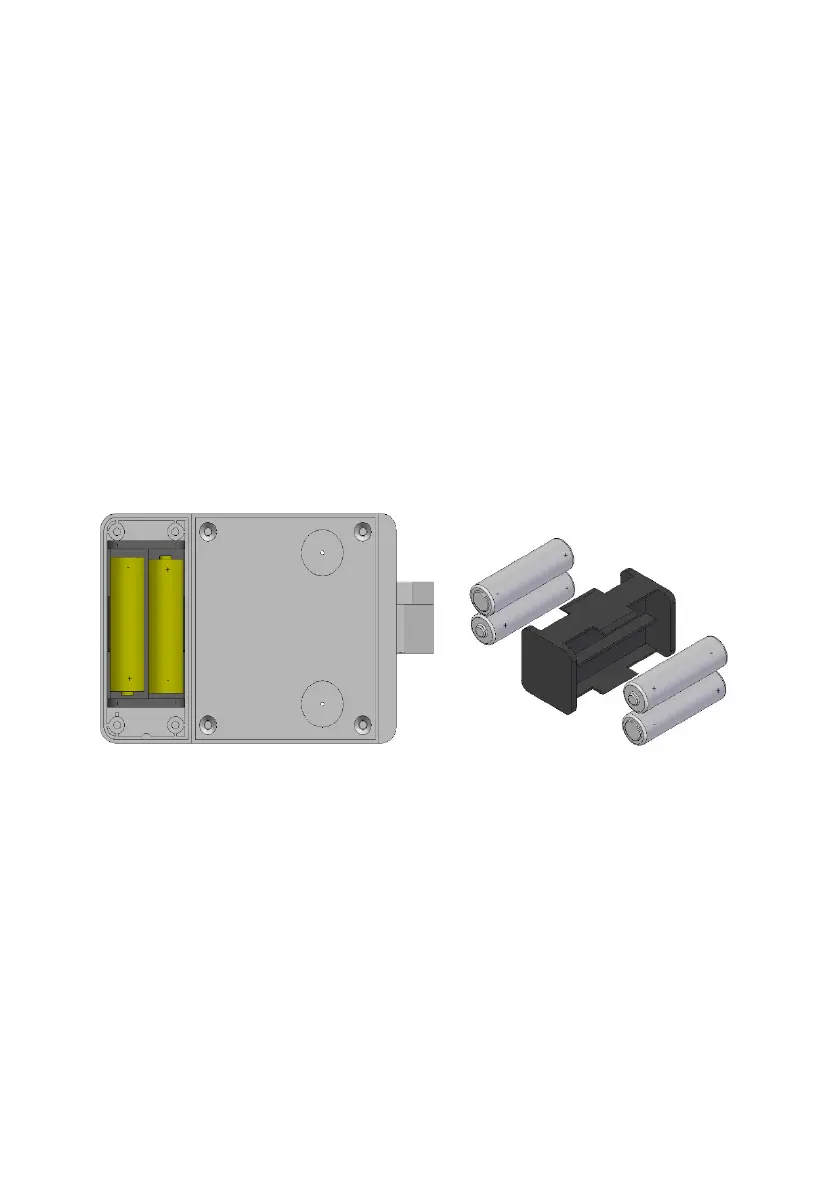
1. Loosen the two or four screws (depending on the model) and remove the battery
cover.
• NOTE: Use a Torx TX10H screwdriver. The H is very important as this
indicates that the screw driver will have a hole in it. It will not be compatible
with the screws otherwise.
2. Remove the battery holder.
3. Replace the four AA alkaline batteries.
4. Insert the battery holder.
5. Put the cover on and tighten the screws.
• NOTE: *The lock will keep the time and date for a maximum of 20 seconds
after removing the batteries; if this time is exceeded the lock has to be re-
initialised.
• WARNING: Risk of explosion if battery is replaced with a battery of the wrong
kind. Dispose of batteries in accordance with the instructions.
2.7 EMERGENCY OPENING
The emergency opening key is an external power device that is needed if the
batteries in your OCS PRO have completely died while the Locker is still locked and
is unresponsive to any touch keypad inputs.
The Emergency Key has 2 metal contacts on the top of the device, that will need to
align with the 2 metal contacts located on the bottom of the OCS SMART’s touch key
pad



 To Next Page