45
7.1.1 Introduzione
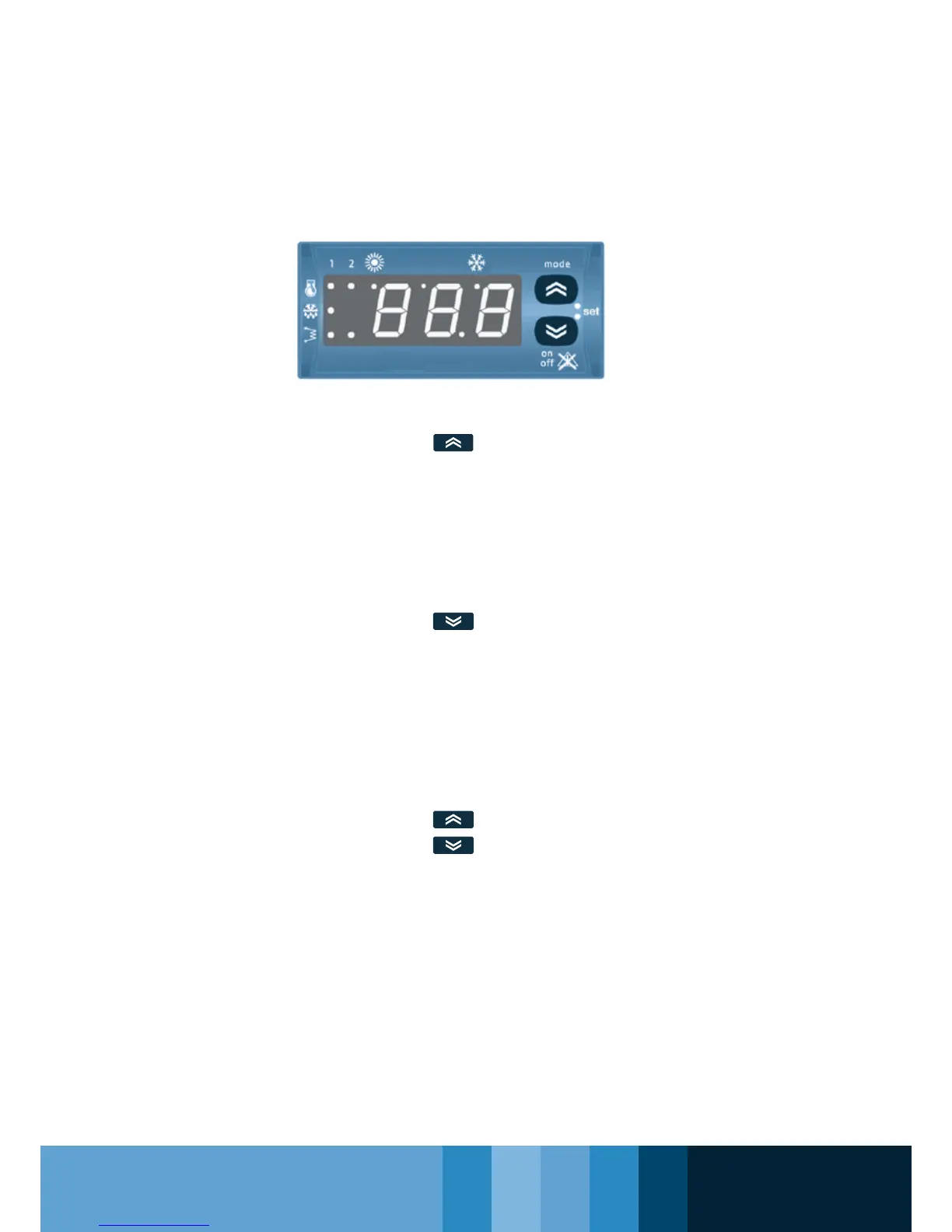
L’interfaccia utente, costituita dal frontale del-
lo strumento posizionata nella fascia centrale,
permette di svolgere tutte le operazioni legate
all’uso del refrigeratore ed in particolare di:
• Impostare il modo di funzionamento
• Gestire le situazioni di allarme
• Vericare lo stato delle risorse
7.1.2 Tasti
Mode
Seleziona il modo di funzionamento:
• se è abilitata la modalità heat, ad ogni
pressione del tasto si ha la seguente sequenza
stand-by---> cooling---> heating---> stand-by
• se la modalità heat non è abilitata:
stand-by---> cooling---> stand-by
Nella modalità menu diventa il tasto SCROLL UP
o UP valore (incremento del valore).
On-Off – reset allarmi
Attua il reset degli allarmi, nonché l’accensione e
lo spegnimento dello strumento.
Una pressione singola resetta tutti gli allarmi
a riarmo manuale non attivi;
Tenendo premuto il tasto per 2 secondi lo stru-
mento passa da On (acceso) a Off (spento) o
da Off a On. In Off rimane acceso solo il punto
decimale del display. Nella modalità menu
diventa il tasto SCROLL DOWN o DOWN
valore (decremento del valore).
Combinazione Mode e On-Off
Tasti “Mode” e “On-Off” premuti contemporanea-
mente.
Premendo e rilasciando entrambi i tasti entro 2
secondi si scende di un livello nel menu di
visualizzazione.
Tenendo premuto entrambi i tasti per più di
2 secondi si sale di un livello.
Se si sta visualizzando l’ultimo livello di un
menu la pressione e il rilascio entro due secondi
fa salire in ogni caso di un livello.
7.1.1 introduction
The user interface, in the front central part of
the instrument, allows to perform all operations
related to the use of the chiller. In particular, it
allows to:
• Set the operation mode
• Manage alarms
• Verify the status of resources
7.1.2 Keys
Mode
Selects the operation mode:
• if the heat mode is enabled, each key stroke
allows to go through the following sequence:
stand-by---> cooling---> heating---> stand-by
• if the heat mode is not enabled: stand-by--->
cooling---> stand-by
In the menu mode it becomes the SCROLL UP
or UP key (increment of the value).
On-Off – Alarm reset
Performs the reset of the alarms, as well as the
tool’s switching on and off.
A single key stroke resets all manually resettable
alarms that are not active;
By keeping the key pressed for 2 second, the
tool passes from ON to OFF or from OFF to
ON. When in OFF, only the decimal point of the
display remains lit. In the menu mode it becomes
the SCROLL DOWN or DOWN key (decrement
of the value).
Mode and On-Off combination
“Mode” and “On-Off” keys pressed
simultaneously.
By pressing and releasing both keys within 2
seconds, it is possible to move down by one level
in the menu displayed.
By keeping both keys pressed for more than 2
seconds it is possible to move up by one level.
If the last level of a menu is being displayed,
the pressure and release of the keys within two
seconds will allow moving up by one level in any
case.



 To Next Page