7.1.3 Visualizzazioni
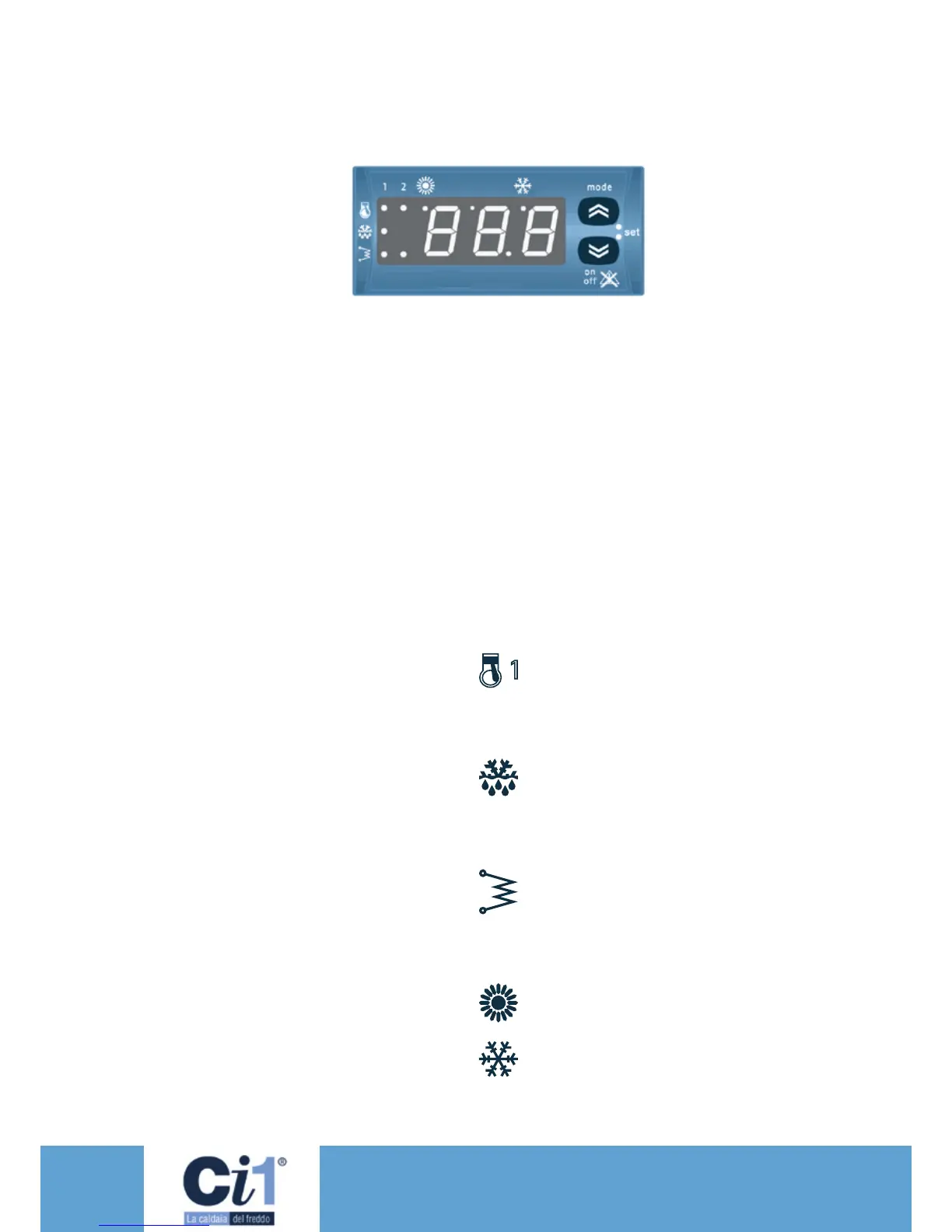
Il dispositivo è in grado di comunicare qualsiasi
tipo di informazione inerente il suo status, la sua
congurazione, gli allarmi attraverso un display e
dei led presenti nel frontale.
Display
In visualizzazione normale
vengono rappresentati:
• la temperatura di regola-
zione, in decimi di gradi
celsius con punto decima-
le o farenaith senza
punto decimale
• il codice di allarme se almeno uno è attivo.
Nel caso di più allarmi attivi viene visualizzato il
primo secondo la Tabella Allarmi.
• Se la termoregolazione non è basata su
ingressi analogici e dipende dallo stato di un
ingresso digitale (AI1 o AI2 congurati come
ingressi digitali) viene visualizzata la label
“On” o “Off” in funzione dello stato del
termoregolatore (attivo - non attivo).
• Nella modalità menu la visualizzazione è
funzione della posizione in cui ci si trova.
Per aiutare l’utilizzatore ad identicare la
funzione impostata sono utilizzate delle label
(etichette) e dei codici.
• Punto decimale: nella visualizzazione delle ore
di funzionamento indica che il valore deve
essere moltiplicato x 100
7.1.4 Led
Led compressore 1.
• ON se il compressore 1 è attivo
• OFF se il compressore 1 spento
• BLINK se sono in corso temporizzazioni di
sicurezza
Led defrost FUNZIONE NON ABILITATA
• ON se sbrinamento attivo
• OFF se sbrinamento disabilitato o terminato
• BLINK se è in corso il conteggio del tempo
(intervallo di sbrinamento)
Led resistenza/boiler
FUNZIONE NON ABILITATA
• ON se la resistenza antigelo interna o il boiler
sono attivi
• OFF se la resistenza antigelo interna o il boiler
sono spenti
Led heating FUNZIONE NON ABILITATA
• ON se il dispositivo è in modalità heating.
Led cooling
• ON se controllore in modalità cooling
Se non sono accesi né il led HEAT né il led
COOL il controllore è in modalità STAND-BY
7.1.3 Information displayed
The device provides any type of information
related to its status, conguration and alarms
through a display and some LEDs on the front.
Display
In the normal display mode
the following data are
displayed:
• set temperature, in
tenths of Celsius degrees
with decimal point, or
Fahrenheit degrees
without decimal point.
• the alarm code, if at least one is active If
several alarms are active, the rst according to
the Alarm Table is displayed.
• If the thermoregulation is not based on analog
inputs and depends on the status of a digital
input (AI1 or AI2 set up as digital inputs) the
label “On” or “Off” is displayed, as a function
of the status of the thermoregulator (active
- nonactive).
• In the menu mode what is displayed depends
on the position where one is. Some labels and
codes help the user identify the set function.
• Decimal point: When the hours of operation
are displayed, it indicates that the value must
be multiplied x 100
7.1.4 Leds
Compressor 1 LED.
• ON if compressor 1 is active
• OFF if compressor 1 is off
• BLINK in case of ongoing safety timings
Defrost LED, FUNCTION NOT ENABLED
• ON if defrost is active
• OFF if defrost is disabled or nished
• BLINK in case of ongoing time count (defrost
interval)
Resistance/boiler LED
FUNCTION NOT ENABLED
• ON if the internal antifreeze resistance or the
boiler are active
• OFF if the internal antifreeze resistance or the
boiler are switched off
Heating LED, FUNCTION NOT ENABLED
• ON if the device is in heating mode.
Cooling LED
• ON if controller is in cooling mode
If either the HEAT LED or the COOL LED are
not lit on, the controller is in STAND-BY mode



 To Next Page