40
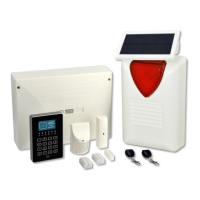
WIRELSS SIREN - BS-475
The wireless siren features 4 DIP Switches (DS1), in order to adjust the alarm sound. Its default posi-
tion is anti-theft alarm sound. It also has 2 tamper contacts in case someone tries to open its lid or
someone tries to detach it from the wall. CN4 jumper junction is responsible for flashing the siren's
LED.
The photovoltaic cell is connected to the KL1 terminal.
The siren is also equipped with a foam sensor input and a Tilt Switch input.
The wireless siren sounds when an alarm occurs.
WIRELESS KEYPAD - BS-477
An alarm system is not recommended to have more than 2 wireless keyboards installed. No more than
one keypad should be used when changes are made to the system.
It is forbidden to send settings or to type codes from 2 keypads at the same time.
The arming keys are activated after pressing them for 2 seconds.
The panic key on the wireless keyboard is "# ESC" and is activated by pressing it for 5 seconds. This
specific key can be pressed even if the keys are locked. In such a case the panic key unlocks the
whole keypad.
BS-477 MENU
It is the same as of BS-466/A menu, but with some minor differences. Most importantly, when entering
a menu, the current active setting is not illuminated, as in BS-466/A. Instead of that, the first setting is
always selected.
"ARMED SYS INDICATORS" and "IDLE BACKLIGHT MODE" menu options do not affect BS-477 and
are intended for use with BS-466/A only.
Inside "WIRELESS NETWORK" menu an extra line "SIGNAL STRENGTH" exists in BS-477.
SIGNAL STRENGTH MENU
"TECHNICIAN MENU" "WIRELESS NETWORK" "SIGNAL STRENGTH".
The user sees the current signal strength value on the screen. This value is updated every few sec-
onds. When refreshed, the display shows "- - - -" a while. Values above 30 means good signal, 20 to
30 average signal, and below 20 means "low signal". Below this value, communication may exist, but
there will be an increased number of lost packets. It is not recommended to install a keypad to a posi-
tion that the indication is less than 20. For a safe conclusion about the signal at one point, the keypad
should take measurements at this point for 10-15 seconds in order to renew display 5-6 times. Thus
the user will be able to draw a conclusion about the mean value of signal strength at this point.


 To Next Page