51
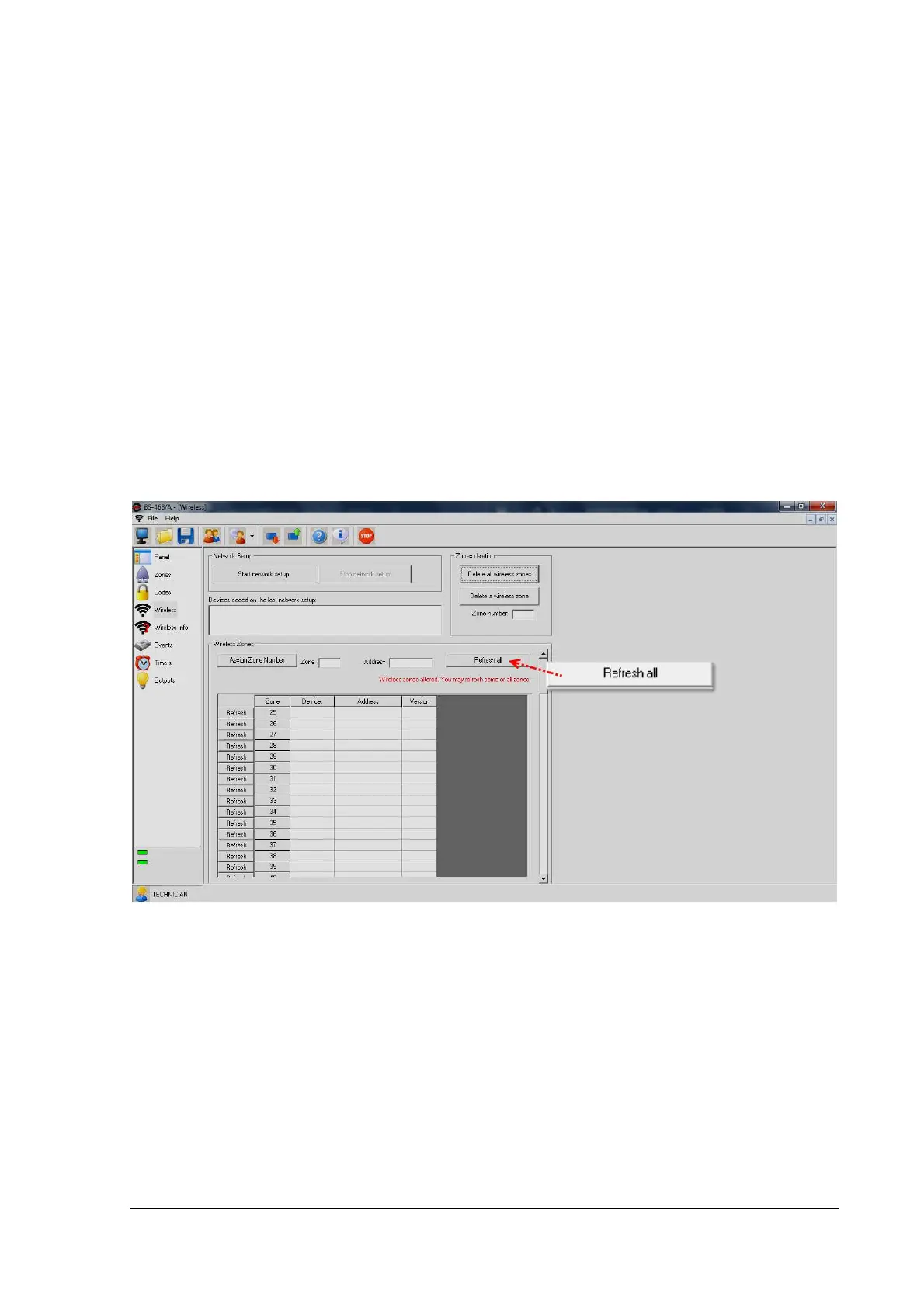
"Wireless" window
The Wireless window contains the main functions and settings of the wireless network. This and the
"Wireless Information" windows are available when BS-479 is installed and scanned properly and the
Pc program works in "Online Mode".
From the specific window the technician can perform the following tasks:
Install wireless devices: The "Start Network Installation" button starts the installation process. This
is described in a paragraph above. The "Stop Network Installation" button stops the installation.
Added devices appear in the white text box below the "Network Setup" section.
Zones deletion: With "Delete all wireless zones" button, we can delete all the available wireless
zones that exist in the system. If we want to delete a single wireless zone, we can do it by press-
ing "Delete a wireless zone" button after filling the desired zone number.
Zone assignment: With "Assign Zone Number" button the technician can assign a zone number to
a specific device ID.
Receive Wireless Zones information: By pressing the "Refresh all" button, the technician can re-
ceive all zones' data. By pressing the "Refresh" button that is found to the left of each zone line,
the user can refresh each zone's data respectively.
Wireless Window


 To Next Page