EasyManua.ls Logo

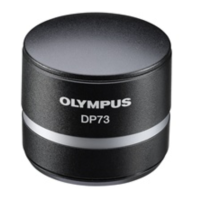
Olympus DP73 - User Manual

Olympus DP73
64 pages
Print Icon
To Next Page IconTo Next Page
Loading...
DP73
This instruction manual is for the Olympus microscope digital camera DP73. To ensure the safety, obtain
optimum performance and familiarize yourself fully with the use of this camera, we recommend that you
study this manual thoroughly before operating the camera.
For image operations including recording, editing and saving, please refer to the online manual for the
cellSens / OLYMPUS Stream Software.
Retain this instruction manual in an easily accessible place near the work desk for future reference.
INSTRUCTIONS
MICROSCOPE DIGITAL CAMERA
A X 8 2 0 8
Optical Microscope Accessory

Other manuals for Olympus DP73

Questions and Answers

  • Y
    ymartinezNov 19, 2025
    Why is the picture too bright on my Olympus Microscope?
    • H
      hammondmarcNov 20, 2025
      Your Olympus Microscope picture might be too bright because the exposure correction is set in the + direction. Return the exposure correction value to 0 and set the desired exposure correction value. It could also be that the metering area is set to a dark area outside the region of interest; move the metering area to the area where you want to obtain optimum exposure. Another cause might be that AE lock, which was set when the exposure time was longer than the currently required exposure time, is active, so cancel AE lock. Check if the input highlight level adjustment is too low, and if so, reset the current level adjustment and adjust the optimum level again. Finally, the microscope illumination might be too bright, so reduce the microscope illumination intensity or engage an ND filter t...
  • J
    Jeffrey CookNov 22, 2025
    Why is the picture too dark on my Olympus Microscope?
    • J
      joshuayoderNov 22, 2025
      The picture from your Olympus Microscope may be too dark because the exposure correction is set in the – direction. Return the exposure correction value to 0 and set the desired exposure correction value. Another reason could be that the metering area is set to a bright area outside the region of interest. Move the metering area to the area where you want to obtain optimum exposure. Also, AE lock, which was set when the exposure time was shorter than the currently required exposure time, could be active; cancel AE lock. The output highlight level adjustment might be too low, so reset the current level adjustment and adjust the optimum level again. Lastly, the microscope illumination may be too dark; increase the microscope illumination intensity or disengage the existing ND filter to incre...

Summary

Hardware Installation

3-1 Installing the Camera Head

Step-by-step guide for attaching the camera head.

3-2-a Installing the PCIe Interface Board to Desktop PC

Instructions for installing the PCIe interface board in a desktop PC.

3-2-b Installing the PCIe Interface Board to Laptop PC

Instructions for installing the PCIe interface board in a laptop PC.

Software Installation

Software Installation Overview

Guide for installing cellSens/OLYMPUS Stream and DP2-TWAIN software.

Image Acquisition Procedure

External Triggering

Troubleshooting Guide

Software and Live Image Troubleshooting

Solutions for software startup and no live image issues.

Recording and Brightness Troubleshooting

Solutions for recording failures and brightness problems.

Safety Precautions

PC and Software

Olympus DP73 Specifications

General IconGeneral
BrandOlympus
ModelDP73
CategoryDigital Camera
LanguageEnglish

Related product manuals